


Understanding the concept of private IP address ranges is essential for anyone working with computer networks. Whether you’re a seasoned IT professional or a curious beginner, this article will provide you with comprehensive insights into private IP addressing and its significance in modern networking.
Private IP addresses form the backbone of local area networks (LANs), facilitating communication within confined environments such as homes, offices, or organizations. Unlike their public counterparts, which are globally unique and routable on the internet, private IP addresses are reserved for internal use, shielded from direct exposure to the vast digital wilderness.
Table of Contents
What Are Private IP Address Ranges?
Private IP address ranges are reserved blocks of IP addresses designated for use within private networks. These addresses are not routable on the public internet, ensuring internal communication remains secure and isolated from external threats.
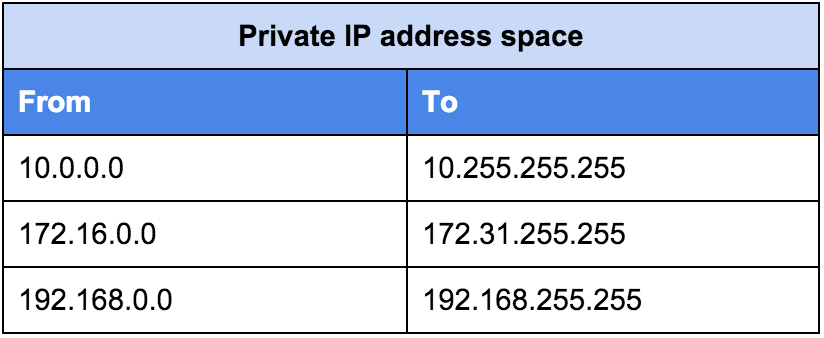
The most commonly used private IP address ranges are defined by RFC 1918 and include:
-
10.0.0.0to10.255.255.255 -
172.16.0.0to172.31.255.255 -
192.168.0.0to192.168.255.255
These ranges are ideal for local network configurations in homes, businesses, or organizations, facilitating efficient data exchange among devices while preserving network security and integrity.
You can learn more about the basics of private IP addresses and why they are essential for network communication.

How Local IPs Help Devices Communicate
Local IPs play a big role in making sure devices in a network can communicate. In any local network—whether at home, in a business, or at school—each device is assigned an internal address. This helps the devices “see” and talk to each other, enabling tasks like file sharing, printing, or accessing shared drives.
For example, when you print a document from your computer to a wireless printer, the computer uses the printer’s local IP to send the print job. Similarly, smart devices like security cameras or voice assistants rely on local addresses to send and receive information within the network.
Using local IPs also makes managing the network easier. Most home routers use DHCP (Dynamic Host Configuration Protocol) to automatically assign these addresses, so users don’t have to configure them manually. This prevents address conflicts, ensures each device gets a unique identifier, and simplifies setup.
Thanks to internal addressing, network communication stays fast, reliable, and private, without needing public internet access for every device.
Understanding IP Address Classes
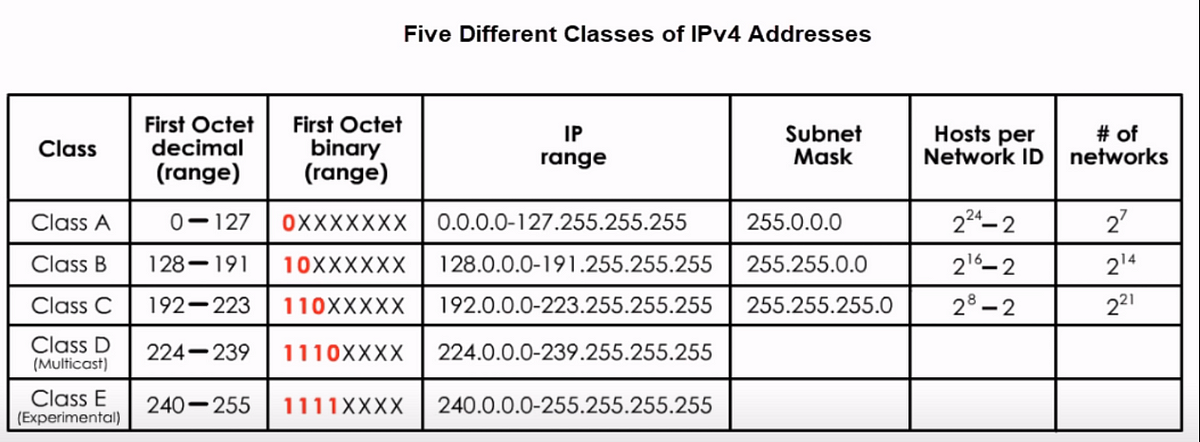
Understanding IP address classes involves grasping the classification system used to allocate IP addresses in computer networks. The system categorizes addresses into five classes: A, B, C, D, and E.
- Class A, B, and C → Used for host addresses.
- Class D → Reserved for multicast.
- Class E → Reserved for experimental purposes.
Each class has a specific range of possible addresses, determined by the number of bits allocated for the network and host portions.
This classification helps in efficiently managing and organizing IP addresses across the internet, ensuring proper communication between devices.
If you want to explore these classes in detail, check out this guide on classes of private IP addresses

Class A Addresses
Class A addresses are identified by a first octet in the range of 1 to 126. These addresses are typically used by large organizations due to their vast number of available host addresses.
Class B Addresses
Class B addresses have a first octet in the range of 128 to 191. They offer a moderate number of host addresses and are suitable for medium-sized networks.
Class C Addresses
Class C addresses range from 192 to 223 in the first octet and provide a smaller pool of host addresses compared to Class A and B. They are commonly utilized in small businesses or home networks.
Private IP Address Ranges
Now let’s explore the specific ranges allocated for IP addressing within each IP address class.
Class A Private IP Address Range
- Start Address:
10.0.0.0 - End Address:
10.255.255.255 - Use Case: Typically used in very large networks such as ISPs, cloud providers, or enterprise infrastructures with thousands of connected devices.
Class B Private IP Address Range
- Start Address:
172.16.0.0 - End Address:
172.31.255.255 - Use Case: Often implemented by universities, government agencies, or mid-sized corporations.
Class C Private IP Address Range
- Start Address:
192.168.0.0 - End Address:
192.168.255.255 - Use Case: Widely used in small networks like home Wi-Fi routers and small businesses.

DNS lookup
DNS lookup refers to the process of querying the Domain Name System (DNS) to translate a domain name into its corresponding IP address.
It involves sending a request to DNS servers, which then return the IP address associated with the specified domain. This enables devices to locate and communicate with web servers efficiently.
For example: when you type www.google.com into your browser, a DNS lookup ensures your device knows which server IP to connect to. Without DNS, you’d have to memorize numerical IPs instead of user-friendly domain names.

Importance of Private IP Addressing
Private IP addressing offers several advantages in network management and security:
- Address Space Conservation – By utilizing IP address ranges, organizations can conserve public IP address space, which is a finite and valuable resource.
- Enhanced Security – Private IP addresses are not accessible from the public internet, providing an additional layer of protection.
- Simplified Network Configuration – Managing internal IP addresses is much easier with private ranges. For example, your Wi-Fi router uses a private range to assign addresses automatically to connected devices.
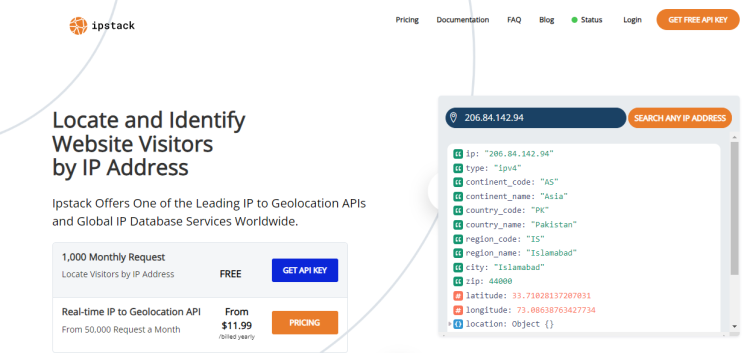
If you’re working on applications that need to resolve device locations or validate IP types, a geolocation API can help by identifying whether an IP is private, public, or even a proxy.
Internal Addressing in Cloud and Business Networks
As more businesses move to cloud environments, internal IP management remains essential. In cloud setups, internal addresses help keep communication between virtual machines secure and separate from the public internet. For example, an enterprise app may have some services running in the cloud and others on-site. Internal IPs help these services connect securely without exposing sensitive data online.
Internal addresses are also key in hybrid networks, where companies use a mix of on-premises and cloud resources. These setups often use VPNs or private connections, with local addresses enabling communication between data centers and cloud services. This avoids using public IPs, which could increase security risks or slow performance.
Managing internal address ranges carefully ensures that large networks don’t face address conflicts. Cloud providers like AWS and Azure offer tools to configure these IPs automatically, making it easy for businesses to scale up without worrying about address management.
Using local addressing in cloud and hybrid environments helps businesses keep data secure, systems efficient, and services scalable.
Implementation Considerations
When implementing private IP addressing within a network infrastructure, certain considerations merit attention:
Network Address Translation (NAT): NAT serves as a pivotal mechanism for translating private IP addresses to public IP addresses, enabling communication between internal networks and the internet.
Subnetting: Subnetting involves dividing a larger network into smaller subnetworks, each with its own subnet mask and address range. This practice helps optimize network performance and manageability.
DHCP Configuration: Dynamic Host Configuration Protocol (DHCP) automates the assignment of IP addresses within a network, streamlining the process of IP address allocation and management.
Challenges and Limitations
Despite its benefits, IP addressing poses certain challenges and limitations:
Address Exhaustion: With the proliferation of connected devices, organizations may encounter address exhaustion within their private IP address ranges, necessitating careful IP address management practices.
Interconnectivity: Establishing connectivity between private networks across different locations or organizations often requires the implementation of virtual private networks (VPNs) or dedicated connections.
Conclusion
Understanding internal IP addressing is fundamental for effective network management and security. By using designated internal address ranges, organizations can optimize communication between devices, conserve limited public IP resources, and enhance overall network resilience. These internal addresses allow devices to communicate securely within local networks, reducing exposure to external threats while simplifying configuration.
Whether you’re setting up a home network, managing a corporate infrastructure, or building cloud-based services, knowing how internal addressing works ensures smooth and reliable operations. Proper implementation of network address translation (NAT), DHCP, and subnetting helps avoid conflicts and makes scaling easier as the number of connected devices grows.
Ultimately, effective use of internal addressing supports efficient data exchange, strengthens security, and maintains system performance in today’s interconnected digital landscape.
Common FAQs About Private IP Address Ranges
1. Can private IP addresses be accessed from the internet?
No, private IP addresses are not routable on the public internet. They can only be used for communication within a private network.
2. How many devices can be connected using private IP addresses?
The number of devices that can be connected using IP addresses depends on the specific address range and subnetting configuration. However, each private IP address range offers a substantial pool of addresses for internal use.
3. Do private IP addresses require unique identification?
Yes, each device within a private network must have a unique IP address to ensure proper communication and avoid conflicts.
4. Is it possible to access the internet using private IP addresses?
Yes, IP addresses can access the internet through a process called Network Address Translation (NAT), where a router translates private IP addresses to a public IP address before forwarding traffic to the internet.
5. Can private IP addresses be used for hosting public services?
While technically possible through port forwarding and other techniques, it’s generally not recommended to host public services using IP addresses due to security and accessibility concerns.
6. What is the difference between private and public IP addresses?
Public IP addresses are globally unique and routable on the internet, while IP addresses are reserved for internal use within private networks and are not accessible from the public internet.
🔒 Stay Ahead of Security Threats!
Learn how to set up email alerts for malicious IPs using IPstack and Novu, and keep your applications protected in real time.
👉 Read the full guide here