


Effective search engine result tracking isn’t just about sending a query and grabbing the top ten links anymore. Search Engine Results Pages (SERPs) are constantly evolving, and they are personalized, localized, and different across devices. If you aren’t deliberate about how you make queries, your results can drift, become inconsistent, or fail to reflect the real audience you’re trying to target.
That’s where our Zenserp API shines. Built for developers who need accurate, structured, and reliable SERP data, our API lets you programmatically query search engines with full control over parameters like location, device, and language. From local SEO insights to automated daily monitoring, we’ve designed Zenserp to handle everything from small hobby projects to large-scale enterprise workflows.
In this guide, we’ll walk through:
- Why setting location, device, and region matters
- How to test your queries in our Playground before shipping code
- How to automate scheduled SERP queries safely and efficiently
- Common pitfalls developers run into and how to avoid them
Along the way, you’ll see real API requests, code snippets, and visuals you can use straight in your projects, no vague statements and no guesswork.
Let’s get started.
Key Takeaways
If you want accurate, repeatable SERP data with Zenserp, these are the principles we follow on every project:
- Set location, device, and language
Avoid drift. Rankings vary by geography, device, and region. - Validate in the Playground
Confirm parameters, inspect JSON, and catch mistakes before deployment. - Use the right endpoint
Web, images, shopping, and video return different data. Choose carefully. - Automate responsibly
Loop safely, handle 429s with backoff, and avoid duplicate requests. - Cache results when possible
Reduce API calls and improve performance for repeated queries. - Account for SERP volatility
Track trends over time; don’t assume rankings are static.
By applying these practices consistently, we can move from “just pulling search results” to building a reliable, production-ready SERP data pipeline with Zenserp.
The 3 Things That Change SERPs the Most (Set These First)
If you only remember one section from this guide, make it this one.
Most inconsistencies in SERP data happen because developers forget to explicitly control three parameters:
- Location
- Device
- Language and region
If you do not set these deliberately, Google will make assumptions. Those assumptions often do not match your target audience, and your rankings will drift.
Let’s break down exactly why these matter and how we recommend configuring them.

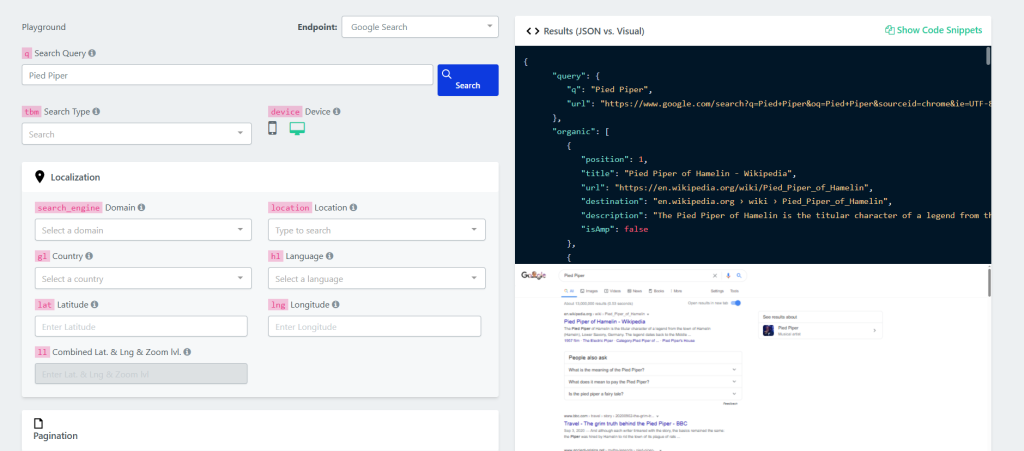
- Location: The Biggest Ranking Variable
Location has the largest impact on search results. For example, a query like:
- Best coffee shop
Will produce completely different results in:
- New York
- Toronto
- London
- A small town
Even broader queries, such as:
- Best CRM software
Can vary subtly by country due to regional competitors, pricing pages, and localized content.
What happens if you do not set a location?
- “Near me” queries become unreliable
- Local pack results appear inconsistently
- Organic rankings differ from what your users see
- Your API results will not match your manual browser checks
When using our API, always define location explicitly rather than relying on defaults.
cURL Example:
curl "https://app.zenserp.com/api/v2/search?apikey=YOUR-APIKEY&q=Best%20CRM%20software&device=desktop&gl=US"
By locking in the location parameter, we remove ambiguity and ensure consistent, repeatable results.
- Device: Mobile vs Desktop Changes the Layout and Rankings
Mobile and desktop SERPs are not identical.
Search engines prioritize different elements depending on the device:
- Mobile often emphasizes local results and app integrations
- Desktop may show more visible organic listings above the fold
- Shopping and ads may appear in different positions
- Featured snippets can behave differently
If you are tracking SEO performance and your audience is primarily mobile users, pulling desktop data will mislead you.
What happens if you skip device targeting?
- Rankings appear inconsistent
- Position tracking does not match the real user experience
- CTR assumptions become inaccurate
We recommend always specifying the device explicitly:
					"device": "desktop"
"device": "mobile"
This ensures your tracking reflects the real environment your users are in.
- Language and Region: Controlling Intent and Context
Language influences not just translation, but search intent. A keyword like:
- Marketing software
can produce different results depending on:
- English (US)
- English (UK)
- French (Canada)
Search engines tailor results based on region-specific domains, currency, terminology, and even regulatory differences.
What happens if you skip language and region?
- Mixed-language results
- Country-specific domains appearing unintentionally
- Inconsistent SERP features
- Difficulty comparing results across markets
When you are tracking international keywords, define language and regional settings clearly so your results align with the market you are analyzing.
Quick Parameter Checklist
Here is a simple rule we follow before running any query:
Parameter | Why It Matters | What Happens If You Skip It |
Location | Controls geo-targeted results | Rankings drift and local results become unreliable |
Device | Changes layout and ranking logic | Data does not reflect real user experience |
Language | Controls market and context | Mixed or incorrect regional results |
Before moving into automation or production, we recommend testing these parameters inside our Playground. When you set location, device, and language upfront, your SERP data becomes predictable, comparable, and production-ready.
Use the Right Endpoint for the Job
Not all SERPs are structured the same way.
If you request the wrong result type, you will either:
- Miss critical data
- Parse the wrong fields
- Waste API calls
- Build unnecessary post-processing logic
We designed our API so you can query different SERP types intentionally. The key is choosing the right one before you build your workflow. For a complete list of supported parameters and result types, see our documentation.
Below is how we recommend thinking about each endpoint.
Web Search (Standard Organic Results)
Use this when you need:
- Organic rankings
- Featured snippets
- People Also Ask
- Local packs
- Knowledge panels
This is the most common endpoint for SEO tracking and competitor analysis.
Example request:
curl "https://app.zenserp.com/api/v2/search?apikey=YOUR-APIKEY&q=Best%20CRM%20software&device=desktop&gl=US&hl=en"
In the JSON response, you will typically work with:
organic array
position
title
url
description
If you are building rank tracking or keyword monitoring, this is usually your default choice.
Image Search
Use this when you need:
Visual search results
Product image analysis
Brand image presence tracking
Image SERPs are structured differently from web results. Instead of organic links, you will receive image-specific metadata.
Example request:
curl "https://app.zenserp.com/api/v2/search?apikey=YOUR-APIKEY&q=Modern%20office%20design&tbm=isch&device=desktop&gl=US"
The key difference is the tbm=isch parameter, which tells Google to return image results.
If you accidentally use the standard web endpoint for image analysis, you will not receive structured image data. For a hands-on example of querying images with Python, see our Google Image Search API Python tutorial.
Shopping Results
Use this when you need:
- Product listings
- Pricing data
- Merchant comparisons
- E-commerce competitor tracking
Shopping results are essential for:
- Price monitoring
- Marketplace tracking
- Product visibility research
Example request:
Lorem ipsum dolor sit amet, consectetur adipiscing elit. Ut elit tellus, luctus nec ullamcorper mattis, pulvinar dapibus leo.
curl "https://app.zenserp.com/api/v2/search?apikey=YOUR-APIKEY&q=Wireless%20headphones&tbm=shop&device=desktop&gl=US"
The tbm=shop parameter switches the SERP type to Google Shopping results.
If you are analyzing product rankings or pricing trends, this is the correct endpoint to use.
Video Results (YouTube / Video Search)
Use this when you need:
Video rankings
YouTube visibility
Video-based SERP features
Video results often appear for tutorials, product reviews, and how-to content.
Example request:
curl "https://app.zenserp.com/api/v2/search?apikey=YOUR-APIKEY&q=how%20to%20use%20CRM%20software&tbm=vid&device=desktop&gl=US"
The tbm=vid parameter returns video results.
If you are tracking video SEO performance, this endpoint ensures you receive video-specific metadata instead of general web results.
How We Decide Which Endpoint to Use
Before writing any automation script, we ask:
- What type of data are we extracting?
- Are we tracking rankings, products, visuals, or videos?
- What fields do we actually need from the JSON response?
Choosing the correct endpoint early simplifies:
- Parsing logic
- Storage structure
- Automation workflows
- Cost management
Using the wrong endpoint creates unnecessary complexity later.
In the next section, we will walk through how to validate these settings step by step inside our Playground before moving to production.
Step-by-Step: Get a Clean SERP Response in 3 Minutes
Before we automate anything, we validate the query.
We always test inside our Playground first. We recommend testing every query in our Playground before deploying to production. You can also review full parameter details in our documentation. It lets us confirm:
- Parameters are set correctly
- The JSON structure matches what we expect
- The fields we need are present
- The results align with the target location and device
Here’s our exact workflow.
Step 1: Open Our Playground
Go to the Zenserp Playground from the dashboard.
What you’ll see:
- A query input field
- Parameter controls (country, device, language)
- Search type selection
- A “Search” button
- A live JSON response panel
This interface mirrors how the API behaves in production. If it works here, it will work in your application.
Step 2: Enter Your Query
For this example, for our query, let’s use:
- “Best project management software”


Enter your query exactly as you would track it, and don’t add any extra modifiers unless your tracking strategy requires them.
Step 3: Set the Critical Parameters
This is where most developers make mistakes.
Before running the query, explicitly set the critical parameters. For our example, let’s use the following:
- Country: US
- Device: Set to Desktop
- Language: en

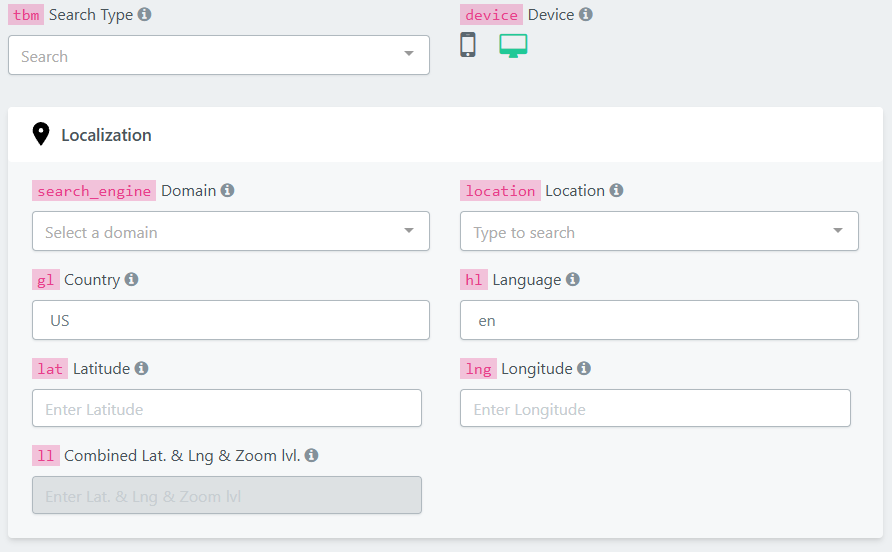
If you skip this step, your test results may not match your production results.
Step 4: Run Query and Inspect the JSON
Click Search.
The right-hand panel will return structured JSON.
Look for:
- organic → Array of search results
- position → Ranking order
- title → Page title
- url → Destination link
- description → Meta snippet
Example response structure:

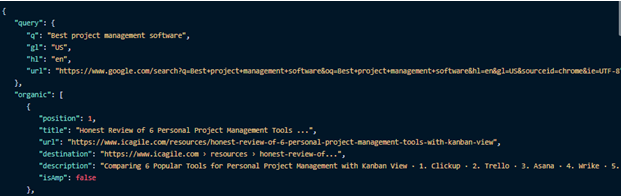
We always confirm:
Positions are populated
URLs are clean
The structure matches our parsing logic
If something looks wrong here, fix it before writing code.
Step 5: Copy the Request into Your Application
Once validated, copy the equivalent API request into your app.
Here’s a working cURL example:
curl "https://app.zenserp.com/api/v2/search?apikey=YOUR-APIKEY&q=Best%20project%20management%20software&gl=US&hl=en"
Now let’s move this into a simple Python example:
					import requests


headers = {
  "apikey": " YOUR-APIKEY "}


params = (
   ("q","Best project management software"),
   ("gl","US"),
   ("hl","en"),
);


response = requests.get('https://app.zenserp.com/api/v2/search', headers=headers, params=params);
print(response.text)
At this point, you have:
- Verified parameters
- Confirmed JSON structure
- Confirmed ranking positions
- Integrated the request into your application
All in under three minutes.
Why This Workflow Matters
Skipping Playground validation leads to:
- Incorrect geo targeting
- Device mismatches
- Parsing errors in production
- Wasted API calls
We recommend this simple rule:
Always validate once in the Playground before automating at scale.
In the next section, we’ll take this validated request and turn it into a fully automated tracking workflow.
How to Automate SERP Queries (Daily / Weekly Tracking)
Once we’ve validated a clean query in the Playground, the next step is automation.
This is where SERP data becomes truly powerful. Instead of manually checking rankings, we schedule queries, store results, and monitor changes over time.
Below is the exact workflow we recommend.
Approach A: Cron Job on Your Server (Simple and Reliable))
This is the most common setup for developers.
Step 1: Define Your Keywords
Start with a controlled list:
					keywords = [
  "Best crm software",
  "Email marketing tools",
  "Project management software"
]
Keep this list structured. In production, you’ll likely store keywords in a database.
Step 2: Build a Query Function with Parameters
We always include:
location
device
language
					params = {
    "q": keyword,
    "gl": "US",
    "device": "desktop",
    "hl": "en"
}
Never rely on defaults.
Step 3: Handle Rate Limits (429 Errors)
If you automate without rate-limit handling, you will eventually hit 429 Too Many Requests.
Instead of failing, we retry with backoff.
Here’s an example to get you started:
					import requests
import time
import json
import os


API_KEY = os.getenv("ZENSERP_API_KEY")


keywords = [
    "Best crm software",
    "Email marketing tools",
    "Project management software"
]


BASE_URL = "https://app.zenserp.com/api/v2/search"


def fetch_keyword(keyword):
    retries = 3
    backoff = 2  # seconds


    params = {
        "q": keyword,
        "gl": "US",
        "device": "desktop",
        "hl": "en"
    }


    headers = {
        "apikey": API_KEY
    }


    while retries > 0:
        response = requests.get(BASE_URL, params=params, headers=headers)


        if response.status_code == 429:
            print(f"Rate limit hit. Retrying in {backoff} seconds...")
            time.sleep(backoff)
            retries -= 1
            backoff *= 2  # exponential backoff
            continue


        if response.status_code != 200:
            raise Exception(
                f"Request failed with status {response.status_code}")


        return response.json()


    raise Exception("Max retries reached for keyword: " + keyword)


def run_tracking():
    results = {}


    for keyword in keywords:
        print(f"Fetching results for: {keyword}")
        data = fetch_keyword(keyword)


        # Store only organic results
        results[keyword] = data.get("organic", [])


    # Save to JSON file (replace with DB in production)
    with open("serp-results.json", "w") as f:
        json.dump(results, f, indent=2)


    print("Tracking complete.")


if __name__ == "__main__":
    run_tracking()
This script:
Loops over keywords
Sets location and device
Retries on 429
Stores results in a JSON file
In production, you would replace the file storage with a database.
Step 4: Schedule It with Cron
On a Linux server, you can schedule the script daily:
0 6 * * * /usr/bin/python3 /path/to/script.py
This ensures the script runs every day at 6:00 AM automatically.
Approach B: GitHub Actions Scheduled Workflow
If you do not want to manage a server, GitHub Actions makes scheduling easy.
Create .github/workflows/serp.yml:
					name: SERP Tracking


on:
  schedule:
    - cron: "0 6 * * *" #Runs daily at 6:00 AM


jobs:
  track:
    runs-on: ubuntu-latest
    steps:
      - name: Checkout code
        uses: actions/checkout@v3


      - name: Set up Python
        uses: actions/setup-python@v4
        with:
          python-version: '3.9'


      - name: Install dependencies
        run: pip install requests


      - name: Run SERP script
        run: python script.py
        env:
          ZENSERP_API_KEY: ${{ secrets.ZENSERP_API_KEY }}
This:
Runs daily
Keeps your API key secure
Executes your tracking script automatically
For many developers, this is the fastest way to implement automated SERP tracking.
Approach C: Cloud Scheduler (Scalable Option)
If you are running infrastructure in the cloud, you can use:
AWS EventBridge
Google Cloud Scheduler
Azure scheduled functions
The concept is the same:


Scheduler → Calls your script → Script calls Zenserp → Store results → View results
This is ideal when tracking hundreds or thousands of keywords.
Best Practices for Automated Tracking
When automating, we recommend:
- Group keywords by priority
- Track high-value keywords daily
- Track long-tail keywords weekly
- Cache results if running frequent checks
- Monitor API usage
Automation should increase reliability, not create noise.
By combining:
- Validated parameters
- Correct endpoint selection
- Scheduled execution
- Rate-limit handling
You move from manual SERP checks to a production-ready tracking system built on our API.
In the next section, we’ll cover reliability and cost tips to make sure your tracking stays efficient and scalable.
Reliability and Cost Tips (So You Don’t Waste Requests)
Once your automation is running, the next goal is stability and efficiency.
Pulling SERP data at scale is powerful, but if you do it carelessly, you can:
- Burn through API credits
- Hit rate limits unnecessarily
- Store duplicate data
- Create noisy, unreliable reporting
Here’s how we keep our SERP tracking reliable and cost-efficient.
If you’re planning your tracking volume, you can review the current Zenserp pricing plans here: https://zenserp.com/pricing-plans/
- Cache Repeated Keywords
If you query the same keyword multiple times within a short window, you are likely pulling nearly identical results.
Instead of calling the API every time:
- Store results with a timestamp
- Set a freshness window (for example, 24 hours)
- Return cached results if they are still valid
This is especially important if:
- Multiple internal tools request the same keyword
- You are debugging frequently
- You are running ad-hoc checks during development
Simple rule:
Do not request the same keyword with the same parameters more often than your tracking strategy requires.
- Track High-Priority Keywords More Frequently
Not all keywords are equal.
We recommend dividing keywords into tiers:
- Tier 1: Revenue-driving keywords → daily tracking
- Tier 2: Core competitive terms → 2 to 3 times per week
- Tier 3: Long-tail or experimental → weekly
This prevents you from spending API requests evenly across keywords that do not generate equal value.
- Use Batching Intelligently
Instead of firing thousands of requests at once:
- Group keywords logically
- Spread execution across time windows
- Avoid burst traffic
For example:
- Run Tier 1 keywords at 6:00 AM
- Run Tier 2 keywords at 8:00 AM
- Run Tier 3 keywords later in the day
This improves reliability and reduces the likelihood of hitting rate limits.
- Monitor Errors and Rate Limits
Automation without monitoring is risky.
At minimum, log:
- HTTP status codes
- 429 retries
- Failed requests
- Unexpected empty results
If you see repeated 429 responses, adjust:
- Backoff timing
- Batch size
- Request frequency
Ignoring errors leads to silent data gaps, which are much harder to debug later.
- Avoid Duplicate Parameter Variations
Every unique combination of:
- Keyword
- Location
- Device
- Language
is effectively a new query.
If you accidentally change one parameter between runs, you may:
- Inflate request volume
- Create inconsistent datasets
- Break historical comparisons
We recommend storing parameter configurations centrally, so they remain consistent across all automation jobs.
Problem | Why It Happens | Fix |
Hitting 429 errors | Too many rapid requests | Add retry + backoff |
Inconsistent rankings | Missing geo/device | Always set parameters |
High API usage | Duplicate queries | Add a caching layer |
SERP drift | Long tracking intervals | Set explicit parameters (location/device) |
Quick Reference Table: Problem → Fix
Our General Rule for Cost Control
We follow a simple principle:
Query only what you need, as often as you need it, and no more.
By combining:
- Proper parameter control
- Smart batching
- Tiered keyword prioritization
- Caching
- Rate-limit handling
You build a SERP tracking system that is stable, scalable, and cost-aware.
In the next section, we’ll cover common developer pitfalls that cause inaccurate SERP data and how to avoid them.
Common Pitfalls Developers Make
Even with the right endpoint and automation in place, inaccurate SERP data usually comes down to configuration mistakes.
Here are the most common ones we see.
- Not setting the location, device, or language
Causes ranking drift and inconsistent local results. Always lock parameters. - Comparing API results to your browser
Browser results are personalized. Use incognito mode with matching settings. - Using “near me” keywords without geo control
Results become generic or inconsistent. Specify a fixed city or region. - Ignoring 429 errors
Silent failures break tracking. Implement exponential backoff and log retries. - Assuming SERPs are static
Rankings change naturally. Track trends over time instead of single-day results.
The Pattern Behind Most Mistakes
Nearly all SERP tracking issues come from:
- Missing parameters
- Inconsistent configuration
- Poor rate-limit handling
When we validate in the Playground, lock parameters, and automate responsibly, we eliminate most accuracy
Conclusion
Accurate SERP tracking is not complicated, but it does require discipline.
Most inconsistencies come from skipping fundamentals: not setting location, ignoring device differences, comparing against personalized browser results, or automating without rate-limit handling.
In this guide, we walked through a practical workflow we use ourselves:
- Set location, device, and language first
- Choose the correct endpoint for your use case
- Validate the query in our Playground
- Automate with retry logic and batching
- Monitor usage and control costs
When you follow this process, your SERP data becomes consistent, comparable, and production ready.
Whether you are tracking SEO rankings, monitoring competitors, analyzing shopping results, or building a reporting dashboard, the key is controlled configuration and reliable automation. Start small, validate carefully, and scale confidently.
Start Building Reliable SERP Tracking Today
Ready to build reliable, location-accurate SERP tracking? Sign up for free and test your first query in our Playground.
Create your account here: https://app.zenserp.com/register
Start with one keyword, validate your parameters, and then scale confidently.
FAQ
- Why do my API results differ from what I see in my browser?
Browser results are personalized based on search history, login state, and real-world location. Our API returns results based strictly on the parameters you set. To compare accurately, use incognito mode and match location and device settings exactly.
- Do I always need to set the location and device?
Yes. Even if you are tracking national keywords, explicitly setting location and device ensures consistent results across runs. Relying on defaults leads to ranking drift.
- How often should I track my keywords?
It depends on importance:
- High-value keywords: daily
- Competitive terms: several times per week
- Long-tail keywords: weekly
Avoid tracking everything daily unless you truly need that granularity.
- What does a 429 error mean?
A 429 Too Many Requests response means you have exceeded the allowed request rate. This is not a failure of the API. It is a signal to slow down.
Implement exponential backoff and stagger your batches to maintain stability.
- Can I automate SERP tracking without managing a server?
Yes. You can use:
- A cron job on your own server
- GitHub Actions scheduled workflows
- Cloud schedulers like AWS EventBridge or Google Cloud Scheduler
All approaches follow the same pattern: schedule → request → store → analyze.
- Are SERPs stable over time?
No. Rankings fluctuate due to algorithm updates, competitor changes, and content freshness. That is why automated tracking and trend analysis are essential.