


You have probably done this already. You run a curl command, get JSON back, paste it into Claude or ChatGPT, ask for help, then jump back to the terminal for the next step.
That works for quick tasks. It gets clumsy fast when the workflow grows.
That is the real difference between CLI based AI workflows and MCP. CLI gives you speed, visibility, and control. MCP gives your assistant direct access to tools and APIs without turning you into the manual handoff layer.
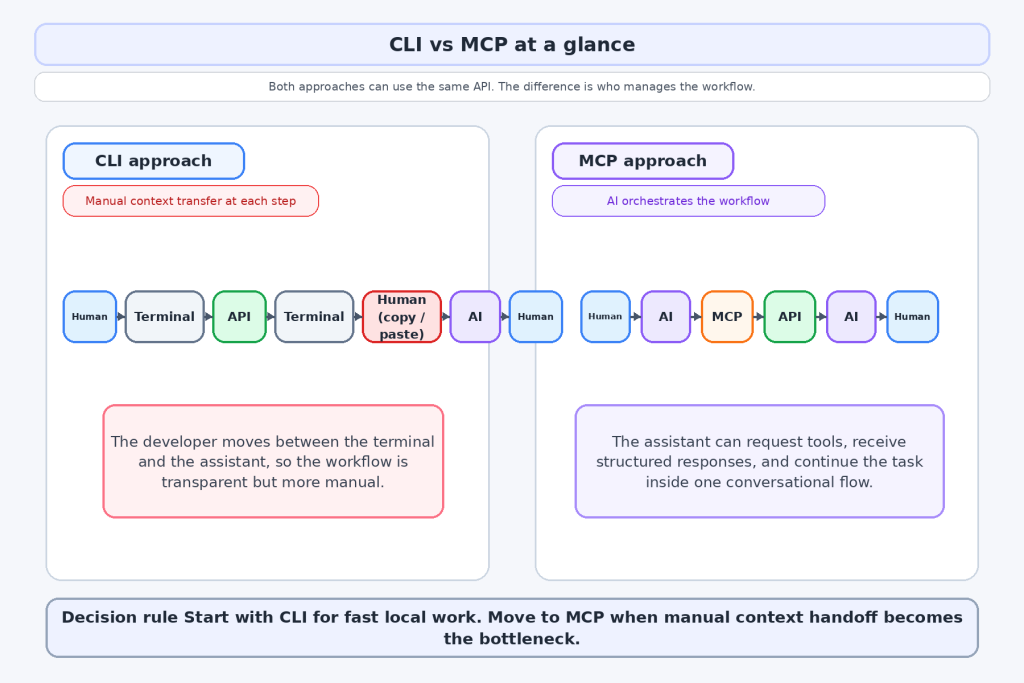
Here is the recommendation up front: start with CLI for fast local work. Move to MCP when manual context handoff becomes the bottleneck.
Build both versions against the same API. Start with the APILayer or jump straight to the Exchange Rates Data API.
Table of Contents
Key Takeaways
- CLI is still the fastest way to test, inspect, and debug API calls.
- MCP gives AI assistants a standard way to discover and invoke tools directly.
- CLI breaks down when you repeat the same multi step workflow again and again.
- MCP is strongest when the assistant needs to chain tools without waiting for manual copy and paste.
- The same APILayer REST API can power both a terminal workflow and an MCP tool.
- The practical path for most teams is CLI first, then MCP when the workflow proves it is worth automating.
What MCP is and why it exists
MCP, short for Model Context Protocol, is a standard way for AI applications to connect to tools and data sources. Instead of manually pasting API responses into the model, an MCP compatible assistant can discover available tools, call them with structured inputs, and receive structured outputs.
That sounds abstract until you compare it with the workflow most developers use today.
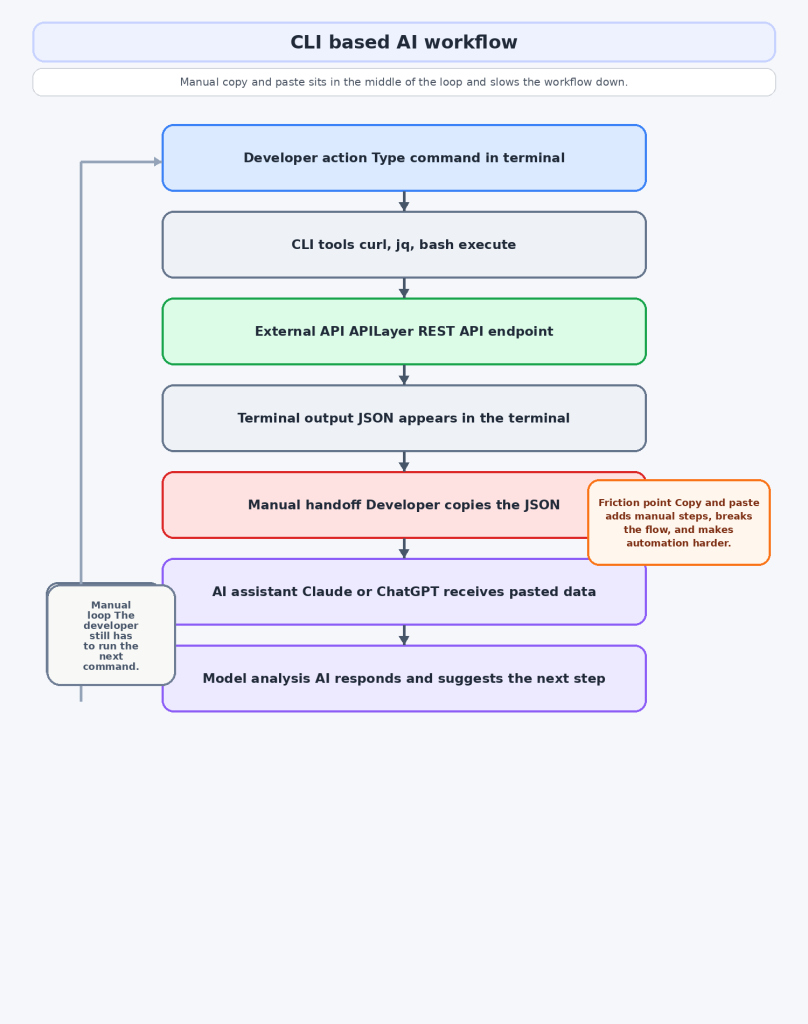
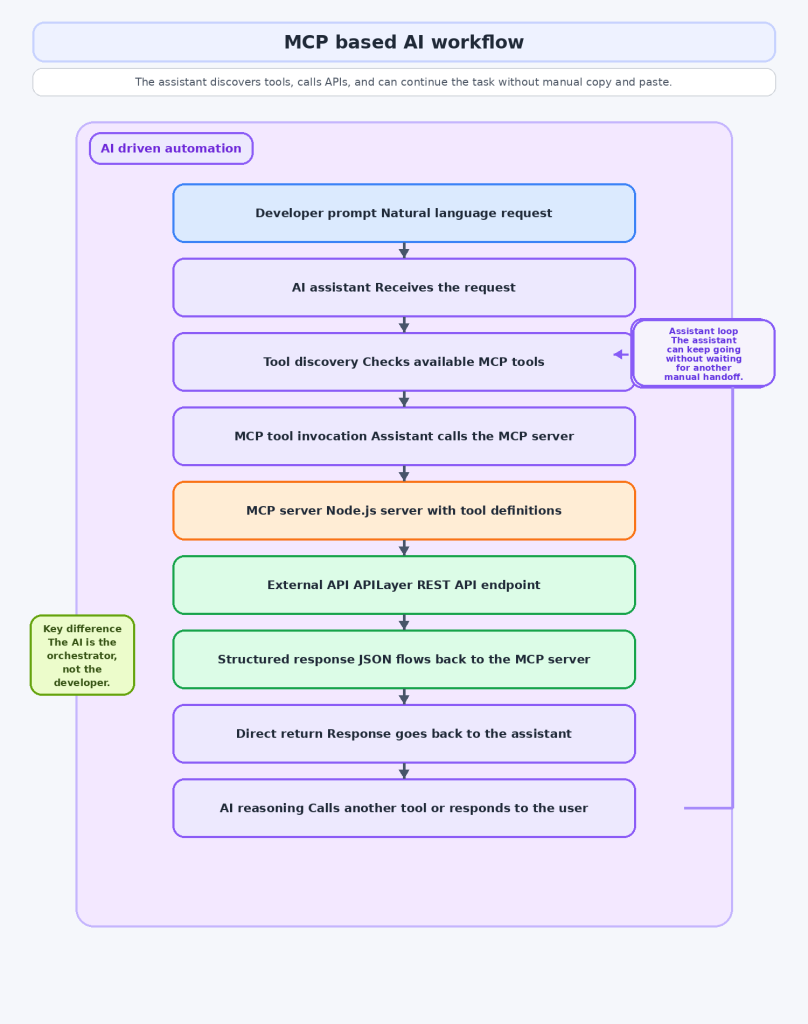
Without MCP, you call the API, read the output, paste the result into the assistant, ask for analysis, then run the next step yourself. With MCP, the assistant can do the calling for you. You ask for the outcome, the assistant picks the tool, the tool hits the API, and the response comes back inside the same conversation.
This matters because AI workflows get messy fast when the model cannot directly access the data it needs.
How CLI based AI workflows work today
CLI is still the default for a reason. It is universal, battle tested, easy to debug, and already part of how developers work. If a request fails, you see the exact command and the exact error. If the JSON looks wrong, you inspect it right there.
Here is a real APILayer example using the Exchange Rates Data API:


A sample response for this request looks like this. The exact values will vary with the time of the call:

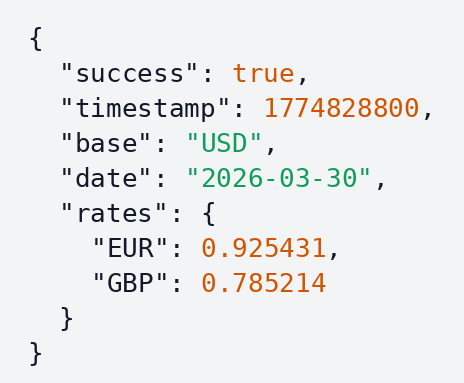
You can make it easier to read with jq:

Then you paste the output into your assistant and ask for code, analysis, or pricing logic. For one off tasks, that is often the right workflow.
APILayer also has a practical REST API design guide that is worth bookmarking when you are evaluating the foundations of a workflow.

Where CLI starts to break down
The pain is not the API call itself. The pain is the handoff around it.
Say you want your assistant to help with a localization workflow: look up visitor context, infer the likely currency, fetch current rates, suggest localized pricing copy, and generate the implementation snippet.
You can do all of that with CLI and a chat window. The problem is that you become the orchestrator. You decide what to call next, you carry the context between steps, and you are responsible for not pasting stale or incomplete data.
That is fine for experiments. It is weak for repeatable workflows. The moment you notice that you are repeating the same sequence every day, CLI plus copy and paste stops feeling lightweight and starts feeling fragile.
How MCP changes the workflow
MCP removes the manual handoff. Instead of feeding the assistant API output step by step, you expose the API as a tool and let the assistant call it directly.
Here is a minimal TypeScript MCP server that exposes this tool:

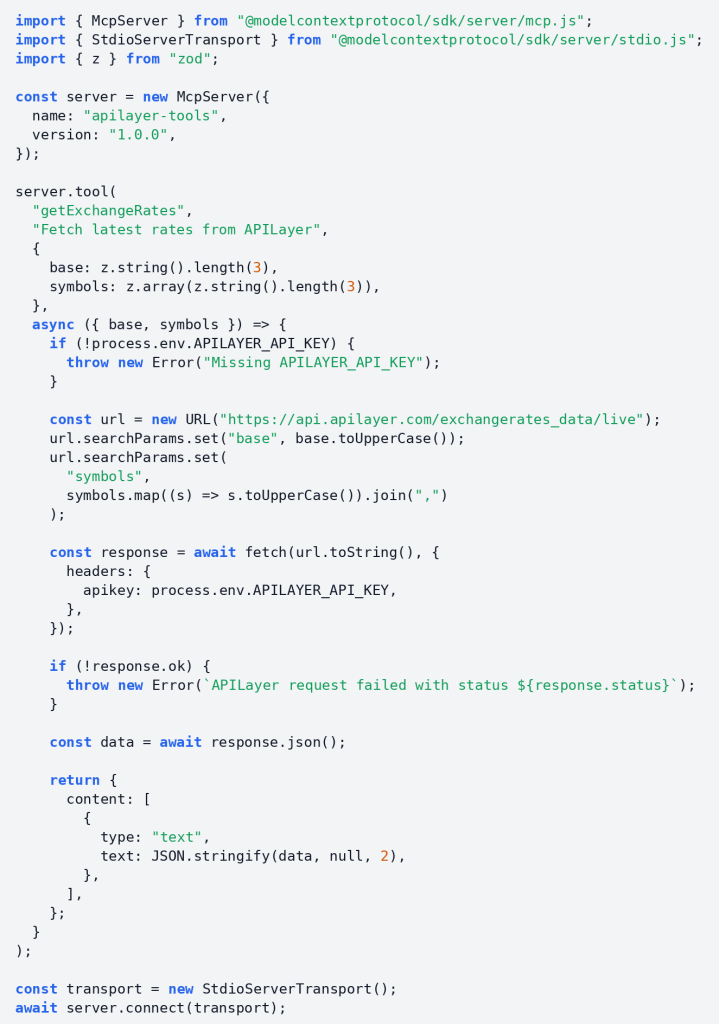
When the assistant calls that tool, it receives structured output like this:

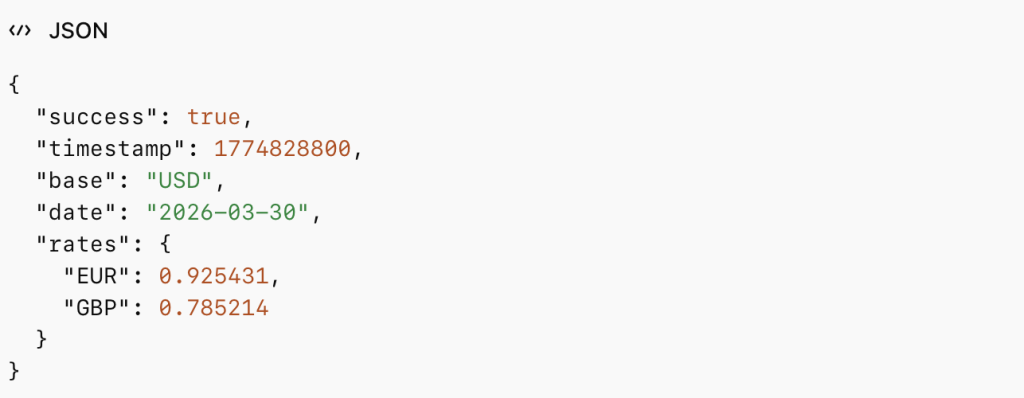
The important difference from the CLI workflow is that the assistant can use that response immediately without waiting for you to copy and paste it. The output above is sample response data, so the timestamp, date, and rates will vary at runtime.
MCP vs CLI side by side
Dimension | CLI | MCP | Winner |
Setup complexity | Almost zero if you already use a terminal | Higher because you need a server, schemas, config, and client support | CLI |
Learning curve | Familiar to most developers | Newer mental model plus tool design work | CLI |
AI native integration | Indirect. The model reads command output after the fact | Direct. The assistant can discover and invoke tools itself | MCP |
Automation depth | Good for scripts, weaker for conversational chaining | Strong for multi step tool use inside one assistant workflow | MCP |
Debugging transparency | Very high. You see commands, output, and errors | Lower because there is more abstraction | CLI |
Ecosystem maturity | Extremely mature and portable | Growing fast but still earlier | CLI |
Multi API orchestration | Manual or custom scripted | Natural fit | MCP |
The blunt version is simple: CLI wins for speed, simplicity, and transparency. MCP wins for AI native automation.

When to use which
Use CLI when you need fast one off tasks, local debugging, and maximum visibility into the exact request and response. It is also the better choice when your assistant does not support MCP well or when you are still testing whether a workflow is worth automating.
Use MCP when the assistant needs to call tools directly, chain several API calls in one flow, or choose between tools dynamically. That is where MCP stops feeling like extra setup and starts feeling like the cleaner architecture.
A good rule is simple. If you still want to inspect every step manually, stay in CLI. If you want the assistant to manage repeated steps on your behalf, move to MCP.
How APILayer fits into both approaches
In a CLI workflow, APILayer gives you well-documented REST endpoints, predictable JSON, and a quick way to test ideas from the terminal. The Exchange Rates Data API is a good example because you can start with one curl call and immediately use the response in scripts, dashboards, or pricing logic.
In an MCP workflow, the same API becomes the backend for a tool. You do not need a separate AI only product. You need a reliable API, a thin wrapper, and an assistant that can call it.
That makes APILayer useful in both stages of the journey: quick terminal validation first, repeatable assistant-driven automation second.
For broader integration guidance, read the REST API design basics post. If you are exposing tools to assistants in production, read the API security guide.
Whether you build the terminal version or the MCP version, you still need reliable APIs underneath. Start with the APILayer and grab a free API key.
Conclusion
MCP is not a replacement for CLI, and CLI is not outdated because MCP exists.
CLI is better when you want speed, direct control, and easy debugging. MCP is better when you want your assistant to stop being a text box and start acting like a real tool user.
Start with a terminal call. Once you catch yourself repeating the same API steps and manual context transfer, wrap that API as an MCP tool. That is usually the point where MCP starts paying for itself.
FAQ
Is MCP better than CLI for AI assisted development?
Not across the board. CLI is usually better for quick local work and transparent debugging. MCP is better when the assistant needs direct access to tools and has to chain actions reliably.
Is CLI still worth learning?
Yes. AI does not replace CLI. It makes CLI more useful because terminal output is still the fastest way to test and inspect real requests.
What is the easiest way to start with MCP?
Wrap one API you already understand. A single exchange rates tool is enough to learn the pattern without overbuilding.
Do APILayer APIs work in both models?
Yes. They are standard REST APIs, so they work in curl, scripts, applications, and MCP wrappers.
Should most teams pick one and ignore the other?
No. The practical path is usually CLI first, then MCP for the workflows that deserve automation.
Get Your Free
IP Geolocation Key!
IPstack
Join thousands of developers using ipstack for real-time IP intelligence!
Get Your Free API Key!100 Requests Free!