

Intraday stock data refers to price updates that occur within the same trading day, rather than just a single closing price. Instead of seeing only where a stock finished, intraday data shows how its price moved throughout market hours.
If you have ever viewed a 5-minute candlestick chart or created a price alert that triggers during the day, you were using intraday data. It powers stock charts, volatility tracking, alerts, and short-term analysis.
Developers typically access intraday stock data through a stock prices API that returns structured OHLC (open, high, low, close) candles at fixed intervals such as 1 minute, 5 minutes, or hourly. It provides more detail than end-of-day data, without the complexity of full real-time tick feeds.
In this guide, you will learn:
- What intraday stock data is and how it differs from real-time and end-of-day data
- How intraday OHLC candlestick data is structured
- How market hours and timezones affect your charts
- How to use intraday data for charts, price alerts, and backtesting
- Practical examples using the Marketstack API
By the end, you will understand not just the definition of intraday stock data, but how to use it correctly in production applications without running into common pitfalls like missing candles, timezone mismatches, or off-by-one date errors.
Table of Contents
Key Takeaways
- Intraday stock data shows price movements within the same trading day, not just the final closing price.
- It is delivered in fixed time intervals such as 1-minute, 5-minute, 15-minute, or hourly candles.
- Intraday data is typically structured as OHLC (open, high, low, close) plus volume, making it ideal for candlestick charts.
- It differs from real-time tick data (streams individual trades) and end-of-day (EOD) data (one final daily price)
- Intraday data powers charts, price alerts, volatility monitoring, and backtesting systems.
- Handling timezones, market hours, and holidays correctly is crucial to avoid missing or duplicated candles.
- When using an API such as Marketstack, always normalize timestamps, respect rate limits, and store interval metadata alongside price data.
What Is Intraday Stock Data?
Intraday stock data captures price movements within a single trading day, rather than just a final closing price. Each data point represents activity during a specific time window.
Common Intervals
- 1 minute
- 5 minutes
- 15 minutes
- 30 minutes
- 1 hour
Each interval aggregates all trades executed during that period.
How It Works
Rather than listing every trade, intraday data is aggregated into time intervals. For example, a 5-minute interval from 10:00 to 10:05 summarizes all trades in that period into OHLC + volume values. This makes the data more manageable than real-time tick feeds while preserving meaningful price movement.
Why Intraday Data Matters
Intraday data is essential for:
- Building candlestick and line charts
- Triggering price alerts during the trading session
- Measuring intraday volatility
- Backtesting short-term trading strategies
- Monitoring breakout or momentum conditions
Compared to EOD data, intraday data gives you fine-grained control and visibility. Compared to tick-level real-time data, it balances detail with efficiency, which is why most trading dashboards rely on it.
Intraday vs Real-Time vs End-of-Day
Understanding the difference is critical when choosing a stock price API.
Feature | Intraday Data | Real-Time Data | End-of-Day Data |
Update Frequency | Fixed intervals | Tick-by-tick | Once daily |
Latency | Delayed or near real-time | Minimal | Final close |
Data Volume | Medium | High | Low |
Best For | Charts, alerts, backtesting | High-frequency trading | Long-term analysis |
Comparison of Intraday, Real-time, and End-of-Day Data
Summary:
- Intraday: Aggregated candles for charts, alerts, and backtests.
- Real-Time: Streams each trade, used in high-frequency systems.
- EOD: Summarizes a single day, best for long-term analysis.
For most developer use cases, intraday stock data strikes the best balance between detail and efficiency.
How Intraday Data Is Structured (Candlestick Format)
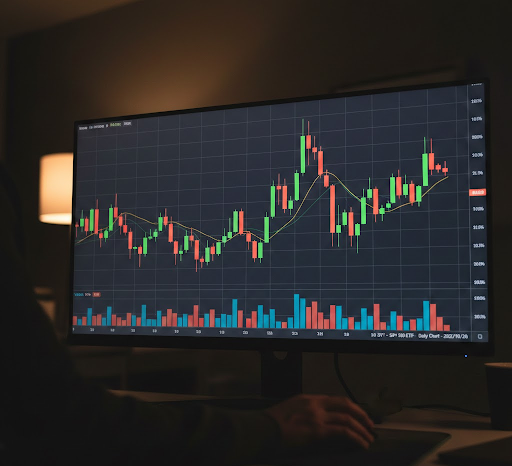
Intraday stock data is delivered as candlestick (OHLC) data:
- Open: First traded price in the interval
- High: Highest price during the interval
- Low: Lowest price during the interval
- Close: Last price in the interval
- Volume: Total shares traded
For example, a 5-minute candle from 10:00–10:05 aggregates all trades in that period.
Timestamps and Intervals
APIs usually provide:
- A timestamp (start or end of interval)
- An interval value (e.g., 5min, 15min)
Always confirm which the API uses to avoid off-by-one errors. Store both the timestamp and the interval for unambiguous data.
Why it matters: Candlestick format compresses thousands of trades into a concise, consistent structure, making it ideal for charts, indicators, alerts, and backtesting.
Market Hours, Holidays, and Timezones
Intraday data exists only during active market hours, so charts naturally show gaps overnight, on weekends, and on holidays. For example, US equities trade 9:30 AM–4:00 PM ET.
Common Issues
- Missing candles outside market hours
- Gaps between Friday close and Monday open
- Misaligned data due to timezone differences
Best Practices
- Store timestamps in UTC internally
- Convert to the exchange timezone only for display
- Confirm whether timestamps represent the interval start or the close
Failing to handle timezones can cause off-by-one errors, missing candles, or inaccurate backtests.
Common Intraday Use Cases
- Candlestick Charts – Visualize 1-minute, 5-minute, or hourly price movement.
- Price Alerts – Trigger notifications when price crosses thresholds or moves sharply.
- Backtesting – Simulate intraday strategies like momentum or breakout trading.
- Volatility Monitoring – Track intraday ranges and session-based price spikes.
Code Examples
Below is a simple example using the Marketstack API.
cURL Example
					curl --request GET \
  --url 'https://api.marketstack.com/v2/intraday/latest?interval=5min&after_hours=true&access_key=YOUR_KEY_HERE&symbols=AAPL' \
  --header 'Accept: application/json'
This request pulls intraday data using a GET request for the symbol AAPL using 5-minute candles. The response includes the timestamp as well as OHLC values
Python Example
Lorem ipsum dolor sit amet, consectetur adipiscing elit. Ut elit tellus, luctus nec ullamcorper mattis, pulvinar dapibus leo.
					import requests

url = "https://api.marketstack.com/v1/intraday?access_key=YOUR_KEY_HERE"

querystring = {"symbols": "AAPL", "interval": "5min"}

response = requests.get(url, params=querystring)
data = response.json()

for candle in data["data"]:
    close_price = candle["close"]
    timestamp = candle["date"]
    print(timestamp, close_price)

    # Simple alert example
    if close_price > 150:
        print("Alert: Price above 150")
This example fetches the latest 5-minute candles and triggers a simple price threshold alert which prints timestamps and close prices.
In production, you would:
Store results in a database
Normalize timestamps
Cache responses to respect rate limits
For a full example of automated stock alerts with Marketstack in Node.js and React, see this tutorial.
Best Practices When Using Intraday Data
To avoid production issues, follow these guidelines:
Cache responsibly to reduce API calls
Respect rate limits
Store data with (symbol, timestamp, interval)
Normalize timestamps to UTC
Validate market hours before assuming missing data
Handle missing candles gracefully
Track interval metadata explicitly
These practices prevent subtle bugs in charts and backtesting systems.
Common Pitfalls
Here are frequent mistakes developers make:
Mixing exchange timezone and UTC
Pulling data outside market hours and assuming it is missing
Confusing intraday intervals with real-time tick data
Forgetting stock splits or dividend adjustments
Not storing the interval alongside the timestamp
Assuming candles are continuous without checking session gaps
Even small inconsistencies can significantly impact alert systems and strategy testing.
How Marketstack Provides Intraday Stock Data
The Marketstack API provides structured intraday stock data through a REST interface.
Developers can:
Request minute-level or hourly intervals
Retrieve historical intraday records
Access standardized OHLC + volume data
Integrate responses directly into dashboards or analytics pipelines
Because the data is returned in a consistent JSON format, it is well-suited for:
Chart rendering
Alert engines
Backtesting systems
Financial dashboards
For most applications, intraday data provides the right balance between precision and efficiency without the complexity of full tick-level feeds.
Get Your Free
Stock Data API Key!
Marketstack
Join thousands of developers using Marketstack for real-time market data!
Get Your Free API Key!No Credit Card Required*
100 Requests Free!
FAQ Section
What is intraday stock data?
Intraday stock data records price movements within a single trading day, often aggregated into intervals like 1, 5, or 15 minutes.
How is intraday data different from real-time data?
Intraday data is aggregated into fixed intervals (OHLC candles), while real-time data streams every individual trade as it happens. Intraday is easier to manage and sufficient for most dashboards and alerts.
What intervals are commonly used for intraday data?
Common intervals include 1-minute, 5-minute, 15-minute, 30-minute, and hourly candles. Longer intervals reduce data volume but lose short-term detail.
How do timezones affect intraday stock data?
Exchanges operate in their local timezone, but APIs may return UTC. Failing to normalize timestamps can cause missing or duplicated candles and incorrect charting.
Can I use intraday data for backtesting strategies?
Yes, intraday historical data is ideal for testing short-term strategies, momentum trades, and alerts. Always avoid using future data to prevent lookahead bias.
Is intraday data more expensive than end-of-day data?
Generally, yes, because intraday requires more frequent updates and larger storage, especially for minute-level intervals.
Conclusion
Intraday stock data provides fine-grained visibility into price movements, making it essential for charts, alerts, volatility tracking, and backtesting. Unlike EOD data, it captures session-level dynamics; unlike tick-level real-time data, it balances detail with efficiency.
By understanding candlestick structures, market hours, timezones, and intervals, developers can build accurate dashboards, reliable alerts, and effective backtests. APIs like Marketstack make it easy to integrate intraday data into production applications, helping developers respond to market movements in real time.
