


If you’re planning to migrate from Fixer API, you probably want a straightforward switch that doesn’t break your application. The good news is that Fixer, currencylayer and APILayer’s exchange rate api are all APILayer products, and Exchange Rate API uses the Fixer response format. Most of the move is renaming things.
The differences that remain are currencylayer’s quotes object, source vs base, the EUR default base and plan-gated calls that fail with error 105. These are exactly the changes that can break invoices while every request still appears to work.
In this guide, we’ll walk through the migration process with a clear comparison, Python code examples, an error-handling guide, and a rollout plan.
One thing to keep in mind: If Fixer already works well for your application and you don’t need to consolidate providers, there’s no reason to migrate just for the sake of it.
Let’s first look at whether switching makes sense.
Table of Contents
Key Takeaways
- Migrating from Fixer mainly means changing the base URL and the API key.
- currencylayer requires endpoint and parameter updates, along with changes to the response structure.
- If you’re coming from currencylayer, the default base currency changes from USD to EUR, so update your requests accordingly. Fixer’s default is already EUR.
- You’ll need a new API key and an updated error-handling approach.
- Running both providers in parallel makes the transition easier. If Fixer meets your requirements, staying with it is also a valid option.
What You Will Change, and Should You Migrate at All?
The goal is to create a single get_rates() adapter that returns the same internal response structure from Exchange Rate API. You can keep Fixer or currencylayer behind a configuration flag until the migration is complete.
Reasons to move
- You want one provider and one key across teams. Exchange Rate API is part of APILayer’s suite, which uses one base-URL pattern (https://api.apilayer.net/{product}) for its APIs. Read about the hidden costs of managing APIs across multiple providers.
- You use currencylayer and prefer a base-plus-rates response.
- You already have an APILayer suite account and want your integrations in one place.
Developers searching for a currencylayer alternative often want exactly this: a straightforward response containing a base currency and its corresponding rates.
Reasons to stay
Fixer and Exchange Rate API share the response format and the same price points, so moving from Fixer doesn’t bring many new features.
There’s also a difference in published refresh rates. Fixer’s pricing page lists an update interval for each plan (hourly on Free), while the Exchange Rate API product page doesn’t publish one. If your app depends on a stated refresh interval, weigh that before you move.
If you’re comparing exchange rate API vs Fixer on features alone, read how the three currency APIs compare. Here, we’ll focus on the code changes.
A note on API keys
Exchange Rate API is part of APILayer’s unified suite at api.apilayer.net, which shares one account, dashboard and key across its products.
However, don’t assume your existing data.fixer.io or api.currencylayer.com key works on api.apilayer.net. Plan on a new key, and ask APILayer support if you want to reuse one.
Who is behind APILayer Exchange Rate API, and can I trust it?
APILayer, the company that also runs Fixer and currencylayer. Exchange Rate API is part of its unified API suite, so the account, billing and key management sit with the provider you already use.
What should I look for when choosing an exchange rate API?
Focus on four things: update frequency, available features such as base switching and historical data, error handling, and what happens when you reach your monthly request limit.
Once you’ve decided to switch, let’s look at the exact changes involved.
Migration Map: Fixer and Currencylayer to Exchange Rate API
Moving from Fixer to Exchange Rate API is mostly a base URL and key change, because Exchange Rate API uses the Fixer response format and the same endpoints. Moving from currencylayer also means renaming source to base and currencies to symbols, and reading a rates object instead of USDEUR-style quotes.
| Feature | Fixer | currencylayer | Exchange Rate API |
|---|---|---|---|
| Base URL | https://data.fixer.io/api/ |
https://api.currencylayer.com/ |
https://api.apilayer.net/exchangerate/ |
| Auth | access_key query parameter |
access_key query parameter |
access_key query parameter |
| Latest rates | /latest |
/live |
/latest |
| Base currency parameter | base (default EUR) |
source (default USD) |
base (default EUR) |
| Currency filter | symbols |
currencies |
symbols |
| Historical | /YYYY-MM-DD |
/historical?date=YYYY-MM-DD |
/YYYY-MM-DD
(adds "historical": true)
|
| Convert |
/convert with
from, to,
amount, optional date
|
/convert with
from, to,
amount, optional date
|
/convert with
from, to,
amount, optional date
(not on Free)
|
| Convert rate field | info.rate |
info.quote |
info.rate |
| Convert result field | result |
result |
result |
| Time series | /timeseries |
/timeframe (max 365 days) |
/timeseries (max 365 days) |
| Fluctuation | /fluctuation |
/change |
/fluctuation |
| Currency list | /symbols |
/list |
/symbols |
| Rates object | rates, keyed by code |
quotes, keyed by source
plus target (USDEUR)
|
rates, keyed by code |
Fixer and currencylayer were checked in their docs on 12 Nov 2026, and Exchange Rate API on 18 Nov 2026. You can find every endpoint in the Exchange Rate API documentation.
Now let’s look at the first few changes in more detail, starting with the base URL and authentication.
Base URLs and Authentication: access_key vs the apikey Header
All three direct APIs take the key in the access_key query parameter, and Exchange Rate API’s getting-started guide documents no other method. One key works for every Exchange Rate API endpoint.
There’s another authentication method worth knowing about. APILayer also offers these APIs through its marketplace:
- api.apilayer.com/fixer/
- api.apilayer.com/currency_data/
- api.apilayer.com/exchangerates_data/
These marketplace endpoints use an apikey request header instead of the access_key query parameter.
So, check which host your existing application uses. If you’re calling api.apilayer.com with an apikey header, you’re using a marketplace subscription.
The target in this guide is a different host, https://api.apilayer.net/exchangerate/, with its own key, so change both the host and the key.
How do I call an exchange rate API with cURL?
You can make a request by passing your API key and the required currency symbols in the URL:
curl "https://api.apilayer.net/exchangerate/latest?access_key=YOUR_ACCESS_KEY&symbols=USD,GBP,JPY"
The documentation’s sample response looks like this:
					{

  "success": true,

  "timestamp": 1790917745,

  "base": "EUR",

  "date": "2026-10-02",

  "rates": {

    "USD": 1.12537,

    "GBP": 0.851832,

    "JPY": 177.604168

  }

}
Store your API key in an environment variable and call the API from your server, never from front-end code. HTTPS (256-bit) is available on every Exchange Rate API plan.
Now that the host and authentication are clear, let’s move on to endpoint names and parameters.
Endpoint Names and Parameters
The changes depend on which API you’re migrating from.
From Fixer:
Endpoint paths, parameter names and field names match one for one, because Exchange Rate API uses the Fixer response format. You only change the base URL and the key.
From currencylayer:
Here are the changes you’ll need to make:
- Rename /live to /latest, /timeframe to /timeseries, /change to /fluctuation, and /list to /symbols.
- Change source to base and currencies to symbols.
- Move the historical date from the date query parameter into the URL path.
If you need a currency fluctuation api, /fluctuation returns rates keyed by currency, each with start_rate, end_rate, change and change_pct. Send both start_date and end_date, or neither (which compares yesterday with today). Sending only one returns error 501. See the Exchange Rate API endpoint examples.
How can I get exchange rate change percentages between two dates?
Call /fluctuation with start_date and end_date. The response gives a change_pct value for each currency. The docs list fluctuation for ‘selected plans’ without naming them, so confirm on the product page that your plan includes it.
A few options are worth knowing: symbols=USD,GBP for smaller, faster responses; spread=1 on /latest, /{date} and /timeseries for bid, ask and spread on selected plans; format=1 for pretty JSON while debugging; and callback=FN for JSONP. Exchange Rate API covers 170+ currencies.
currencylayer and Exchange Rate API both document a maximum of 365 days per time-series request, and Exchange Rate API returns error 505 above that. Check Fixer’s limit in its docs before you rely on it. Base switching, spread, /timeseries and /fluctuation are all listed for ‘selected plans’, so confirm on the product page which plan includes each one.
Endpoint names are relatively easy to update. The response structure, however, needs a little more attention.
Response Shape: Rates vs USDEUR-style Quotes
This is one of the most important differences to account for when migrating.
currencylayer returns a source field and a quotes object with keys such as USDAED and USDAFN.
Exchange Rate API uses a base field and a rates object with currency codes such as USD and GBP.
That’s the main exchange rate api json difference you’ll need to handle in your existing code.
Pay attention to the default base currency, too.
currencylayer uses USD as its default source currency, while Exchange Rate API uses EUR as its default base.
This means that if your existing code doesn’t specify source, it automatically uses USD. After migration, a request without base returns EUR-based rates instead. As a result, the numbers will be different.
There are two more differences to keep in mind:
- currencylayer’s/convert endpoint returns the conversion rate in info.quote. Exchange Rate API and Fixer use info.rate.
- Exchange Rate API follows the Fixer format for time series, so expect rates keyed by date, then by currency. Confirm the shape with one test call before you rely on it.
Does APILayer Exchange Rate API’s Free plan restrict the base currency?
In practice, yes. Base switching is listed for selected plans only, and the Free plan is EUR-base. A plan without it returns error 105 base_currency_access_restricted (HTTP 400, with no info text).
On the Free plan, you can calculate cross rates using the EUR base:
rate(A to B) = rates[B] / rates[A]
So currencylayer’s quotes[“USDEUR”] becomes rates[“EUR”] when the base is USD, or rates[“EUR”] / rates[“USD”] when the base is EUR.
With the response differences covered, let’s look at what you need before starting the migration.
Prerequisites: Plan and Key You Need Before You Switch
Before changing your integration, make sure your current plan supports the features your application uses.
Match the tier you have today using the plan table below. If your code calls /convert or runs in a commercial product, such as a live store or a SaaS app, you need at least Basic. If it uses a non-EUR base, /timeseries, /fluctuation or spread, confirm on the product page which plan includes it before you switch.
Next, get a free Exchange Rate API key for testing, or pick a paid plan on the product page. Either way, you’ll get a new exchange rate API key.
Store the key in an environment variable:
EXCHANGERATE_API_KEY
For the examples in this guide, you’ll need:
- Python 3 with the requests library
- cURL
- Your existing test suite
Let’s start with Fixer, since that migration requires fewer code changes.
Step by Step: Migrate from Fixer API Code
If you want to migrate from Fixer API code, the process is fairly straightforward. You can keep the Fixer quickstart guide open to compare your existing requests.
Step 1: Update the base URL.
Move the API URL into your configuration and replace the existing Fixer URL.
Step 2: Update the API key variable.
The authentication parameter remains access_key. You only need to replace the key stored in your environment variable.
Step 3: Update your code.
The following diff shows the changes
- FIXER_URL = "https://data.fixer.io/api"
- KEY = os.environ["FIXER_API_KEY"]
+ RATES_URL = "https://api.apilayer.net/exchangerate"
+ KEY = os.environ["EXCHANGERATE_API_KEY"]
- resp = requests.get(f"{FIXER_URL}/latest", params={"access_key": KEY, "base": "USD", "symbols": "EUR,GBP"})
+ resp = requests.get(f"{RATES_URL}/latest", params={"access_key": KEY, "base": "USD", "symbols": "EUR,GBP"})
data = resp.json()
eur = data["rates"]["EUR"]
Step 4: Run your existing test suite.
Use your recorded fixtures to check the integration, then record new fixtures from Exchange Rate API and run the tests again. Any test that calls /convert with a Free key fails with error 105, and the base: USD parameter needs a plan with base switching. Without it, drop base and compute cross rates.
Keep in mind that the returned rates may not be identical. Fixer and Exchange Rate API can return slightly different values at the same moment because of different timestamps.
Use a reasonable tolerance when comparing the results.
Using currencylayer instead? That migration involves a few more changes, but an adapter makes the process much easier.
Step by Step: Migrate Currencylayer Code
The currencylayer migration requires changes to the endpoint names, parameters, and response structure. Keeping the currencylayer quickstart guide handy will make it easier to compare your existing requests.
Step 1: Create an adapter.
The first change is to convert currencylayer’s quote keys into the rates structure used by Exchange Rate API.
For example, {“USDEUR”: 0.92} becomes {“EUR”: 0.92}.
Use the following adapter during the parallel run. It returns the same {currency: rate} shape from both providers, and on Exchange Rate API it computes cross rates from the EUR base, so it works whether or not your plan includes base switching.
					import os


import requests


OLD_KEY = os.environ["CURRENCYLAYER_API_KEY"]

KEY = os.environ["EXCHANGERATE_API_KEY"]


def normalize_quotes(source, quotes):

    """Turn {"USDEUR": 0.92} into {"EUR": 0.92}."""

    return {k[len(source):]: v for k, v in quotes.items() if k.startswith(source)}


def get_rates(provider, base="USD", symbols="EUR,GBP"):

    wanted = symbols.split(",")

    if provider == "currencylayer":

        resp = requests.get(

            "https://api.currencylayer.com/live",

            params={"access_key": OLD_KEY, "source": base, "currencies": symbols},

            timeout=10,

        )

        data = resp.json()

        if not data.get("success"):

            raise RuntimeError(f"currencylayer error: {data.get('error')}")

        return normalize_quotes(data["source"], data["quotes"])


    # Exchange Rate API: fetch EUR-based rates and compute cross rates,

    # so this works on plans without base switching too.

    resp = requests.get(

        "https://api.apilayer.net/exchangerate/latest",

        params={"access_key": KEY, "symbols": ",".join(sorted(set(wanted + [base])))},

        timeout=10,

    )

    data = resp.json()

    if resp.status_code != 200 or not data.get("success"):

        raise RuntimeError(f"Exchange Rate API error ({resp.status_code}): {data.get('error')}")

    rates = dict(data["rates"])

    rates[data["base"]] = 1.0

    return {c: rates[c] / rates[base] for c in wanted}
Step 2: Update the latest-rates request.
Replace the /live endpoint with /latest and update the parameter names.
- GET https://api.currencylayer.com/live?access_key=KEY&source=USD¤cies=EUR,GBP
- rate = data["quotes"]["USDEUR"]
+ GET https://api.apilayer.net/exchangerate/latest?access_key=KEY&base=USD&symbols=EUR,GBP
+ rate = data["rates"]["EUR"]
If your plan has no base switching, call without base and read rates[“EUR”] / rates[“USD”] instead.
Step 3: Update conversion requests.
The from, to, amount, and date parameters remain the same.
The only response change is the rate field: replace info[“quote”] with info[“rate”]. /convert needs Basic or higher on Exchange Rate API.
Step 4: Update historical requests.
Move the date from the query parameter into the URL path.
For example: /historical?date=2026-10-01 becomes /2026-10-01. For a worked example with caching by date, see the historical rates section of how to build a currency converter with Exchange Rate API.
Step 5: Replace ETag caching.
currencylayer documents ETag support and 304 Not Modified responses.
The Exchange Rate API docs don’t describe ETag support, so don’t rely on If-None-Match headers or 304 responses after the move. Replace them with the time-based cache described in the caching section below.
With the main migration changes covered, there’s one more important area: error handling.
Error Handling Differences
All three APIs document a similar error structure:
{
"success": false,
"error": {
"code": 104,
"type": "usage_limit_reached",
"info": "..."
}
}
Exchange Rate API documents these error codes:
- 101: missing or invalid key; 102: inactive user; 103: invalid API function
- 104: usage limit reached; 105: function access restricted, or base currency access restricted (HTTP 400, no info text); 106: no rates available
- 201: invalid base currency; 202: invalid currency codes
- 302: invalid date; 303: currency not available on that date; 402: invalid from or to currency; 403: invalid conversion amount
- 501: no time frame; 502: invalid start date; 503: invalid end date; 504: invalid time frame; 505: time frame too long
You can find the full list in the error codes reference.
What we saw live on 12 Nov 2026 with an invalid key:
- Fixer and currencylayer returned HTTP 401 with success: false, error.code: 101, error.type: invalid_access_key, and error.info.
Check the HTTP status and success first, then branch on the numeric code. The helper below also reads a message field, in case a gateway error comes back in a different shape.
					def read_error(status, data):

    err = data.get("error", {})

    return status, err.get("code"), err.get("info") or err.get("message")
Two traps catch migrants. The 202 error message mentions currencies= even though the parameter is symbols, so don’t rename it back. And an unknown path returns 302 invalid_date, not 103, so a leftover currencylayer path such as /live or /list can show up as a date error. Never rely on error.info text, because the base-currency 105 error has none.
Also, Fixer’s getting-started page lists a different code set (401, 403, 429, and 601 to 606) from the 101, 104 and 105 codes Fixer returned live, so don’t publish or rely on a direct code-to-code mapping without testing real error responses.
Handling rules
- 101 and 102 indicate configuration problems. Send an alert instead of retrying.
- 104 means the monthly quota has been reached. Send an alert and serve cached rates.
- 105 means the call needs a higher plan.
- 201 and 202 indicate invalid input.
What happens when you exceed the Free tier of an exchange rate API?
Exchange Rate API’s Free plan is a hard limit with no overages, so the 101st request in a month returns error 104.
Paid plans bill overage per extra request instead of cutting you off. Plan for it with caching, as shown below.
The next thing to consider is how your existing plan compares with Exchange Rate API.
Plan Differences: Match Your Current Tier
Fixer, currencylayer and Exchange Rate API share four price points, but the plan names differ. Match by price and request volume, not by plan name.
Here’s how the plans compare. Fixer and currencylayer were checked on 12 Nov 2026, and Exchange Rate API on 18 Nov 2026.
Price and volume | Fixer | currencylayer | Exchange Rate API |
$0 a month, 100 requests | Free: hourly updates, HTTPS, non-commercial use | Free: daily updates, HTTPS, non-commercial use | Free: hard limit, historical rates, HTTPS, no conversion, non-commercial use |
$14.99 a month, 10,000 requests | Basic: hourly updates, conversion, all base currencies, commercial use | Basic: hourly updates, conversion, source switching, commercial use | Basic: conversion, commercial use, standard support |
$59.99 a month, 100,000 requests | Professional: 10-minute updates, time series, bid/ask spread | Enterprise: 10-minute updates, time-frame queries, bid/ask spread | Professional: same features as Basic |
$99.99 a month, 500,000 requests | Professional Plus: 60-second updates, fluctuation | Enterprise+: 60-second updates, change queries | Enterprise: same features as Basic |
Sources: the Fixer and currencylayer pricing pages, and the Exchange Rate API product page linked at the top of this guide. Watch the names: currencylayer’s ‘Enterprise’ is the $59.99 tier, while Exchange Rate API’s ‘Enterprise’ is the $99.99 tier. Exchange Rate API lists base switching, spread, time series and fluctuation for ‘selected plans’ without naming them, so confirm on the product page before you pick a tier.
Exchange Rate API’s yearly billing saves up to 15% ($13.49, $52.49 and $84.99 a month for its three paid tiers). On security, Fixer and currencylayer list SSL or HTTPS on every plan, and Exchange Rate API includes 256-bit HTTPS on all plans.
The overage cost per extra request is the same on all three products:
- $0.005996 (Basic tier)
- $0.0023996 (the $59.99 tier)
- $0.00079992 (the $99.99 tier)
Do forex APIs charge more for time-series and fluctuation data?
No, not per request. They’re plan features. On Fixer and currencylayer, time series starts at $59.99 a month and fluctuation at $99.99. Exchange Rate API lists both for ‘selected plans’, so check its product page.
Do exchange rate APIs charge extra for historical data access?
The pricing pages for Fixer and currencylayer list historical data as an included feature, not a separate paid add-on. Each API request counts toward your plan’s monthly request limit.
The Free plans include historical data, including Exchange Rate API’s, but with a 100-request monthly limit. Check each provider’s plan details for the historical endpoints and options you use.
What are the limitations of the APILayer Exchange Rate API free plan?
The Free plan gives you 100 requests a month as a hard limit with no overages, plus exchange rate data, historical rates and HTTPS. It doesn’t include /convert, commercial use or support, and in practice it’s EUR-base only.
The product page also doesn’t publish an update interval for any plan, and the docs don’t describe ETag support.
Once you’ve selected the right plan, caching can help you manage your monthly request limit.
Caching and Rate Limits After the Switch
Caching reduces unnecessary API requests and helps you stay within your monthly allowance.
Exchange Rate API doesn’t publish an update interval, so don’t promise users a refresh rate. Cache the /latest response, store its timestamp, and refresh on a schedule that fits your request budget. On Free, 100 requests a month is about three calls a day, so caching is mandatory for any real app.
Also, remember that every API call counts as one request, regardless of the endpoint. Instead of making a separate request for every currency pair, fetch all the currencies you need in a single /latest call using the symbols parameter.
Store the response timestamp along with your cached rates. This makes it easier to display when the rates were last updated and identify outdated data.
Now, let’s bring everything together and look at the migration rollout.
Test, Run in Parallel and Cut Over
A gradual migration gives you better control over the transition and makes it easier to identify differences between providers.

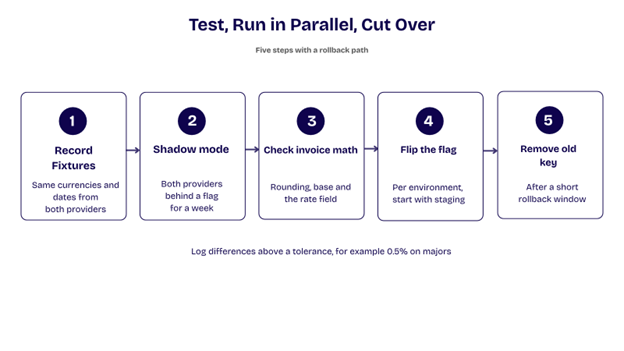
- Record fixtures from both providers using the same currencies and dates.
- Run both providers behind a feature flag for a week in shadow mode. Log differences above your chosen tolerance, such as 0.5% for major currencies. Small differences caused by timestamps and update intervals are normal.
- Check invoice calculations from start to finish. Pay attention to rounding, base currency, and the conversion rate field (info.rate vs info.quote).
- Switch providers by flipping the feature flag.
- Keep the old API key active during a short rollback period, then remove it.
As an engineering manager, how do I swap exchange rate providers without breaking invoice calculations, and which provider is safest?
No provider is automatically the safest choice just because of its name.
A parallel migration is the safer approach because it lets you compare actual results before switching. Moving from Fixer to Exchange Rate API is the simplest option since the endpoints and response structures match.
I inherited an app running on a discontinued exchange rate API. What’s the easiest drop-in replacement?
If your existing API returns a base currency and a rates object keyed by currency code, Exchange Rate API is a close match.
You mainly need to update the host and API key. If the old API uses USDEUR-style keys, you can use the adapter from the earlier section.
Where does APILayer Exchange Rate API source its exchange rates from?
Go by what the Exchange Rate API product page and its FAQ say on the day you check, and don’t assume data providers that APILayer doesn’t name. If your auditors need a named source, ask APILayer support before you switch.
With the migration complete, let’s look at the final deployment steps.
Deployment Notes
Once your integration is ready, add the new key as a secret in each environment. A live store or SaaS app needs a paid plan, because Free excludes commercial use.
Deploy the application with the feature flag turned off, enable it environment by environment, and remove the old provider code once the migration is complete.
Next Steps
- Read how to build a currency converter with Exchange Rate API, which also covers historical rates for any date and a Google Sheets version.
- Explore time-series and fluctuation endpoints with a plan that supports them.
- See how to build a currency tool for an AI agent with APILayer’s ExchangeRatesData API.
If you’re ready to switch, get a free key, run the cURL example above with it, then compare tiers on the Exchange Rate API product page.
And remember, if Fixer already does everything your application needs, there’s no reason to switch.
Still have questions? Here are some quick answers.
FAQs
Is Exchange Rate API a drop-in replacement for Fixer?
Close to it. Exchange Rate API uses the Fixer response format, endpoints and parameter names, so the main changes are the base URL (https://api.apilayer.net/exchangerate/) and the key. Re-test plan-gated calls that can fail with error 105, and compare rates within a tolerance rather than expecting identical values.
How do I convert currencylayer quotes like USDEUR into a rates object?
Strip the three-letter source prefix from each key, so USDEUR becomes EUR, or read rates[‘EUR’] from a /latest call with base=USD. The default base changes from USD to EUR, so on a plan without base switching compute rates[‘EUR’] / rates[‘USD’] instead.
Can I use my Fixer or currencylayer API key with Exchange Rate API?
Plan on no. Base switching is listed for selected plans only, and the Free plan is EUR-base in practice, returning error 105 if you set base. Compute cross rates from the EUR base instead, with rates[B] / rates[A], and confirm current plan features on the product page.
Can I change the base currency on the Free plan?
Plan on no. Base switching is listed for selected plans only, and the Free plan is EUR-base in practice, returning error 105 if you set base. Compute cross rates from the EUR base instead, with rates[B] / rates[A], and confirm current plan features on the product page.
Which Exchange Rate API plan matches my Fixer Professional Plus plan?
Enterprise, at $99.99 a month for 500,000 requests. Confirm on the product page that it includes the time-series and fluctuation calls you use, because Exchange Rate API lists those for ‘selected plans’, and re-check prices before you switch.
Do I have to migrate from Fixer?
No. Fixer and Exchange Rate API are both APILayer products with the same price points. Migrate if you want one provider and one key across teams; otherwise, keeping your existing Fixer integration is a perfectly valid choice.