


Black Friday and Cyber Monday can be intense for technical teams. You are dealing with traffic spikes, last minute promo changes, unreliable third party tools, fraud attempts, and a very small window to get everything right.
Using APIs can take a lot of that pressure off and help you actually capitalize on the opportunity. With the right stack, you can validate users, personalize offers, watch competitors, and keep pricing and content in sync across regions using a few simple API requests.
In this listicle, we will walk through 8 APIs that help you build a stronger, more reliable Black Friday and Cyber Monday setup for your ecommerce store, SaaS product, or platform.
Key takeaways
- Black Friday is not just “run a big discount and hope it works”. It is about keeping systems fast, safe, and sane when traffic goes crazy.
- You do not need to reinvent fraud checks, geolocation, currency, or data cleanup. You can plug in focused APIs that already solve those problems.
- APILayer gives you a single place to grab IP, email, phone, FX, scraping, weather, and SERP data so you spend less time wiring vendors and more time shipping.
- Most of these APIs have free tiers, so you can test them in a staging or low traffic environment before you turn them loose on Black Friday.
Table of Contents
What is API integration?
At a basic level, an API is a contract. It describes how to ask a system for something, what you need to send, and what you get back.
API integration is what happens when you actually wire those contracts into your product or platform so different services can talk to each other and share data in real time.
You can think of it like this:
- API: The interface. A set of endpoints, methods, and schemas that say “here is how you can work with me”.
- API integration. The implementation. The code that calls those endpoints, handles responses and errors, and connects them to your own workflows.
On its own, an API has potential. API integration is where that potential turns into something useful in production.
Why APIs matter for Black Friday readiness
From a developer point of view, Black Friday is a checklist of hard problems. Your systems need to be capable of:
- Handling traffic spikes with minimum risk.
- Keeping prices correct across currencies.
- Reducing fraud and low quality signups.
- Making sure landing pages, banners, and promos look right in every region on every device.
- Watching competitors so you can respond to their offers.
Instead of building everything from scratch, you can plug in ready-to-use APIs for each of these jobs. APILayer brings many of those APIs into one platform, with simple REST interfaces, clear pricing and unified documentation.
Below are 8 APIs that can help you before, during, and after Black Friday.
1. IPstack – Real-time IP Geolocation


Why you need it:
Black Friday usually brings a spike in new signups, logins, and card checks. IPstack lets you quickly identify risky traffic from VPNs, proxies, or suspicious countries and apply extra friction before someone hits your payment processor.
Top use cases
- Add IP based risk checks at signup, login, and checkout.
- Enforce geo based pricing, tax, and content rules.
- Block or review orders that come from mismatched IP and billing countries.
- Deliver content based on location
Example use case:
- At checkout, call IPstack with the customer IP
- If the IP is from a high risk country or flagged as a proxy, add friction or trigger manual review
- If the IP region does not match the billing country, add an extra verification step
2. Numverify – Validate phone numbers before sending SMS campaigns

Why you need it:
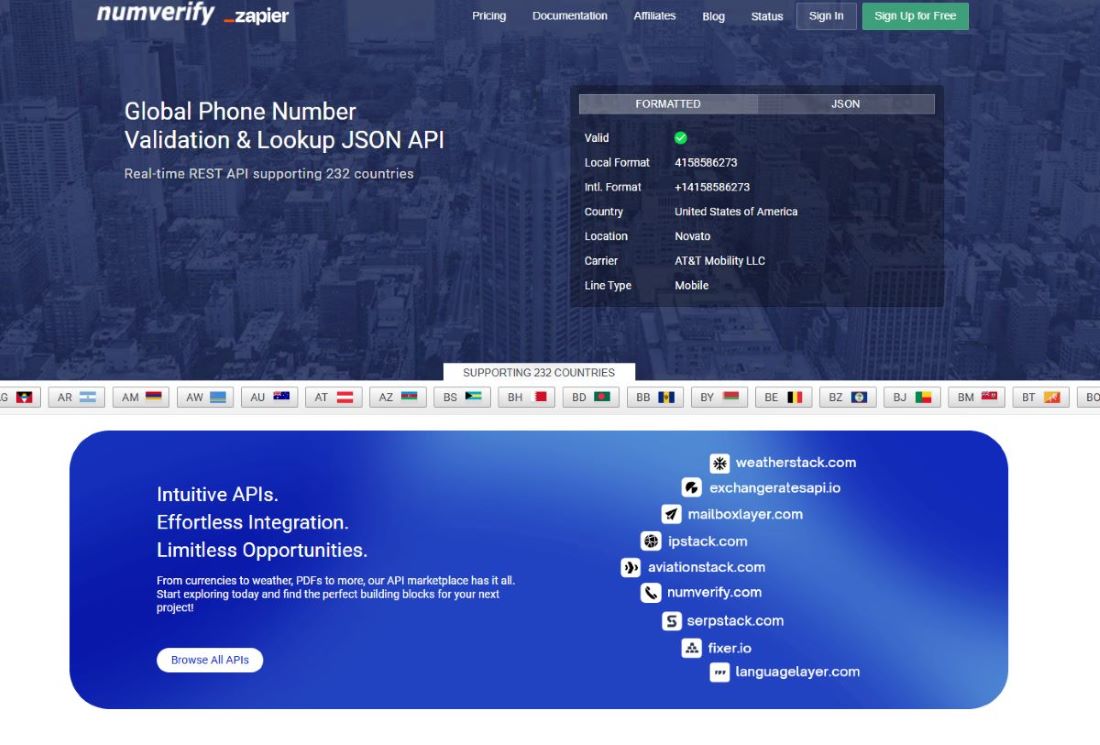
If you run SMS campaigns for Black Friday, you do not want to send messages to invalid or non existing numbers. That is wasted budget and can hurt deliverability.
Numverify helps you:
- Validate phone numbers at signup or checkout
- Check line type (mobile, landline) before sending texts
- Confirm country and local formatting
Example use case
- Add Numverify to your signup form or checkout.
- Validate number submissions.
- Only send Black Friday SMS offers to valid mobile numbers
3. Mailboxlayer – Validate email lists and stop junk signups


Why you need it:
Black Friday often means a spike in email signups, early access waitlists, abandoned cart reminders, and promo emails. Mailboxlayer helps keep that data clean so your campaigns perform better.
You can:
- Validate email format and syntax.
- Check MX records to see if the domain can receive mail before sending.
- Identify disposable or temporary email providers.
- Detect role based addresses (info@, sales@) that may not be ideal for campaigns.
Example use case
- Run Mailboxlayer checks on your email capture forms.
- Block disposable domains from entering your main promo list.
- Keep your Black Friday audience high quality.
4. Fixer or Currencylayer – Real time FX for global pricing


Black Friday and Cyber Monday sales can often drive international traffic, a small pricing mistake in another currency can turn into a big margin problem.
Fixer and Currencylayer give you:
- Real time and historical FX rates.
- Easy conversion between base and quote currencies.
- A way to keep discount prices aligned across your markets.
Example use case
- Store your base price in your local currency.
- Use Fixer or Currencylayer to convert that price to EUR, GBP, CAD, or any other currency when a user visits.
- Show stable prices that reflect current FX rates without manual updates.
5. Serpstack – Monitor search results and competitors


Why you need it:
During Black Friday, many brands compete for the same search terms and queries. Serpstack lets you pull Google search results through an API so you can see where you rank, which competitors show up, and what kinds of SERP features appear for each query.
Top use cases
- Track your key Black Friday and Cyber Monday keywords every few hours and store the JSON for reporting
- Check which competitors are running ads on those queries and what their ad copy looks like
- See if your landing pages show up as organic results, in top stories, shopping, or other SERP features
- Compare results by country or device using location and device parameters
6. Scrapestack – Web scraping for competitor prices and content


Why you need it:
Competitors change prices and promos too fast to track manually. Scrapestack lets you pull their pages through one API and feed the raw HTML into your own scripts for real time pricing and offer monitoring.
Top use cases:
- Monitor competitor product pages for price changes, discount percentages, and “only X left” stock messaging
- Check Black Friday landing pages across multiple competitors to see what offers and messaging they are running
- Crawl category pages and store structured data in your own system for reporting or alerting
Fetch pages that normally block basic scripts by using Scrapestack handling for JavaScript rendering and proxies
7. Screenshotlayer – Visual QA for landing pages and ads


Why you need it:
During Black Friday you may ship multiple landing page versions, banners, and experiments. Screenshotlayer lets you capture full page screenshots of any URL.
Benefits:
- Visual QA after each deployment.
- Archiving of key promos for internal review.
- Quick checks that localized pages render correctly.
Example use case
- After each production deployment, run a script that calls Screenshotlayer for your main Black Friday URLs.
- Save the screenshots and review them for layout, copy, and translation issues.
8 . Weatherstack – Weather driven promotions


Why you need it: For some businesses, weather has a big impact on product demand, especially: clothing, outdoor gear, heating, AC, and more.
Weatherstack provides:
- Real time weather data
- Forecast data for upcoming days
- Simple endpoints for current conditions
Example use case
- Use Weatherstack to check weather for a visitor region
- Show different Black Friday hero modules based on conditions, for example:
- Rainy or snowy → highlight jackets, boots, and umbrellas
- Sunny and warm → highlight outdoor or travel products
Getting started for this Black Friday
If you are very close to Black Friday or already in the middle of the sale, you do not need a perfect architecture. Start simple:
- Pick one or two APIs that solve your biggest pain:
- Fraud and location issues: start with IPstack.
- Dirty email lists: start with Mailboxlayer.
- Incorrect currency prices: start with Fixer or Currencylayer.
- Most APILayer APIs include a free tier that is perfect for testing.
- Integrate the APIs at the main input points, like forms and checkout.
Use them:
- When a user first lands on your Black Friday page
- When a form submits (signup, waitlist, or checkout forms)
- Right before checkout completes
- When you render prices on product and cart pages
Monitor usage and upgrade plans if you see limits approaching. Over time, you can expand to more APIs and build a complete Black Friday and holiday stack.
FAQs
1. Can I start with free API tiers for Black Friday?
Yes. Many APILayer APIs include free tiers. They are ideal for testing and smaller traffic levels. For serious Black Friday traffic, you should plan to upgrade so you do not hit rate limits during peak hours.
2. What APIs are most useful for Black Friday ecommerce?
For most ecommerce sites, the most useful APIs are IPstack for IP intelligence and fraud checks, Fixer or Currencylayer for currency conversion, and Mailboxlayer or Numverify for cleaning email and phone data. These directly affect revenue, margin, and campaign performance.
3. Can I use these APIs alongside Stripe or PayPal?
Yes. Think of Stripe and similar tools as your payment engine, and APILayer as the signals around it. You run IP, email, phone, and FX checks before the request ever hits your payment provider.
4. Is it realistic to add new APIs this close to Black Friday?
You do not need to rebuild your stack. Start by Integrating the APIs at the main input points, like forms and checkout. For example email validation on forms or IP checks at checkout, then expand once things are stable.
Recommended Resource : 10 Free & Affordable APIs Every Startup Developer in 2025 Should Know About