

AI API

OAuth vs API Keys vs JWT: Which Authentication Method Should Your REST API Use in 2026?

You’re building a REST API and you need to lock it down. You’ve got three main options, API Keys, JWT, and OAuth 2.0. They’re not interchangeable, and picking the wrong one will either leave you exposed or buried in unnecessary complexity.

This guide breaks down OAuth vs API Keys vs JWT in a way that helps you make a clear, defensible decision, not just understand the theory.

Why This Decision Matters Right Now

In 2026, most systems are API-first. Your frontend, mobile app, internal services, third-party integrations, everything talks through APIs.

That means your authentication layer is no longer a detail. It’s your front door.

Here’s what goes wrong when you pick the wrong method:

  • Over-engineering: You implement full OAuth 2.0 for a simple internal service. Now you’re maintaining an auth server, token lifecycle, scopes, for no real gain.
  • Under-securing: You expose a public API with just API keys. Keys get leaked, reused, or abused, and now you’re rate-limiting instead of preventing misuse.
  • Scaling pain: You start with API keys, then later need per-user permissions. Retrofitting OAuth becomes painful.
  • Zero-trust mismatch: Modern architectures assume no implicit trust. Weak auth methods don’t hold up.

In short: this isn’t just a security decision, it’s a product and architecture decision.

If you’re designing APIs today, this belongs right alongside your database and system design choices.

How Each Method Actually Works

Let’s strip away the buzzwords and look at what actually happens on the wire.

API Keys (Simple Identifier-Based Auth)

API keys are the simplest thing that could work.

Flow

				
					Client → Request (with API Key) → Server → Validate Key → Respond


Step-by-step

  1. Server generates a unique API key (e.g., sk_live_abc123)
  2. Client stores it (env variable, config, etc.)
  3. Client sends request:

GET /data

Header: apikey: YOUR_API_KEY

  1. Server:
    • Looks up the key
    • Checks if valid / active
    • Applies rate limits / quotas
  2. Returns response

Important truth

API keys are not a full authentication protocol. They’re just identifiers.

They don’t inherently:

  • Prove identity strongly
  • Support user-level permissions
  • Expire automatically (unless you build it)

Checkout the Blog: https://blog.apilayer.com/what-is-api-access-api-keys-authentication-rate-limits-and-common-errors-explained/ 

JWT (JSON Web Tokens)

JWT is a token format, not a full authentication system.

Structure

header.payload.signature

Example:

eyJhbGciOiJIUzI1NiIsInR5cCI6IkpXVCJ9…

Flow

				
					Client → Login → Server issues JWT → Client sends JWT → Server validates → Respond


Step-by-step

  1. User logs in
  2. Server creates JWT:
    • Header: algorithm (HS256/RS256)
    • Payload: user ID, roles, expiry
    • Signature: cryptographic proof
  3. Client stores token (usually in memory or secure storage)
  4. Client sends:

Authorization: Bearer <JWT>

  1. Server:
    • Verifies signature
    • Checks expiration
    • Reads claims (user ID, roles)
  2. Returns response

Key idea

JWTs are stateless, the server doesn’t need to store sessions.

OAuth 2.0 (Delegated Authorization Framework)

OAuth 2.0 is not just auth, it’s a delegation system.

Two flows you actually care about:

1. Authorization Code Flow (User-based access)

				
					User → Login via Provider → Authorization Server → Access Token → API


Steps:

  1. User clicks “Login with X”
  2. Redirected to authorization server
  3. User logs in and consents
  4. Server returns authorization code
  5. Client exchanges it for:
    • Access token
    • Refresh token
  6. Client calls API using access token

2. Client Credentials Flow (Service-to-service)

				
					Service → Auth Server → Access Token → API


Steps:

  1. Service sends client ID + secret
  2. Gets access token
  3. Uses token to call APIs

Key components

  • Authorization Server
  • Access Tokens
  • Refresh Tokens
  • Scopes (permissions)

Important truth

OAuth often uses JWT under the hood, but adds:

  • Delegation
  • Permissions
  • Token lifecycle

OAuth vs API Keys vs JWT — Honest Comparison

Here’s the part you actually care about:

Dimension

API Keys

JWT

OAuth 2.0

Security level

Low–Medium (easy to leak, static)

Medium–High (signed, expirable)

High (delegation, scopes, rotation)

Implementation complexity

Very low

Medium

High

Best for

Simple APIs, public data, quick integrations

Internal APIs, auth sessions

Third-party access, user delegation

Statefulness

Stateless (lookup required)

Stateless

Mostly stateless (with token infra)

Token expiration

Manual (if implemented)

Built-in (exp claim)

Built-in (access + refresh tokens)

Supports scopes/permissions

Limited

Custom (in payload)

First-class support

Revocability

Hard (rotate key)

Medium (blacklist if needed)

Strong (revoke tokens)

Suitable for third-party access

Limited

Not ideal alone

Yes (primary use case)

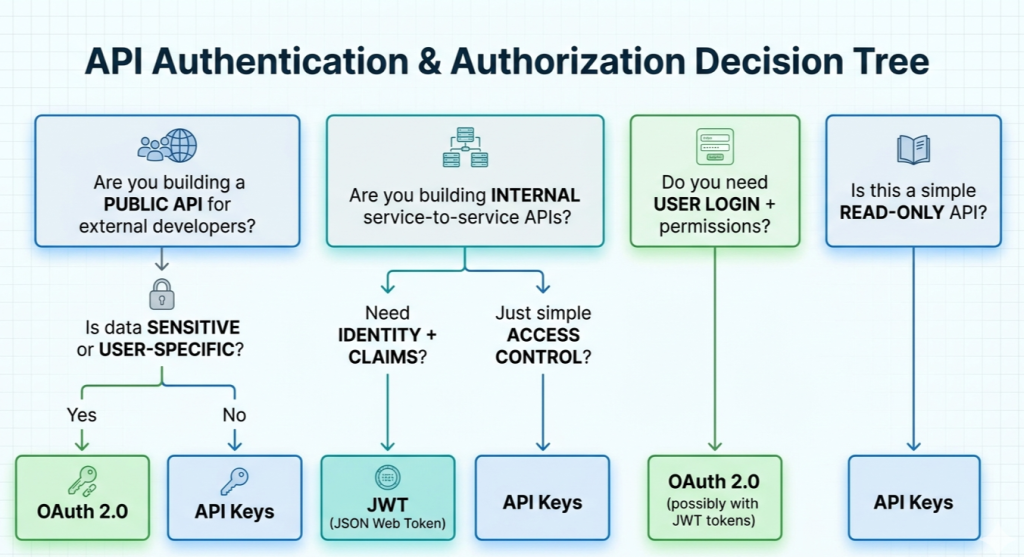
Decision Tree (What Should You Use?)

Let’s make this practical.

Clear recommendations

  • Public data APIs (weather, IP, exchange rates) → ✅ API Keys
  • Internal microservices → ✅ JWT
  • User login + third-party integrations → ✅ OAuth 2.0
  • High-security enterprise APIs → ✅ OAuth 2.0 + JWT

Real-World Example: Why APILayer Uses API Keys

APILayer is a great example of where API keys are the right choice.

They offer:

  • Exchange rates
  • IP geolocation
  • Market data

These are:

  • Mostly read-only
  • Not user-specific
  • High-volume, developer-friendly

Why API Keys make sense here

  • Fast onboarding (no OAuth flow)
  • Minimal friction for developers
  • Easy to integrate into scripts, backend jobs
  • Scales well with rate limiting

Working Example (APILayer API)

Let’s call the Exchange Rates API.

cURL

				
					curl "https://api.exchangerate.host/live?access_key=YOUR_KEY&base=USD&symbols=EUR"


Python (requests)

				
					import requests

url = "https://api.exchangerate.host/live"

params = {
"access_key": "YOUR_KEY",
"base": "USD",
"symbols": "EUR"
}

response = requests.get(url, params=params)

print(response.json())


Real API Response

				
					{
   "success": true,
   "terms": "https://currencylayer.com/terms",
   "privacy": "https://currencylayer.com/privacy",
   "timestamp": 1771758026,
   "source": "USD",
   "quotes": {
       "USDAED": 3.672498,
       "USDAFN": 63.999812,
       "USDALL": 82.022626,
       "USDAMD": 376.059891,
       "USDAOA": 917.00033
       …
       …
       …
       …
   }
}


📘 Documentation: https://docs.apilayer.com/Exchangerate/docs/api-documentation 

When API Keys Are Enough

This example shows:

  • No user identity required
  • No delegated access
  • Simple request-response

API keys are perfect here.

When You’d Upgrade

You’d move to OAuth if:

  • Users connect their own accounts
  • Data becomes private
  • You need fine-grained permissions

Security Best Practices

Even the “right” choice can go wrong if implemented poorly.

API Keys

  • Rotate keys regularly
  • Never send in query parameters (use headers)
  • Store in environment variables (never hardcode)
  • Add rate limiting and usage quotas

JWT

  • Use short expiration times
  • Prefer RS256 over HS256 for public APIs
  • Always validate:
    • Signature
    • Expiration
    • Issuer
  • Never store sensitive data in payload

OAuth 2.0

  • Use PKCE for public clients
  • Always enforce HTTPS
  • Strictly validate redirect URIs
  • Store tokens securely (no localStorage for sensitive apps)

Final Takeaway

If you remember one thing from this OAuth vs API Keys vs JWT comparison, let it be this:

  • API Keys → simplest, best for public data APIs
  • JWT → best for internal systems and stateless auth
  • OAuth 2.0 → best for user-based and third-party access

Don’t over-engineer. Don’t under-secure. Pick the tool that matches your use case.

What Should You Do Next?

Here’s something concrete:

  • If you’re unsure → start with API keys and validate your use case
  • If you need user auth → move to OAuth early
  • If you’re scaling microservices → adopt JWT-based auth
Related posts
AI API

Give Your AI Agent Five Live-Data Tools with One API Key (APILayer Suite + Claude Tool Use)

AI API

APILayer vs RapidAPI: Choosing an API Provider in 2026

AI API

How to Choose an API for AI Agents: A 2026 Evaluation Framework (with Real Examples)

AI APITutorial

API Aggregation Strategy: A Comprehensive Guide