You verify your email list, remove invalid addresses, send your campaign, and still end up on a blocklist. How? One of the addresses on your list might be a spam trap that looked perfectly valid.
At Mailboxlayer, we want to be clear about one thing. Email verification has its limitations, and spam traps are one of them. In this guide, we’ll explain what they are, the different types, what email verification can and cannot catch, and the practices that help keep them off your list.
Let’s start with the basics.
Table of Contents
Key Takeaways
- A spam trap is an address operated to monitor unsolicited mail, often appearing as a valid mailbox.
- No verification API can reliably identify spam traps.
- Email verification catches typos and dead addresses before they reach your list.
- Proper consent, list sourcing and regular cleanup help keep traps away.
- If you hit one, investigate your list sources instead of trying to find the exact address.
What is a Spam Trap?
A spam trap is an email address used to collect, record and monitor spam and other unsolicited emails. It never sends emails or subscribes to mailing lists. So, when it receives your campaign, it signals that something is wrong with your email list.
That’s how M3AAWG defines it in Help! I Hit a Spam Trap! (February 2023). These addresses are “designed to be indistinguishable from other email addresses” and can exist on both corporate and free email domains.
Mailbox providers, blocklist operators such as Spamhaus, and email deliverability monitoring companies use them. M3AAWG also points out that commercial trap feeds are used for monitoring, not blocking. Spamhaus makes another important point: “spamtraps are never revealed by their owners.”
Here’s what you need to understand: a trap isn’t necessarily an invalid address. It’s a valid, working mailbox that you don’t have permission to email.
Let’s look at the different types.
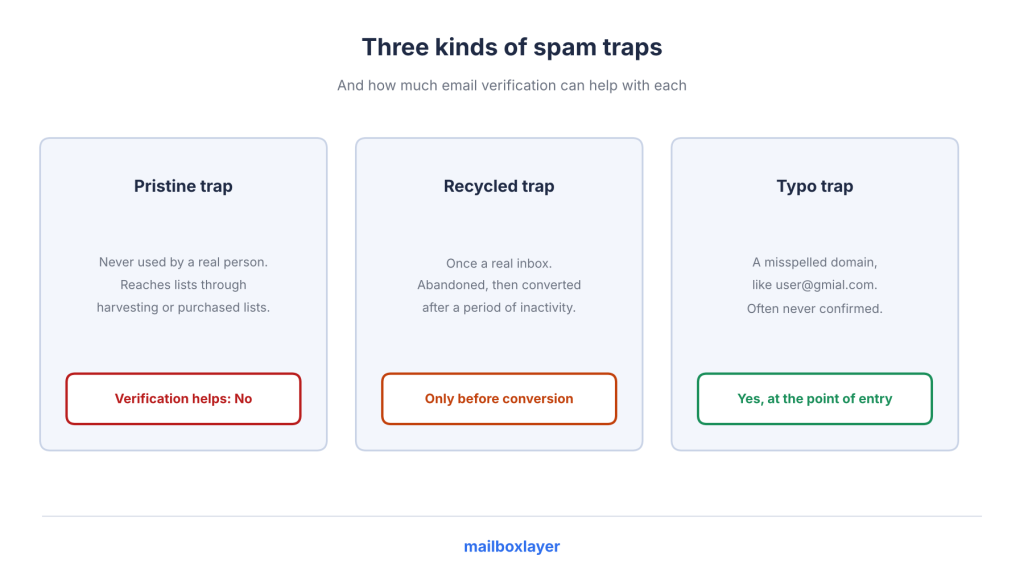
The Main Types of Spam Traps
There are three main types. Each one gets onto your list differently and tells you something about how your email addresses were collected.
Trap type | What it is | How it gets on a list | What a hit signals |
Pristine (pure) | An address never used by a real person before becoming a trap | Web harvesting, address probing, dictionary attacks or purchased lists | M3AAWG says it “may be a strong indicator of the presence of purchased lists” |
Recycled | An address that belonged to a real person but was abandoned and later converted into a trap | Old lists or addresses that were never removed | Poor list management, outdated data, missing bounce processing, or all three |
Typo | An address with a misspelt domain, such as user@gmial.com or user@notmail.com | Mistyped signups | The address was never confirmed |
Source for the table: M3AAWG.
M3AAWG recommends at least 12 months of inactivity before converting an address into a recycled trap, although the actual period varies between operators. Many operators also treat typo traps differently from pristine ones because they can appear through otherwise legitimate signups.
Spamhaus also identifies seeded traps, which are hidden on web pages to catch scrapers, and dead domains purchased by trap owners.
It also notes that typo domains “can contain a lot of real mail,” so they carry less weight than pure traps. Validity makes a similar distinction and describes pristine traps as “exceedingly hard to identify.”
So, what happens when you send an email to one?
What Happens When You Hit a Spam Trap
The impact depends on the number of hits, the type of trap and who operates it. M3AAWG says the consequences “can vary greatly.”
A high trap-hit rate can cause receiving domains to reject your emails or give them lower priority. In more serious cases, your sender domain or IP can end up on a blocklist “across a broad swath of the internet.” Validity also points to blocklisting, spam-folder placement and long-term damage to sender reputation.
You usually won’t receive a direct notification when this happens. Instead, you might notice your domain or IP appearing on a blocklist or a sudden increase in rejected emails.
There is no fixed threshold for how many hits lead to these consequences. Spamhaus doesn’t publish one either.
Spamhaus describes a hit as “proof of a data collection or hygiene issue.” In other words, it’s not simply bad luck. It points to a problem with how you collected or managed your email addresses.
Which email validation API should I use to protect sender reputation?
Choose an API that checks addresses when users enter them and catches typos, dead domains, unreachable mailboxes and disposable addresses. Mailboxlayer provides these checks. However, sender reputation also depends on consent, list sourcing and regular cleanup, which no API can monitor.
Email verification still plays an important role here. Let’s look at what it can actually catch.
What Email Verification Can Catch
An email deliverability API checks an email address before you add it to your list. Let’s look at the checks available through Mailboxlayer and the types of problems they help prevent.
Syntax and Typo Checks
The format_valid field tells you whether an email address follows the correct format. The did_you_mean field suggests a correction when the API detects a possible typo. If no correction is found, the field stays empty.
This is where email verification is particularly useful for typo traps. Someone might accidentally enter an incorrect email address while signing up. Catching that mistake on the form gives them a chance to correct it before the address reaches your list.
There’s one limitation, though. Typo suggestions are most useful during signup, when the person is still there to correct the address. If you’re checking an old imported list, a typo domain that accepts emails can still pass the other checks.
What’s the best email validation API with typo suggestions (“did you mean”)?
Choose an API that suggests corrections directly on your signup form. Mailboxlayer provides this through its did_you_mean field, which returns a suggested address when a possible typo is detected. Show the suggestion to the visitor and let them confirm the correct address.
Typos are relatively easy to catch. Domain and mailbox checks handle the next part.
MX and SMTP Checks
The mx_found field tells you whether a domain has MX records, while smtp_check reports whether the SMTP check for an address succeeded.
The SMTP check is enabled by default and can be controlled using the smtp parameter. In simple terms, mailboxlayer combines an MX lookup api and an SMTP check api in one request.
These checks help identify dead domains, misspelt domains without mail servers and mailboxes that no longer exist.
For recycled traps, they only help during the period when an abandoned address is still bouncing. Once an operator converts it into a trap, the address becomes a working mailbox again.
That’s the important limitation. Pristine and recycled traps can accept SMTP checks just like regular email addresses, so they can pass these checks.
SMTP checks are useful indicators of mailbox availability, but they are not infallible. As explained in the APILayer Mailboxlayer documentation, mail servers can behave unpredictably, so verification results should not be treated as a guarantee of delivery.
Which API checks if an email address actually exists via SMTP?
Mailboxlayer’s smtp_check field reports whether the SMTP check succeeded, and it runs by default. A successful check means the mailbox accepts mail. It doesn’t tell you who owns the address or whether that person gave you permission to email them.
Which email validation API runs SMTP checks without getting blocked by mail servers?
Mail servers decide how they respond to SMTP checks, and some behave unpredictably. Treat unclear results with caution and use confirmed opt-in to cover the remaining gap.
What’s the most reliable tool for a fintech engineer to run MX record and SMTP deliverability checks through an API?
Choose an API that returns mx_found, smtp_check and score in one request. Mailboxlayer provides all three, making it easier to check domain records, mailbox availability and email quality together. For unclear results, use a confirmation email to verify the subscriber.
Some other email verification flags are useful too, but they don’t identify traps.
Disposable, Free and Catch-all Flags
mailboxlayer provides three additional fields:
- disposable identifies temporary or throwaway email addresses.
- free identifies free email providers such as Gmail or Yahoo.
- catch_all identifies domains that accept emails sent to any address.
None of these fields tells you whether an address is a trap.
The connection is indirect. A catch-all domain accepts every address, which means an SMTP check cannot confirm whether a particular mailbox exists. Spamhaus also notes that some pristine traps exist on wildcard domains.
So, if you see catch_all: true, treat it as a lower-confidence result rather than assuming the address is a trap.
Disposable addresses aren’t traps either. They’re simply a signal that an address might create fraud or data-quality problems.
What’s the best API to detect disposable or temporary email addresses?
Choose an API with a disposable email flag. Mailboxlayer provides this through its disposable field, which identifies throwaway inboxes. Remember, these addresses are a fraud and data-quality concern, not necessarily spam traps.
Now you know what email verification can catch. Let’s look at what it can’t.
What Email Verification Cannot See
This is where email verification limitations become important. Every verification check tells you something about an address, but none of them can confirm whether it’s a trap or whether the owner gave you permission to send emails.
Check | What it proves | What it cannot prove |
Syntax | The format is valid | That the person owns the address |
Typo suggestion | The domain is probably mistyped | Anything about old imported data |
MX | The domain has MX record | That this particular mailbox is real |
SMTP | SMTP verification attempt succeeded | Who owns it or whether they opted in |
Catch-all, disposable and free flags | The domain type | Anything about trap status |
There are three main reasons for this.
Reason 1: Traps are designed to look like normal email addresses.
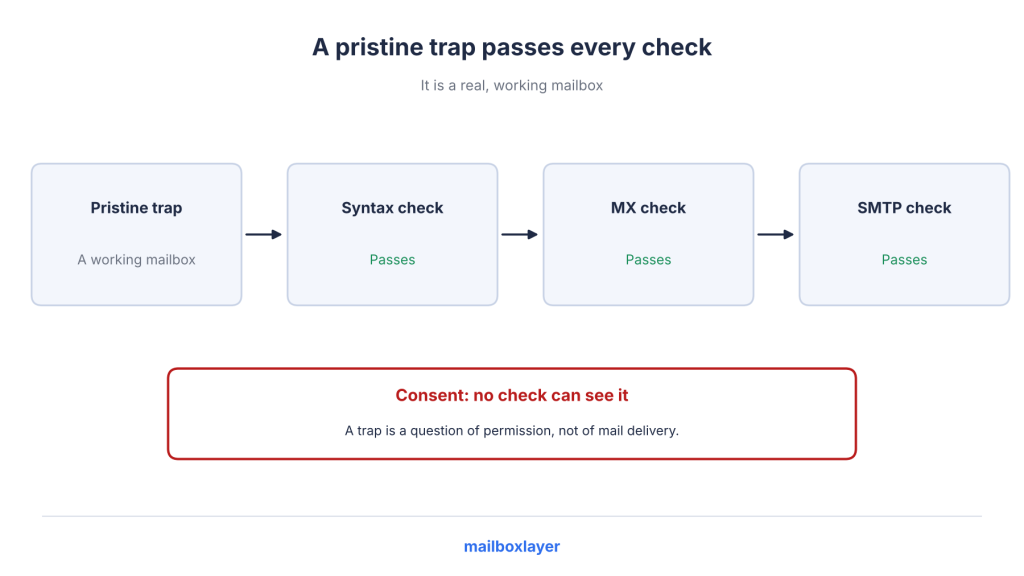
M3AAWG makes this clear. A pristine trap is a real, working mailbox, so it can pass syntax, MX and SMTP checks without any problem.
Reason 2: Trap owners don’t reveal their addresses.
Spamhaus confirms this, and M3AAWG advises email service providers (ESPs) not to reveal trap identities to customers, even indirectly.
This means any spam trap detection api can only identify addresses it already suspects or has encountered. It cannot promise reliable results.
Reason 3: Verification checks whether an address can receive emails, not whether you have permission to send them.
An API can tell you whether a mailbox accepts mail. It cannot tell you whether someone actually signed up for your newsletter or agreed to receive your campaigns. No verification API can see consent.
Spamhaus also points out that hunting for individual traps fixes “the symptom and not the underlying problem.” Validity adds that signup verification can catch many typo traps, while regular list cleaning can help identify some typo and recycled traps.
Here’s a quick look at how much verification can help with each type.
Trap type | Can verification help? |
Pristine | No |
Recycled | Only before conversion, through bounce data |
Typo | Yes, at the point of entry |
Which email verification API is the most accurate?
No email verification API can reliably identify traps because these addresses are designed to look like normal mailboxes. For the checks it does perform, Mailboxlayer’s FAQ says its SMTP check is accurate “in most cases.”
So, if verification can’t handle everything, what should you do? These six practices will help.
List Practices That Actually Keep Spam Traps Off Your List
A good email list starts with how you collect addresses, not just how you clean them later. Spamhaus recommends following proper collection, list hygiene and sending practices to avoid trap hits.
Here are six steps worth following.
1. Own Your List Sourcing
Never buy, rent or scrape email lists. M3AAWG identifies purchased, rented and appended lists, harvested addresses and trade-show participant lists as common ways traps get added to email databases.
It also highlights incentivised signups, social media signups, refer-a-friend forms and sweepstakes as higher-risk sources. These methods often reward people for entering “any email address over the right email address.”
Keep a record of where each address came from, when it was collected and which form was used. Your ESP might ask for this opt-in information if you face a trap investigation.
2. Use Confirmed Opt-in
Confirmed opt-in, also called double opt-in, adds one extra step to your signup process.
After someone enters their email address, you send them a confirmation email. They must click the link in that email before you add them to your list.
A trap won’t click the confirmation link, so it never becomes an active subscriber.
Spamhaus recommends “Employing COI at the data collection point.” Google’s sender guidelines also tell bulk senders to “Confirm each recipient’s email address before subscribing them.”
M3AAWG also lists single opt-in forms as one of the ways traps can reach email lists.
3. Verify Every Address at the Point of Entry
M3AAWG puts it simply: “The best practice is to validate the email address as it is entered, and to prompt the subscriber to re-enter their address if validation fails.”
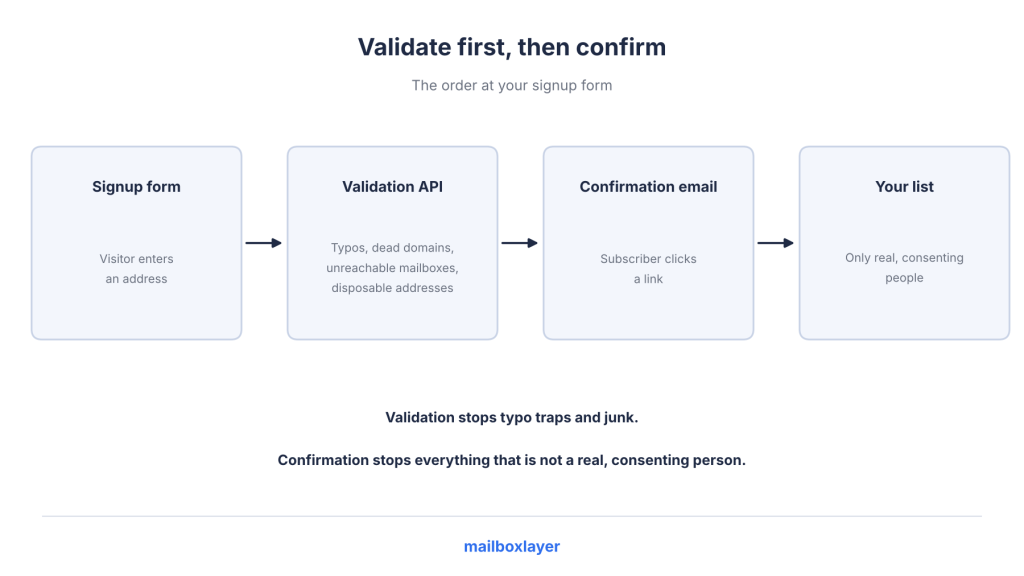
Follow this order:
- Email validation API: Check for typos, dead domains, unreachable mailboxes and disposable addresses.
- Confirmation email: Ask the subscriber to confirm their email address before adding them to your list.
The validation step catches incorrect and problematic addresses. The confirmation step makes sure the person can access the mailbox and has actively confirmed their subscription.
Don’t forget about bots either. M3AAWG notes that automated form submissions can also add traps to your list. Keep an eye on unusual signup spikes and suspicious activity.
For the technical implementation, read our guide to email verification in your application architecture.
Can you recommend a reliable email validation API for signup forms?
Choose an API that checks addresses during signup and returns typo suggestions, MX results, SMTP results and disposable email flags in one request. Mailboxlayer provides these checks. Call it from your server and follow the validation step with a confirmation email.
4. Process Bounces and Sunset Inactive Addresses
Recycled traps usually come from addresses that were once active but were left on your list after their owners stopped using them.
Two practices help prevent this.
Bounce processing
Remove hard-bounced addresses immediately. Google also recommends automatically unsubscribing recipients after multiple bounced messages for bulk senders.
A bounce detection api approach helps you identify addresses that are no longer reachable and avoid sending to them again.
Sunset policy
M3AAWG recommends suppressing recipients who remain “chronically unengaged or non-deliverable.” This reduces the chance of continuing to email an address after it has been abandoned and converted into a trap.
Validity recommends sending a re-engagement campaign first and removing subscribers who don’t respond.
For example, you could use this policy:
- No opens or clicks for six months.
- Send a re-engagement email series.
- Suppress subscribers who still don’t respond.
The inactivity period depends on your sending habits, and open tracking isn’t always accurate.
Be especially careful with old email segments. M3AAWG warns that sending to people you haven’t contacted in a long time can be risky because their old addresses may have been retired and reused as traps.
CRM administrators at marketing agencies want the most accurate way to reduce bounce rates before sending email campaigns. What should they use?
Verify your list before each campaign using mx_found and smtp_check. Remove hard bounces immediately and suppress inactive subscribers through a sunset policy. Combining email verification with bounce processing helps reduce bounces more effectively than relying on either one alone.
5. Re-verify Old Data Before You Send
Before sending a campaign to an inactive segment or imported email list, run the addresses through an email verification service.
An email hygiene api helps remove addresses that now bounce or belong to domains that no longer exist. It can also catch some addresses that might eventually become recycled traps.
However, re-verification doesn’t guarantee a trap-free list. If you have an old segment without confirmed permission, M3AAWG recommends removing it or running a permission campaign to confirm that people still want to receive your emails.
Which email verification API can clean an existing email list in bulk?
Mailboxlayer offers bulk_check on its Professional plan (25 emails per request) and Enterprise plan (100 emails per request). Bulk checks help remove dead addresses, but they don’t identify every trap. Make sure you reconfirm permission for segments without proper consent.
6. Watch for Trap Signals
Keep an eye on your blocklist status and sender reputation. Tools such as Sender Score and Microsoft SNDS, mentioned by Validity, can help you monitor your sending reputation.
M3AAWG also notes that lower-than-average engagement with a particular domain can indicate a trap network. Trap hits can often be traced back to a specific list segment or acquisition source.
If you do hit one, here’s how to handle it.
What to Do If You Hit a Spam Trap
A trap hit is a sign that something needs attention in your list collection or management process. Focus on finding the source of the problem rather than trying to identify one specific address.
- Don’t hunt for the trap address. Spamhaus explains that identifying and suppressing one address usually removes the symptom without fixing the underlying data problem.
- Audit your acquisition sources. Follow M3AAWG’s checklist. Look at how each list was collected, when the first hit happened, which campaign or segment it came from, and whether a particular source or domain appears more often.
- Remove the problematic source. Stop collecting addresses from sources responsible for suspicious activity.
- Suppress unengaged segments. Remove subscribers who haven’t interacted with your emails for a long time.
- Reconfirm permission. If you don’t have clear consent, ask recipients to confirm they still want your emails.
- Improve your collection process. Use point-of-entry validation, confirmed opt-in and a clear sunset policy.
Now let’s look at how Mailboxlayer fits into this process.
Where Mailboxlayer Fits
Mailboxlayer works as the first filter in your email collection process. It catches typos, dead domains, unreachable mailboxes and disposable addresses before they reach your list.
It doesn’t return a spam-trap flag, and no email verification API can honestly promise reliable trap detection.
You still need proper consent, responsible list sourcing and regular cleanup to maintain a healthy email list.
Checking an Address With the Mailboxlayer API
The Mailboxlayer email validation API uses a single GET request to check an email address. You can find the supported endpoints, authentication method and response details in the Mailboxlayer API documentation. The two required parameters are access_key and email.
It also supports optional parameters:
- smtp: Enables or disables the SMTP check. It’s enabled by default.
- format=1: Returns formatted JSON, which is useful during debugging.
- callback: Supports JSONP.
Here’s an example request:
curl "https://api.apilayer.net/mailboxlayer/api/check?access_key=YOUR_ACCESS_KEY&email=user@gmial.com"
Example response (trimmed):
					{
  "email": "user@gmial.com",
  "did_you_mean": "user@gmail.com",
  "format_valid": true
}
See the Mailboxlayer response fields for the complete response structure. If you want to build a working tool, follow our guide to build an email verification tool with the mailboxlayer API.
The API response includes these fields: email, did_you_mean, user, domain, format_valid, mx_found, smtp_check, catch_all, role, disposable, free and score.
Notice that there’s no spam-trap field. The score field returns a value between 0 and 1 to indicate email quality and deliverability. The documentation doesn’t specify fixed thresholds, so you can choose a cutoff that suits your list. Just remember that a high score doesn’t mean an address isn’t a trap.
Plans:
- Free: $0 with 100 API requests in total as a one-time allowance.
- Starter: $14.99/month for 5,000 requests.
- Professional: $74.99/month for 50,000 requests.
- Enterprise: $249.99/month for 250,000 requests.
Catch-all detection is available on Starter and higher plans. On the Free plan, a catch-all request returns error 310, catch_all_access_restricted.
The bulk_check feature is available on Professional (25 emails per request) and Enterprise (100 emails per request).
Rate limits are 300 requests per minute on Free, 300 on Starter and 300 on Professional and 600 on Enterprise.
You can find more details in the Mailboxlayer pricing section.
Is Mailboxlayer accurate for email verification?
Mailboxlayer’s FAQ states that its SMTP check is accurate “in most cases.” Some mail servers behave unpredictably. The API is designed to catch typos, dead domains, unreachable mailboxes and disposable addresses, not identify traps.
What is included in mailboxlayer’s free plan?
The Free plan includes 100 requests per month with no time limit. Catch-all detection isn’t included and returns error 310. The Starter plan starts at $14.99/month, includes 5,000 requests and adds catch-all detection.
Conclusion
Spam traps are addresses operated to monitor unsolicited email, often appearing as ordinary, working mailboxes. Email verification can catch typo traps and dead addresses, but it can’t identify every trap or confirm whether someone agreed to receive your emails.
That’s why proper list sourcing, confirmed opt-in, bounce processing and regular cleanup matter.
Mailboxlayer works as the first filter in this process. Add an email verification check to your sign-up form before sending the confirmation email.
Get your free MailboxLayer API key and start checking email addresses as they’re entered.
What are the top email verification APIs in 2026?
Our roundup compares seven email verification APIs, including Mailboxlayer. Read our complete guide to the best email verification APIs in 2026.
Here are answers to a few common questions.
FAQs
What is a spam trap?
A spam trap is an email address used to catch and monitor unsolicited emails. It never signs up for mailing lists, so receiving an email from a sender indicates a problem with their list. M3AAWG defines it as an address used to collect, record and monitor spam.
Can an email verification API detect spam traps?
Not reliably. These addresses are designed to look like normal, working email addresses, and their owners don’t reveal them. Verification can help catch typo traps during signup and some recycled traps through bounce data. Pristine traps remain difficult to identify.
What are the main types of spam traps?
The three main types are pristine, recycled and typo traps. Pristine addresses were never used by real people, recycled addresses belonged to people who later abandoned them, and typo traps use misspelt domains. Spamhaus also identifies seeded traps hidden on web pages and dead domains purchased by trap owners.
How long before an abandoned address becomes a recycled spam trap?
It depends on the operator. M3AAWG suggests at least 12 months of inactivity before an address is converted into a recycled trap. Since there’s no fixed timeline, maintaining a sunset policy is a better approach than relying on a specific deadline.
What happens if I hit a spam trap?
The impact depends on the type of trap, the number of hits and the operator. You might experience lower inbox placement, rejected emails or blocklisting. Instead of trying to find the exact address, investigate your list sources and collection practices.
How do I keep spam traps off my email list?
Collect addresses directly from users, validate them during signup, use confirmed opt-in, process bounces and remove inactive subscribers. Never buy or scrape email lists. Following these practices helps prevent traps from entering your list in the first place.
STAY CONNECTED
Mailboxlayer
Related categories