An AI agent can answer flight questions more reliably when it can call a flight data API instead of trying to remember or predict a schedule. Tool calling gives the agent a structured way to request flight data from an external API and use the returned information in its answer.
For example, a user might ask, “What flights are available from JFK to LAX on Thursday?” The AI agent can identify the information it needs, call Aviationstack, receive flight data, and then turn that response into a natural-language answer.
This is the basic idea behind using a flight data API for AI agents. The AI handles the conversation and decides when it needs external data. Your application handles the actual API request.
As of September 2026, Aviationstack provides real-time flight data, historical data, and future flight schedules through REST endpoints that return JSON. Its current product page also lists future flight schedules as a supported capability.
Table of Contents
What Does Tool Calling Add to an AI Flight Agent?
Tool calling gives an AI agent access to information outside its model knowledge by allowing the model to request a specific function with structured arguments.
For a flight agent, the flow looks like this:
					[ User ]
   |
   | "What flights are available Thursday?"
   v
( AI Agent )
   |
   | get_future_flights()
   v
[ Your Application ] <=== Flight Data Request ===> [ Aviationstack API ]
   |
   | Tool Output (JSON)
   v
( AI Agent )
   |
   | Final Answer
   v
[ User ]
The important part is that the model does not directly receive an unrestricted API key. Your application defines the available tool, validates the arguments, makes the Aviationstack request, and returns the result to the model.
OpenAI’s current function-calling documentation describes the same general pattern: provide tools to the model, receive a tool call, execute the function in your application, send the tool output back, and then let the model produce its final response.
Why Use a Flight Data API for AI Agents?
A flight data API gives an AI agent access to structured information about flights, airports, airlines, schedules, and flight status.
Without a live data source, an agent should not be expected to know whether a particular flight operates on a specific future date. Flight schedules are time-bound data, and the answer can depend on the airport, route, date, and available schedule information.
Aviationstack provides real-time flight data and also has a dedicated future flights endpoint for upcoming schedules. Its current product page describes historical and future schedules as part of its API offering.
This makes the future flights capability particularly relevant to questions such as:
What flights are available Thursday?
Which flights are scheduled from JFK?
What flights are departing from an airport on a particular date?
Which airline operates a particular scheduled flight?
The AI agent does not need to memorize these answers. It needs to know when to ask Aviationstack.
How Do I Give an AI Agent Access to Flight Data?
Give the AI agent a function that describes the flight lookup you want it to perform, then connect that function to the Aviationstack API in your application.
For example, you can define a tool called get_future_flights. The model receives its name, description, and input schema. When the model decides to use it, your application receives arguments such as an airport code, flight type, and date.
The application then calls Aviationstack’s future flights endpoint and returns the API response to the model.
This separation is important. The AI decides when to use the tool, while your application controls how the tool accesses Aviationstack.
Step 1: Get an Aviationstack API Key
Start by creating an Aviationstack account and obtaining an API key.
Aviationstack uses an access key to authenticate API requests. The current API uses endpoints under:
https://api.aviationstack.com/v1/
The standard Flights endpoint is:
https://api.aviationstack.com/v1/flights
Aviationstack’s current product page describes the service as a REST API returning aviation data in JSON format.
Keep the API key on your server. Do not place it directly in browser-side JavaScript or inside the tool definition sent to the model.
Step 2: Understand the Future Flights Endpoint
Aviationstack provides a Future Flights Schedule endpoint for upcoming flight schedules.
The endpoint is:
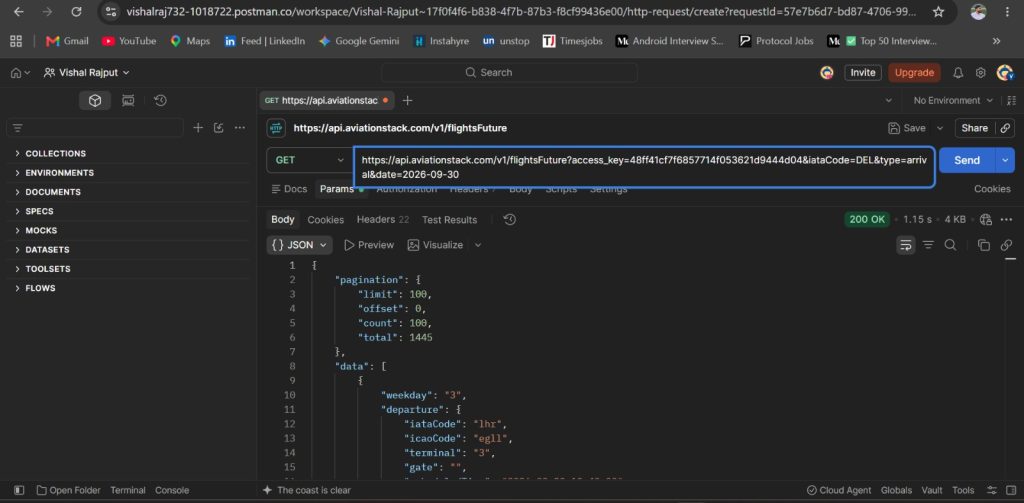
https://api.aviationstack.com/v1/flightsFuture
The official Aviationstack release article documents the endpoint with parameters including an airport IATA code, departure or arrival type, and a date.
A basic request has this structure:
					GET https://api.aviationstack.com/v1/flightsFuture
    ?access_key=YOUR_ACCESS_KEY
    &iataCode=JFK
    &type=departure
    &date=2026-10-01
The exact date should be generated from the user’s request rather than hard-coded in a production agent.
As of September 2026, the current Aviationstack pricing page shows Future Flight as unavailable on the Free plan and available on the Starter, Professional, and Enterprise plans. The current Starter plan is listed at 10,000 requests per month, while Professional is listed at 50,000 requests per month.
Step 3: Create the Flight Data Function
The next step is to create a normal application function that calls Aviationstack.
Here is a Node.js example:
					import axios from "axios";

const AVIATIONSTACK_API_KEY = process.env.AVIATIONSTACK_API_KEY;

async function getFutureFlights({ iataCode, type, date }) {
  const response = await axios.get(
    "https://api.aviationstack.com/v1/flightsFuture",
    {
      params: {
        access_key: AVIATIONSTACK_API_KEY,
        iataCode,
        type,
        date
      }
    }
  );

  return response.data;
}
The function accepts three values:
iataCode
type
date
For example:
					{
  "iataCode": "JFK",
  "type": "departure",
  "date": "2026-10-01"
}
The function then sends those values to Aviationstack.
This is the application-side function. The AI agent will not execute the HTTP request itself. It will request this function when the user’s question requires flight data.
Step 4: Define the Tool for the AI Agent
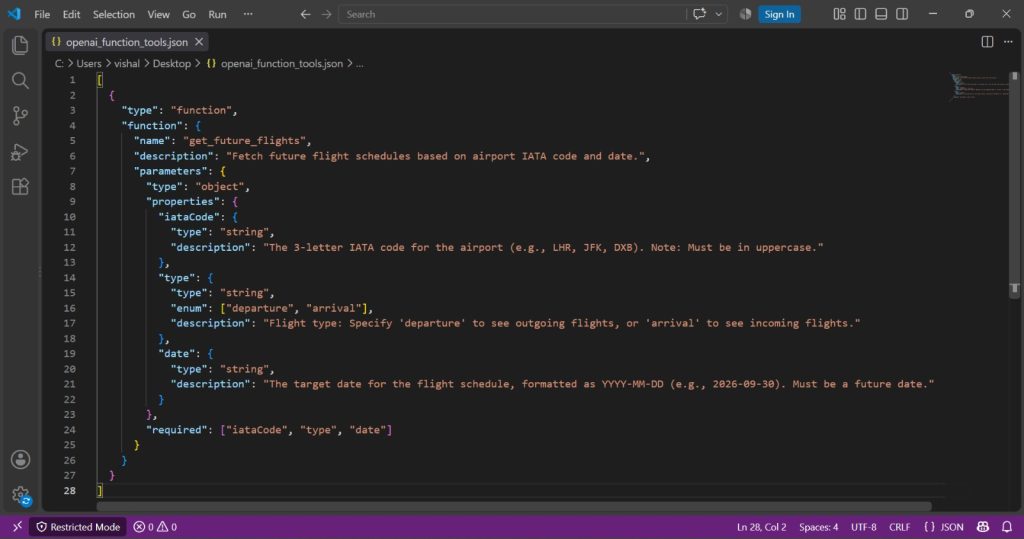
Now describe that function to the model using a JSON schema.
With OpenAI’s current Responses API, function tools are defined with a name, description, and JSON Schema parameters.
The tool definition can look like this:
					const tools = [
  {
    type: "function",
    name: "get_future_flights",
    description:
      "Get scheduled future flights for an airport on a specific date.",
    parameters: {
      type: "object",
      properties: {
        iataCode: {
          type: "string",
          description: "The IATA code of the airport, such as JFK."
        },
        type: {
          type: "string",
          enum: ["departure", "arrival"],
          description: "Whether to return departing or arriving flights."
        },
        date: {
          type: "string",
          description: "The flight date in YYYY-MM-DD format."
        }
      },
      required: ["iataCode", "type", "date"],
      additionalProperties: false
    },
    strict: true
  }
];
The description matters because the model uses it to determine when the function is relevant.
For example, if the user asks:
What flights are available from JFK on October 1?
the agent can infer that it needs a future flight lookup.
If the user instead asks:
What is the IATA code for JFK?
there is no reason to call the future flights tool.
Step 5: Connect the Tool to OpenAI Function Calling
The AI agent now needs to receive the tool definition as part of its request.
The current OpenAI Responses API supports function calling through the tools parameter. The model can return a function call containing the function name and JSON arguments. Your application then executes the function and sends the result back to the model.
A simplified first request looks like this:
					import OpenAI from "openai";

const openai = new OpenAI();

const response = await openai.responses.create({
  model: "gpt-5.6",
  input: "What flights are available from JFK on October 1, 2026?",
  tools
});

console.log(response.output);
The model may return a function call similar to:
					{
  "type": "function_call",
  "name": "get_future_flights",
  "arguments": "{\"iataCode\":\"JFK\",\"type\":\"departure\",\"date\":\"2026-10-01\"}"
}
Your application reads those arguments and calls the corresponding JavaScript function.
Step 6: Execute the Tool Call
Once the model requests the function, your application should parse the arguments and execute the Aviationstack request.
A basic implementation is:
					for (const item of response.output) {
  if (item.type === "function_call") {
    const args = JSON.parse(item.arguments);

    const result = await getFutureFlights(args);

    console.log(result);
  }
}
In a complete tool-calling flow, the result must then be sent back to the model using the function call’s ID.
A complete version looks like this:
					const response = await openai.responses.create({
  model: "gpt-5.6",
  input: "What flights are available from JFK on October 1, 2026?",
  tools
});

const toolOutputs = [];

for (const item of response.output) {
  if (item.type === "function_call") {
    const args = JSON.parse(item.arguments);

    const result = await getFutureFlights(args);

    toolOutputs.push({
      type: "function_call_output",
      call_id: item.call_id,
      output: JSON.stringify(result)
    });
  }
}

const finalResponse = await openai.responses.create({
  model: "gpt-5.6",
  previous_response_id: response.id,
  input: toolOutputs
});

console.log(finalResponse.output_text);
This follows the current tool-calling pattern documented by OpenAI. The model makes the function request, your application executes the function, and the function result is returned to the model before the final answer is generated.
Step 7: See the Aviationstack Response
The Aviationstack API returns structured JSON containing flight information.
The following is a real Aviationstack response example published by APILayer. It shows fields such as airline, departure, arrival, flight number, status, and scheduled times.
					{
  "data": [
    {
      "airline": {
        "iataCode": "AV",
        "icaoCode": "AVA",
        "name": "SA AVIANCA"
      },
      "arrival": {
        "actualRunway": null,
        "actualTime": null,
        "baggage": null,
        "delay": "65",
        "estimatedRunway": null,
        "estimatedTime": "2024-06-18T23:10:00.000",
        "gate": "3",
        "iataCode": "JFK",
        "icaoCode": "KJFK",
        "scheduledTime": "2024-06-18T22:05:00.000",
        "terminal": "1"
      },
      "departure": {
        "actualRunway": "2024-06-18T20:46:00.000",
        "actualTime": "2024-06-18T20:46:00.000",
        "baggage": null,
        "delay": "97",
        "estimatedRunway": "2024-06-18T20:46:00.000",
        "estimatedTime": "2024-06-18T19:10:00.000",
        "gate": "C4",
        "iataCode": "TPE",
        "icaoCode": "RCTP",
        "scheduledTime": "2024-06-18T19:10:00.000",
        "terminal": "2"
      },
      "flight": {
        "iataNumber": "AV4511",
        "icaoNumber": "AVA4511",
        "number": "4511"
      },
      "status": "scheduled",
      "type": "arrival"
    }
  ]
}
For an AI agent, the application does not need to pass every field if the model only needs a small subset.
For example, your application could extract:
					function simplifyFlight(flight) {
  return {
    airline: flight.airline?.name,
    flightNumber: flight.flight?.iataNumber,
    departureAirport: flight.departure?.iataCode,
    arrivalAirport: flight.arrival?.iataCode,
    departureTime: flight.departure?.scheduledTime,
    arrivalTime: flight.arrival?.scheduledTime,
    status: flight.status
  };
}
A smaller tool response can make it easier for the model to work with the data and reduces the amount of intermediate information passed through the agent workflow.
Step 8: Let the Agent Turn the Data Into an Answer
Once the tool result reaches the model, the model can turn structured flight data into a natural response.
For example, the user might ask:
What flights are available from JFK on October 1?
The agent can:
- Identify that the question requires future flight data.
- Call get_future_flights.
- Pass the airport and date as arguments.
- Receive the Aviationstack response.
- Extract relevant flights.
- Answer the user using the returned data.
The agent is not inventing a flight schedule. The schedule comes from the API response returned during the tool call.
That distinction is important for any AI application working with time-sensitive information.
What Flight API Works With OpenAI Function Calling?
Aviationstack works with OpenAI function calling because the integration happens through your application, not through a special Aviationstack-specific OpenAI feature.
OpenAI function calling allows developers to define a function with a JSON Schema and execute that function in their own application. Aviationstack can sit behind that function as the external flight data source.
The architecture is:
					OpenAI model
     |
     | function call
     v
Your application
     |
     | HTTP request
     v
Aviationstack
     |
     | JSON response
     v
Your application
     |
     | function output
     v
OpenAI model
This also means the same Aviationstack function can be connected to different agent frameworks or LLM providers that support tool calling.
How Do I Build an AI Flight Agent With Function Calling?
Build an AI flight agent by combining an LLM with a function that validates flight-search arguments and calls Aviationstack.
A simple architecture has three layers:
Layer Responsibility
Layer | Responsibility |
|---|---|
AI agent | Understands the user’s natural-language flight question and decides whether to call a tool |
Application function | Validates the tool arguments and sends the API request |
Aviationstack | Returns the flight data used by the agent |
The table shows the separation of responsibilities in a tool-calling flight agent. Keeping these layers separate means the model handles language while your application controls API access and data handling.
For production systems, the application should also validate airport codes, dates, allowed query types, API errors, timeouts, and unexpected responses before passing the result back to the model.
Can an AI Agent Tell Me What Flights Are Available Thursday?
Yes, an AI agent can answer a question about Thursday’s scheduled flights when the application connects it to Aviationstack’s future flights endpoint and supplies the correct date.
The important step is converting the natural-language word “Thursday” into a specific calendar date before calling the API.
For example, the agent could identify:
					{
  "iataCode": "JFK",
  "type": "departure",
  "date": "2026-10-01"
}
The application then passes those values to Aviationstack.
Do not let the model invent the date. Your application should validate the interpreted date and use a consistent timezone policy for date-sensitive queries.
How Should You Handle Flight Data Errors?
Handle API errors before sending the result back to the AI agent.
A simple wrapper can check for an unsuccessful request:
					async function getFutureFlights(args) {
  try {
    const response = await axios.get(
      "https://api.aviationstack.com/v1/flightsFuture",
      {
        params: {
          access_key: process.env.AVIATIONSTACK_API_KEY,
          iataCode: args.iataCode,
          type: args.type,
          date: args.date
        },
        timeout: 10000
      }
    );

    if (response.data.error) {
      return {
        error: true,
        message: response.data.error.info
      };
    }

    return {
      error: false,
      data: response.data.data
    };
  } catch (error) {
    return {
      error: true,
      message: "Flight data request failed."
    };
  }
}
The model should receive a clear error rather than an empty or misleading result.
The agent can then tell the user that the flight lookup could not be completed instead of generating an answer from memory.
How Do You Keep an AI Flight Agent From Hallucinating?
Give the agent a clear instruction to use the flight data tool for schedule questions and answer only from the returned data.
For example:
You are a flight information assistant.
Use the get_future_flights tool whenever the user asks about
future flight schedules.
Do not invent flight numbers, airlines, departure times,
arrival times, or availability.
If the tool returns no matching flights, say that no matching
flight data was returned.
The tool description should also be specific:
Get scheduled future flights for an airport on a specific date.
Use this tool when the user asks about upcoming flight schedules.
The model can still make mistakes when interpreting a user’s request, so your application should validate tool arguments before making the API request.
What Data Should a Flight Tool Return to an AI Agent?
A flight tool should return the fields the agent needs to answer the user’s question, such as airline, flight number, departure airport, arrival airport, scheduled departure time, scheduled arrival time, and status.
The exact response depends on the Aviationstack endpoint being used. The published Aviationstack response structure separates airline, departure, arrival, flight, and status information into different objects.
For a conversational flight agent, a compact structure can be easier to work with:
					{
  "airline": "Example Airline",
  "flightNumber": "AB123",
  "departureAirport": "JFK",
  "arrivalAirport": "LAX",
  "departureTime": "2026-10-01T14:30:00+00:00",
  "arrivalTime": "2026-10-01T18:00:00+00:00",
  "status": "scheduled"
}
For a production implementation, populate these values directly from the Aviationstack response rather than using the example values above.
Common Mistakes When Adding Flight Data to an AI Agent
Giving the model the API key
The API key should stay in your application environment. The model only needs access to the function you expose.
Letting the model construct arbitrary API URLs
Define a fixed function and validate its arguments. This gives your application control over which Aviationstack endpoint and parameters can be used.
Treating a future schedule as a guaranteed flight operation
A scheduled flight is not the same thing as a guaranteed departure. If your application also needs current operational status, make a separate real-time lookup when appropriate.
Sending the entire API response to the model
Return only the fields the agent needs when possible. This keeps the tool output easier to process.
Forgetting date interpretation
Questions such as “Thursday” or “next Monday” must be converted into an actual date before the API call.
Aviationstack and the APILayer Suite
Aviationstack is part of the APILayer suite, so developers get one account, one API key, one dashboard, and one invoice across the suite. (apilayer.com)
Explore APILayer Products
Discover APIs for geolocation, finance, aviation, weather, web scraping, AI, and more. Browse APILayer's product catalog to find the right APIs for your application and integrate the data and functionality your project needs.
Explore APILayer ProductsFind the right tools to start building.
Frequently Asked Questions
How do I give an AI agent access to flight data?
Give the agent a function tool that accepts structured flight-search parameters, then make that function call Aviationstack and return the API response to the model.
What flight API works with OpenAI function calling?
Aviationstack works with OpenAI function calling because your application can expose an Aviationstack request as a function tool and return its JSON response to the model.
How do I build an AI flight agent with function calling?
Define a flight lookup function, describe its parameters with JSON Schema, execute Aviationstack when the model calls it, and send the result back to the model for the final answer.
Can an AI agent tell me what flights are available Thursday?
Yes, when connected to Aviationstack’s future flights endpoint, an AI agent can convert Thursday into a calendar date and request scheduled flight data for that date.
Do I need a separate API key for each API in the APILayer suite?
No. Aviationstack is part of the APILayer suite, which provides one account, one API key, one dashboard, and one invoice across the suite.
STAY CONNECTED
Aviationstack API
Read our blogs on Aviationstack API, covering features, integration tips, and use cases for accessing real-time and historical aviation data.
Related categories