


Building a multi-currency product is no longer optional. Whether you’re developing SaaS pricing pages, subscription billing systems, e-commerce checkouts, invoices, or financial dashboards, your users expect prices to appear in their local currency and formatted correctly.
But handling money isn’t just about adding a $ sign.
Developers must correctly:
- Store monetary values safely
- Use ISO 4217 currency codes
- Avoid symbol ambiguity
- Format amounts per locale
- Convert currencies using reliable exchange rate data
- Cache and timestamp rates for financial accuracy
In this guide, we’ll walk through the right way to handle currency in modern applications, and show how an exchange rate API like Fixer fits naturally into the architecture.

Table of Contents
Key Takeaways
- Currency symbols are not unique. $, kr, and £ represent multiple currencies.
- Always store and process money using ISO 4217 currency codes (USD, CAD, EUR).
- Currency formatting is locale-dependent (decimal separators, symbol placement, spacing).
- Conversion requires a reliable, timestamped exchange rate source.
- Exchange rate APIs like Fixer make multi-currency systems scalable and maintainable.
Currency Symbols vs Currency Codes (The Difference)
Currency Symbols
Examples:
- $
- €
- £
- ¥
- kr
These symbols are designed for human readability, not technical precision.
ISO 4217 Currency Codes
The international standard for currency representation:
- USD → US Dollar
- CAD → Canadian Dollar
- EUR → Euro
- GBP → British Pound
- JPY → Japanese Yen
These codes are defined by ISO 4217 and are globally unique.
Why Symbols Alone Are Risky
The biggest problem? Symbol ambiguity.
Symbol | Possible Currencies | Safer Display Format |
$ | USD, CAD, AUD, NZD, SGD, MXN | $10 USD |
£ | GBP, EGP, SYP | £10 GBP |
kr | SEK, NOK, DKK, ISK | 10 kr SEK |
¥ | JPY, CNY | ¥100 JPY |
If your pricing page shows:
$29
Is that USD? CAD? AUD?
In global SaaS products, ambiguity damages trust. The safe pattern:
- Internally: use USD
- Display: $29 (localized)
- In ambiguous contexts: $29 USD
For deeper implementation strategies, the APILayer blog on financial APIs explains how standardization improves reliability in global systems:
https://blog.apilayer.com/
The Right Way to Store Money in Databases
Handling money incorrectly is one of the most common engineering mistakes.
Don’t Store Money as Floats
Floating-point precision errors will cause rounding issues.
0.1 + 0.2 = 0.30000000000000004
That’s unacceptable in financial systems.
Best Practice: Store Minor Units as Integers
When handling money in software systems, it’s a best practice to store monetary values in their smallest units (minor units) as integers rather than as floating-point numbers.
For example, instead of storing price = 19.99, you should store amount = 1999 and currency = “USD”, which represents 1999 cents. This approach prevents floating-point precision issues that can cause subtle but critical rounding errors. In financial applications, even a tiny calculation discrepancy can lead to reporting and reconciliation problems.
Using integers for monetary storage also aligns cleanly with ISO 4217 currency standards, where each currency is represented by a three-letter code like USD or EUR. A recommended database schema would include fields such as amount_minor: INTEGER and currency_code: CHAR(3). This structure keeps currency metadata separate from numeric values and makes conversions more predictable. It also ensures that your system can safely support multi-currency operations at scale.
From a system design perspective, storing minor units simplifies arithmetic and makes currency conversion logic easier to manage. Integer-based calculations are deterministic and free from floating-point inconsistencies. This design pattern is widely adopted in enterprise billing platforms, payment gateways, and accounting systems. For production-grade financial software, storing money as integer minor units is considered the industry standard for accuracy and reliability.
How Currency Formatting Works
Even if conversion is correct, formatting mistakes instantly reduces product credibility.
Formatting depends on:
- Decimal separator
- Thousands separator
- Symbol placement
- Spacing rules
Example: Same Amount, Different Locales
Assume: 1234.56 EUR
Locale | Display Format | Notes |
en-US | €1,234.56 | Decimal = dot, thousands = comma |
de-DE | 1.234,56 € | Decimal = comma, thousands = dot |
fr-FR | 1 234,56 € | Space separator |
ja-JP | €1,235 | Often no decimals shown |
Formatting Rules Checklist
✔ Use locale-aware formatting libraries
✔ Do not hardcode separators
✔ Let system handle pluralization
✔ Always format after conversion
✔ Never assume symbol position
In JavaScript:
					const amount = 1234.56;
const formatted = new Intl.NumberFormat("de-DE", {
  style: "currency",
  currency: "EUR",
}).format(amount);

console.log(formatted);
// 1.234,56 €
This ensures proper localization without manual logic.
For more API-driven formatting and global data handling strategies, see APILayer’s technical blog: https://blog.apilayer.com/
Converting Prices Using an Exchange Rate API
Now comes the core problem: currency conversion.
Conversion requires:
- Base currency
- Target currency
- Reliable exchange rate
- Timestamped data
- Clear rounding rules
This is where an exchange rate API like Fixer becomes essential.
Fixer provides real-time and historical foreign exchange rates in JSON format, making it easy to integrate into SaaS applications.
Documentation:
https://fixer.io/documentation
Basic Conversion Workflow
- Choose base currency (e.g., EUR)
- Fetch latest exchange rates
- Convert amount
- Apply rounding
- Format for display
Step 1: Fetch Latest Exchange Rates (cURL Example)
curl "http://data.fixer.io/api/latest?access_key=YOUR_ACCESS_KEY&symbols=USD,CAD,GBP"
Sample Response
					{
  "success": true,
  "timestamp": 1710000000,
  "base": "EUR",
  "date": "2026-03-05",
  "rates": {
    "USD": 1.08,
    "CAD": 1.46,
    "GBP": 0.86
  }
}
The response includes:
- base currency
- timestamp
- Conversion rates
Step 2: Convert Amount (JavaScript Example)
Assume your product stores prices in EUR.
					async function convertPrice(amountEUR) {
  const response = await fetch(
    "http://data.fixer.io/api/latest?access_key=YOUR_ACCESS_KEY&symbols=USD"
  );

  const data = await response.json();
  const rate = data.rates.USD;

  const converted = amountEUR * rate;

  return converted;
}

convertPrice(49).then(price => {
  const formatted = new Intl.NumberFormat("en-US", {
    style: "currency",
    currency: "USD",
  }).format(price);

  console.log(formatted);
});
Enterprise Best Practices for Conversion
1. Cache Exchange Rates
Do NOT call the API on every page load.
Instead:
Fetch rates every 10 to 60 minutes
Store in Redis or in-memory cache
Refresh asynchronously
2. Timestamp Rates for Invoices
For legal and accounting purposes:
Store the exchange rate used
Store the timestamp
Never recalculate historical invoices
3. Define Rounding Rules
Different currencies have different rounding practices:
USD → 2 decimals
JPY → 0 decimals
CHF → sometimes 0.05 rounding
Define rules per currency.
4. Separate Conversion Logic from Formatting
Conversion = mathematical
Formatting = presentation
Never mix them.
Multi-Currency Pricing Architecture
Let’s imagine a subscription platform.
Database
plan_price_minor = 4900
currency = “EUR”
Pricing Page Flow
Detect user locale
Map locale → currency
Fetch cached exchange rate
Convert base price
Format via locale
Display
Invoice Flow
Lock exchange rate at time of payment
Store rate in invoice record
Store converted amount
Never re-evaluate
This architecture ensures that financial operations remain accurate, consistent, and reliable across the system. By structuring currency storage, conversion, and formatting properly, applications can maintain precise calculations and clear financial records. It also improves auditability by preserving exchange rates and transaction details for verification. At the same time, caching and optimized workflows enhance performance and allow the system to scale efficiently as the number of users and transactions grows.
Why Use an Exchange Rate API Like Fixer?
Building your own FX infrastructure is costly.
An exchange rate API like Fixer helps by:
An exchange rate API like Fixer helps developers access real-time currency rates, ensuring applications always display up-to-date pricing and financial data. This is especially important for global platforms where currency values fluctuate frequently.
It also supports historical currency conversion, allowing businesses to retrieve exchange rates from a specific date. This is crucial for generating invoices, financial reports, and maintaining accurate accounting records.
Additionally, the API provides simple JSON REST endpoints, making it easy for developers to integrate currency data into web apps, mobile apps, and backend services. The standardized format reduces implementation complexity across different programming languages.
Finally, exchange rate APIs enable scalable SaaS billing systems by automating currency conversions for global users. This allows applications to support multi-currency pricing while maintaining accuracy, performance, and consistency.
Other APIs in the same ecosystem include:
currencylayer
ExchangeRate.host
These APIs simplify multi-currency product development and reduce operational complexity.
Common Developer Mistakes
Using symbols as identifiers
Storing floats instead of integers
Ignoring locale formatting
Recalculating historical invoices
Calling exchange rate API per request
Avoiding these ensures enterprise-grade reliability.
Real-World Example: Multi-Currency Pricing in a SaaS Subscription Platform
Let’s look at how a real SaaS application might implement multi-currency pricing using an exchange rate API Fixer.
Imagine a SaaS company that sells a productivity tool with a base subscription price of €49 per month. Internally, the platform stores all pricing in EUR using minor units (4900) to avoid floating-point precision issues. However, when users visit the pricing page from different countries, the application dynamically converts and displays the price in their local currency.
For example, when a user from Canada visits the website, the backend detects the region and retrieves the EUR → CAD exchange rate from an exchange rate API. If the current rate is 1 EUR = 1.46 CAD, the system converts the base price and displays it using locale-aware formatting.
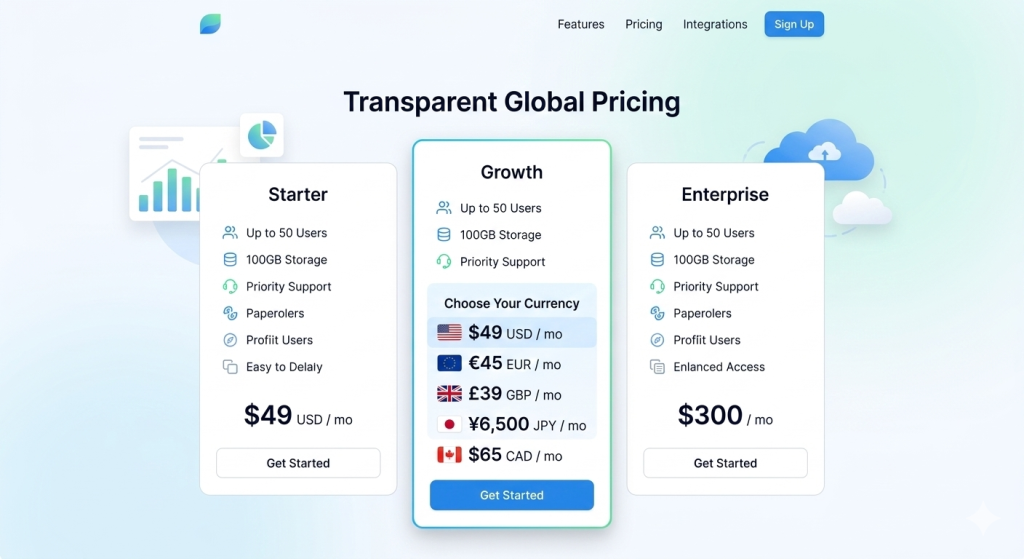
Example of a SaaS pricing page dynamically displaying localized currency values.
How the Conversion Workflow Works
A typical multi-currency pricing workflow looks like this:
- Store base product price in a single currency (EUR)
- Detect the user’s locale or preferred currency
- Fetch the latest exchange rate from the API
- Convert the base price
- Format the value according to local currency rules
- Cache the exchange rate for performance
This approach ensures the platform maintains consistent pricing logic while supporting global users.
Step 1: Fetch the Latest Exchange Rates
The backend fetches the latest currency rates from the API.
Example API Request (cURL)
curl "http://data.fixer.io/api/latest?access_key=YOUR_ACCESS_KEY&symbols=CAD,USD,GBP"
Example API Response
					{
  "success": true,
  "timestamp": 1710000000,
  "base": "EUR",
  "date": "2026-03-05",
  "rates": {
    "CAD": 1.46,
    "USD": 1.08,
    "GBP": 0.86
  }
}
The response includes:
- Base currency (EUR)
- Current exchange rates
- Timestamp of the rate data
- List of supported currencies
Developers typically cache this response for 10 to 60 minutes to avoid excessive API calls.
Step 2: Convert the Price
Once the exchange rate is retrieved, the application converts the base price.
Example Conversion Logic (JavaScript)
					async function getPriceInCAD() {
  const basePriceEUR = 49;

  const response = await fetch(
    "http://data.fixer.io/api/latest?access_key=YOUR_ACCESS_KEY&symbols=CAD"
  );

  const data = await response.json();
  const rate = data.rates.CAD;

  const convertedPrice = basePriceEUR * rate;

  return convertedPrice;
}

getPriceInCAD().then(price => {
  console.log(price);
});
Step 3: Format the Price for the User
After conversion, the price must be formatted using locale-specific rules.
Example Formatting
					const formattedPrice = new Intl.NumberFormat("en-CA", {
  style: "currency",
  currency: "CAD"
}).format(71.54);

console.log(formattedPrice);
Final Result Displayed
CA$71.54 / month
This ensures the amount appears exactly how Canadian users expect to see it.
FAQ
- Why shouldn’t I store currency symbols in my database?
Symbols are ambiguous and not unique. ISO currency codes (USD, EUR) are standardized and globally recognized.
- How often should I refresh exchange rates?
For pricing pages: every 15–60 minutes is common.
For invoices: lock the rate at transaction time.
- Can I use one base currency for everything?
Yes. Many SaaS platforms store all prices in a single base currency (e.g., EUR) and convert dynamically.
- Should conversion happen on the frontend or backend?
Preferably the backend. This ensures:
- Centralized logic
- Rate consistency
- Auditability
- How do I handle currencies without decimals (like JPY)?
Define currency metadata and configure rounding rules per currency.
- What’s the safest display format for global pricing?
Symbol + localized formatting.
In ambiguous contexts: include currency code.
Example: $49 USD
Stay Connected
Casino reviews are among the most read pages in the industry and among the least neutral. Most sites publishing them earn a commission when a reader signs up, which shapes what gets covered and how warmly. Knowing that does not make reviews useless, only in need of careful reading.
Reading Casino Reviews Critically
A review worth trusting names the licence, quotes the withdrawal limits and mentions at least one genuine drawback, because a page with no criticism is advertising with a score attached. Readers comparing sources often Ozwin Casino and check whether the same facts appear consistently. Look for the affiliate disclosure, which regulated markets require and honest publishers place where it can be found.
| Signal | What It Suggests |
|---|---|
| No stated drawbacks | Likely promotional content |
| Affiliate disclosure | Basic transparency |
| Dated payout test | Real hands on checking |
- Look for a disclosure of commercial relationships
- Prefer specifics over adjectives and star ratings
Reviews are a starting point for a shortlist and a poor basis for a final decision. The facts they contain can be verified independently, and anything that cannot be verified is opinion. Use them to narrow the field, confirm the licence yourself, and set a deposit budget before registering anywhere.

