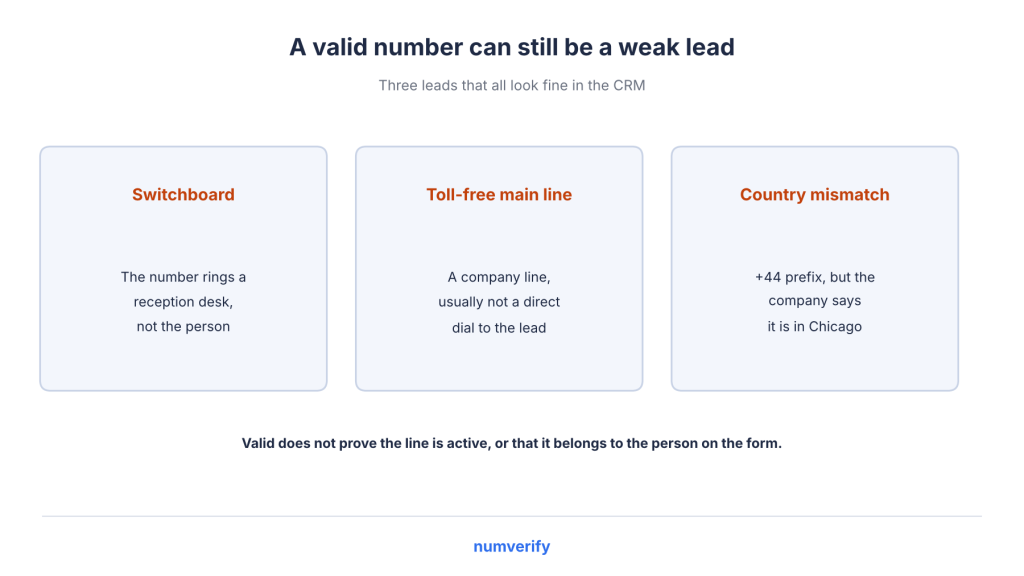
An SDR starts the day with 40 demo requests. Several leads have numbers like 1234567890. One number connects to a reception desk, another is a toll-free main line, and one has a +44 prefix even though the company is based in Chicago. Everything looks fine in the CRM, but the contact details tell a different story.
This is exactly where lead validation comes in.
At Numverify, we often see RevOps and marketing ops teams dealing with these issues. This guide explains which phone-number signals matter for B2B lead quality and how to use them to score and route leads in your CRM.
Let’s start with the basics.
Table of Contents
Key Takeaways
- A valid phone number doesn’t automatically mean it’s a good lead.
- Look at validity, line type, carrier, and country together.
- Use phone signals to route leads instead of rejecting them immediately.
- Show a soft prompt for possible typos, and don’t lose leads when a lookup fails.
- Store validation results in CRM fields so your workflows can use them.
What is Lead Validation?
Lead validation is the process of checking whether a new lead’s contact details are real, consistent, and usable before they enter your CRM or reach your sales team. It usually covers email, phone, and company data. Here, we’ll focus on phone numbers.
Why focus on phone numbers? In B2B sales, phone numbers help teams reach prospects quickly through calls and text messages. They also provide useful information, including country, line type, and carrier.
You’ll come across a few related terms, so let’s understand how they differ.
Lead Validation vs Enrichment vs Verification
- Validation: Does the number follow a valid numbering plan, and does it match the rest of the lead information?
- Enrichment: What additional information can we get, such as line type, carrier, and location? This is what phone number enrichment is all about.
- Verification: Does the person actually control the number? A one-time code sent through SMS or a phone call can help confirm this.
A validation API doesn’t prove that someone owns a number. That’s where one-time codes come in.
Which phone number API should I use to capture only good leads?
Choose an API that returns validity, line type, carrier, and country information in one request when someone submits a form. This gives your team useful signals for routing leads instead of simply blocking them. Numverify provides these details, and you can compare providers based on your requirements. Remember, no phone validation API proves number ownership.
Let’s look at what happens when phone data isn’t accurate.
Why Phone Data Quality Breaks B2B Pipeline
Poor phone data creates problems at different stages of your sales pipeline. Here are some common examples:
- Mistyped digits.
- Fake or placeholder numbers entered to bypass a required field.
- Numbers submitted without a country code.
- Switchboards and toll-free main lines instead of direct dial numbers.
- Phone numbers from a different country than the company.
- The same person appearing multiple times with different phone number formats.
These issues lead to wasted SDR calls, slower follow-ups, incorrect lead routing, unreliable reports, and unnecessary SMS expenses.
Poor phone data quality also affects contact and connect rates, making campaigns look less effective than they actually are. That’s why phone validation for lead generation should happen when someone submits a form rather than after the lead reaches your sales team.
Phone data can also become outdated. People change jobs, and carriers reassign phone numbers.
There’s also a compliance angle. Under the GDPR accuracy principle, personal data must be “accurate and, where necessary, kept up to date” (Article 5(1)(d)).
What’s the best API to block fake phone numbers at signup?
Use a server-side phone validation API when someone submits a form. If the number is invalid, show a soft prompt asking them to check it. This catches typos, impossible prefixes, and many placeholder entries. However, a properly formatted fake number can still pass validation. If you need proof of ownership, use a one-time verification code.
What’s the ROI of using a phone validation API vs cleaning numbers manually?
There’s no fixed ROI because it depends on your lead volume, API pricing, and sales process. Compare the monthly cost of wasted SDR calls and delayed follow-ups with the cost per API request. Manual cleaning also takes time and doesn’t catch problems when someone first submits a form. Running your existing leads through a validation API gives you a clearer picture of the potential savings.
Now, let’s look at the phone signals that help you understand lead quality.
The Phone Signals That Tell You About Lead Quality
A phone validation API can return several fields from a single lookup. Each one provides a different piece of information, but it’s important to understand what these signals actually tell you.
Signal | API field | What it tells you | What it does not tell you |
Validity | valid | The number follows a real numbering plan | Whether the line is active or belongs to the lead |
Line type | line_type | Mobile, landline, toll-free, and so on | Whether a landline connects directly to a person or a switchboard |
Carrier | carrier | The carrier registered with the number | Whether it’s always the current carrier (numbers can be ported) |
Country | country_code, country_name | Which country the number belongs to | Where the person is currently located |
Location | location | City, state, or county, if available | Where the person actually lives or works |
Standard format | international_format | A consistent format for storing numbers | Anything about lead quality |
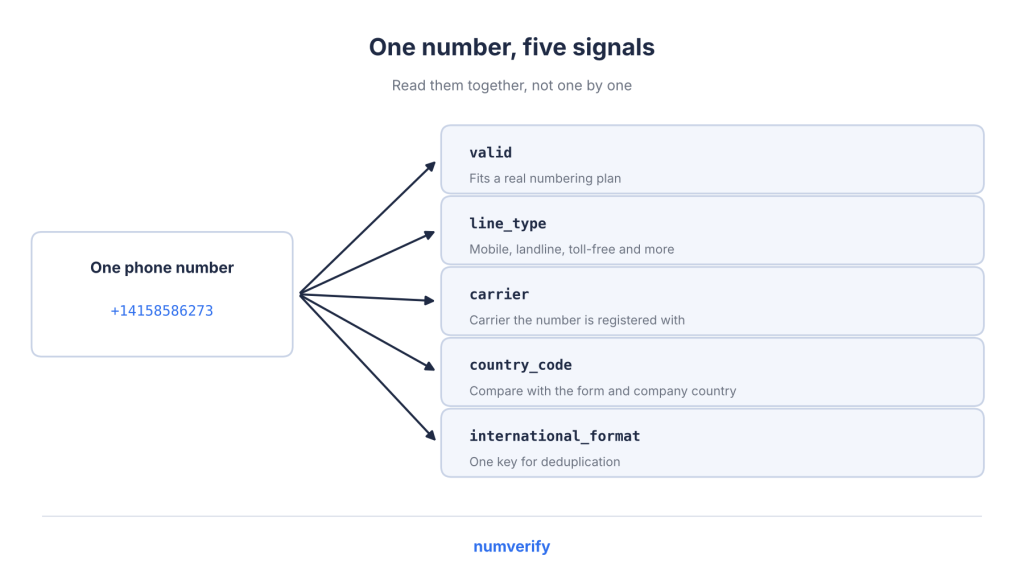
No single field should decide whether a lead is good or bad. The real value comes from looking at these signals together and comparing them with the other information submitted in the form.
Let’s go through each one.
Valid or Invalid
The valid field returns true when a phone number is considered valid. According to Numverify documentation, numbers are “cross-checked against the latest international numbering plan databases.”
It’s important to understand what valid means here. The number follows a recognised numbering plan, but that doesn’t confirm whether the line is currently active or belongs to the person who submitted the form.
The documentation doesn’t describe this as a network-level check.
An invalid result can help identify common issues such as typos, missing digits, impossible prefixes, and many placeholder numbers.
What’s the best API to validate phone numbers in real time?
Choose an API that returns validation results in a single request and call it from your server when the form is submitted. Numverify provides this through its /validate endpoint. Keep your API key on the server instead of exposing it in the browser. Also, treat request limit errors as “not checked” rather than marking the number invalid.
Validity gives you the first signal. Line type adds another layer of context.
Line Type: Mobile, Landline, VoIP and Others
A phone number type lookup tells you what kind of line you’re dealing with. For B2B teams, here’s how to interpret the common types:
- Mobile: Often provides a direct way to reach a person.
- Landline: Could be a direct desk number or a company switchboard.
- Toll-free: Usually connects to a company’s main contact line rather than an individual.
- Premium-rate: A potential red flag when submitted through a lead form.
VoIP numbers need a little more attention. They use internet-based calling instead of traditional telephone lines, and many legitimate businesses use cloud phone systems.
That means a VoIP number isn’t automatically a fraud signal in B2B lead generation. Treat it as additional context rather than a reason to reject a lead.
What’s the best API to detect whether a number is mobile or landline?
Look for an API that returns a dedicated line type field. Numverify provides line_type, and its blog lists mobile and landline among the available values. This information helps sales teams understand which numbers are more suitable for direct calls and which may connect to a business reception desk.
I’m a product manager in the lead generation space. What’s the most accurate way to detect the carrier and line type of a phone number?
No API can guarantee perfect results because phone numbers can move between carriers. Use carrier and line type as separate data points, and consider them alongside country information. This gives your team a better understanding of the number than relying on a single field.
Carrier information adds another useful detail.
Carrier
The carrier field returns “the name of the carrier with which the specified phone number is registered.”
For lead quality, carrier information helps identify patterns in form submissions, segment SMS campaigns, and add context when a lead looks unusual.
You can also read our guide on phone validation and carrier lookup to understand how these two checks work together.
One thing to keep in mind is number portability. People can move their existing numbers between carriers. The Numverify documentation doesn’t specify whether ported numbers always reflect the current carrier, so treat this field as carrier information associated with the lookup rather than a guaranteed real-time record.
Which API tells me the carrier of a phone number?
Numverify returns the carrier name through the carrier field in its validation response. Other providers also offer carrier lookup services. When comparing them, consider how carrier information fits into your lead qualification process. Number portability can affect the accuracy of carrier data.
Next, let’s look at country and location information.
Country and Location Consistency
Country information helps you compare a phone number with the other details submitted by a lead.
For example, compare the country_code from the phone lookup with:
- The country selected in your lead form.
- The company’s headquarters country from your enrichment tool.
- The visitor’s IP-based country.
A mismatch can help you route the lead to the right regional team or send it for manual review.
However, don’t treat every mismatch as a problem. Global companies, remote employees, and people travelling internationally often use numbers from different countries. It’s better to route or review these leads than reject them.
The location field returns a city, state, or county, if available. This information is associated with the phone number, not the person’s current location, so it shouldn’t be used for precise territory assignment.
The Numverify documentation lists coverage across 232 countries.
Which phone number API returns the country and location of a number?
Numverify returns country_code, country_name, and location. The location field provides a city, state, or county when available. Keep in mind that this information relates to the phone number, not the person’s current location. The documentation lists coverage across 232 countries.
There’s one more useful field that helps keep your CRM organised.
One Standard Format for Deduplication
Store international_format as the standard phone number value in your CRM.
For example, the Numverify documentation includes +14158586273 as an international format.
This helps you identify duplicate contacts even when the same number has been entered in different ways. Instead of storing multiple records for one person, you can use a consistent phone number format as the basis for deduplication and CRM data hygiene.
For detailed formatting rules, see our guide to normalizing international phone numbers using E.164.
Now that we understand the different signals, let’s look at how phone validation connects with sales outreach compliance.
Phone Checks and Compliance for Sales Outreach
Phone validation also plays a role in how sales teams manage their outreach.
In the US, the TCPA rules under 47 CFR 64.1200 treat calls to mobile numbers differently. Autodialed or prerecorded calls to numbers assigned to cellular services generally require prior express consent. Telemarketing calls of this kind require prior express written consent.
This is one practical reason to store line type information with every lead.
However, a phone validation result doesn’t prove consent or confirm that the number still belongs to the person who submitted it.
The same regulation includes a safe harbor for certain calls to reassigned numbers, subject to checking the FCC’s Reassigned Numbers Database under 64.1200(m).
This is general information, not legal advice. Your legal team can help determine which requirements apply to your outreach activities.
Let’s put these phone signals into a practical workflow.
A Lead Validation Framework: Score and Route on Phone Signals
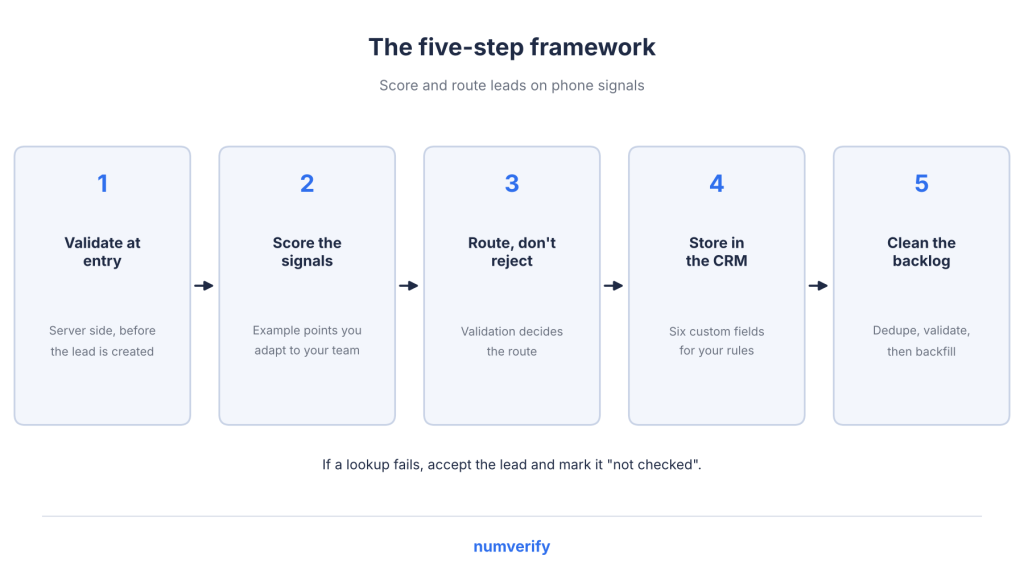
You can organise your phone-checking workflow into five steps. The point values and routing rules below are examples that you can adapt to your own sales process.
Explore APILayer Products
Discover APIs for geolocation, finance, aviation, weather, web scraping, AI, and more. Browse APILayer's product catalog to find the right APIs for your application and integrate the data and functionality your project needs.
Explore APILayer ProductsFind the right tools to start building.
1. Validate at the Point of Entry
Start checking phone numbers when someone submits a form. Make the API request from your server before creating the lead in your CRM.
A phone validation API can return the required information in real time. This is point-of-entry validation, and it adds an extra layer of data quality without making the form complicated for visitors.
Follow these practices:
- Pass the form’s country as a two-letter country_code when someone enters a national number. This gives the API the context it needs to validate the number.
- If valid returns false, show a soft prompt such as “Please check your phone number” instead of blocking the submission. A typo doesn’t automatically make someone a bad lead.
- If the API is unavailable or a request limit is reached, accept the lead and mark it as “not checked”. A failed lookup shouldn’t result in a lost lead.
Which phone number API is best for lead generation forms?
Choose an API that runs server-side, returns multiple phone signals in one request, and handles failed lookups without blocking submissions. Numverify follows this approach. You can also compare providers using the comparison guide linked in the conclusion.
I’m a CRM administrator in the lead generation space. What’s the easiest way to validate phone numbers at signup in real time?
Connect a phone validation API to your form submission process using a webhook or a small server-side function. Save the returned information in custom CRM fields. Show a soft prompt for invalid numbers, and mark failed API requests as “not checked”.
Once validation is in place, you can use the returned information to score leads.
2. Score the Phone Signals
A simple scoring system helps your sales team prioritise leads based on phone data.
Here’s an example:
Signal | Points (example) |
Valid mobile | +20 |
Valid landline | +10 |
Toll-free main line | 0 |
valid is false | -40 |
Country mismatch with the form | -10 |
Premium-rate | -50 |
Duplicate of an existing contact | Merge, don’t score |
Combine these points with your existing lead scoring criteria, including email quality, company fit, and form intent.
For the email side of lead qualification, see the mailboxlayer post on role-based addresses.
Firmographic details, such as company size, come from your enrichment tool rather than phone validation.
Remember, scoring only makes sense when it helps your team decide what to do next.
3. Route, Don’t Reject
Once you have the validation results, use them to decide where each lead should go.
Situation | Action |
Valid mobile, matching country, high-intent form | Send to SDRs for a quick call. Send texts only with the required consent. |
Valid landline or toll-free | Accept the lead, attach it to the account, and ask sales or enrichment to find a direct number. |
Country mismatch | Route to the regional team responsible for that country or send it for review. |
Invalid and not corrected after the prompt | Keep the lead in email-only nurture. Don’t send it to a dialer. |
Premium-rate or clear junk | Suppress it from outreach. |
The goal of validation isn’t just to decide whether a lead can enter your CRM. It’s to make sure each lead reaches the right team and communication channel.
For this to work, your CRM needs access to the validation results.
4. Store the Results in Your CRM
Create custom CRM fields to store the information returned by your phone validation API.
Here are the fields to include:
- phone_valid
- phone_line_type
- phone_carrier
- phone_country
- phone_e164
- phone_checked_at
Your routing, dialer, and SMS workflows can use these fields to make decisions. Saving API results to a contact record is similar to what a contact enrichment API does, except you’re collecting the information when the lead enters your system.
Recheck phone numbers whenever they change, before large call or SMS campaigns, and periodically for older records.
HubSpot and Salesforce are two examples of CRMs that support custom properties and workflows. We don’t claim a native Numverify integration with either platform.
If you’re using Zapier or Google Sheets, you can also explore these no-code API automation ideas with Google Sheets and Zapier.
Which phone number validation API integrates with HubSpot or Salesforce?
We don’t claim a native Numverify integration with either platform. Both CRMs support custom properties and workflows, so you can call the API through a webhook, workflow, or automation tool and save the returned information in your CRM fields.
What’s the best phone validation API for call centres and CRM cleanup?
Look for an API that supports both real-time and bulk validation. For CRM cleanup, start by deduplicating numbers using their standard format. Then validate unique numbers and update the relevant CRM fields. Call centres should also store line type and the date of the last lookup for each contact.
Finally, let’s look at the existing phone records in your CRM.
5. Clean the Existing Backlog
Your existing CRM records need the same attention as new leads.
Follow a simple process:
- Deduplicate contacts using their standard phone number format.
- Validate the unique numbers.
- Update the CRM fields from Step 4 with the returned information.
For larger contact lists, you can use bulk phone number verification to process existing records more efficiently.
That covers the five-step workflow. Now let’s see how Numverify handles the actual phone number lookup.
Checking Lead Phone Numbers with the Numverify API
The Numverify data enrichment API returns validity, line type, carrier, and country information in a single request.
Here’s a closer look at how one API request returns phone validation information and how the plans fit into the process.
Its documentation describes the service as a tool for “lead verification” and explains how checking numbers at the point of entry helps with “increasing the quality of your leads”.
Endpoint: https://apilayer.net/api/validate
- Required parameters: access_key and number.
- Optional parameters: country_code (two letters, for national numbers), format=1 (pretty JSON, useful for debugging), and callback (JSONP).
- Leave out country_code when the number is already in E.164 format.
curl "https://apilayer.net/api/validate?access_key=YOUR_ACCESS_KEY&number=14158586273"
Example JSON response:
					{
  "valid": true,
  "number": "14158586273",
  "local_format": "4158586273",
  "international_format": "+14158586273",
  "country_prefix": "+1",
  "country_code": "US",
  "country_name": "United States of America",
  "location": "Novato",
  "carrier": "AT&T Mobility LLC",
  "line_type": "mobile"
}
You can find details about each field in the Numverify response fields.
Here’s how the API response maps to the CRM fields we created in Step 4:
API field | CRM field |
valid | phone_valid |
line_type | phone_line_type |
carrier | phone_carrier |
country_code | phone_country |
international_format | phone_e164 |
(set by your system at check time) | phone_checked_at |
Handling API errors
When a request fails, the API returns success: false along with an error code, type, and information about the issue.
For lead forms, treat these errors differently:
- 104: Monthly request limit reached.
- 106: Rate limit reached.
- 210: No phone number was provided.
- 211: The phone number contains non-numeric characters.
For errors 104 and 106, mark the number as “not checked” instead of treating it as invalid. Always make API requests from your server so your access key stays private.
Numverify plans
Here’s an overview of the available Numverify plans:
- Free: $0 for 100 requests per month (non-commercial use).
- Basic: $14.99 per month for 5,000 requests.
- Professional: $59.99 per month for 50,000 requests.
- Enterprise: $129.99 per month for 250,000 requests.
- Custom: Pricing available on request, with discounts for annual billing.
All listed plans include real-time validation, carrier and line type detection, country and location detection, and 256-bit HTTPS.
What is included in Numverify’s free plan?
The Free plan costs $0 and includes 100 requests per month for non-commercial use. According to the FAQ, it’s a trial with no time limit. The listed plans, including Free, also include real-time validation, carrier and line type detection, country and location detection, and 256-bit HTTPS.
Conclusion
Lead validation involves more than checking whether a phone number is valid or invalid. By looking at validity, line type, carrier, and country together, your sales team gets a better understanding of each lead.
Use these signals to score and route contacts instead of automatically rejecting them. Keep your validation rules simple, store the results in your CRM, and adjust the scoring examples to match your team’s requirements.
You can get a free Numverify key and run your existing demo requests through the API to see how many numbers are invalid, toll-free, or associated with a different country.
To learn more about Numverify, visit its product page. If you’re comparing phone validation providers, you can also read our guide on Numverify vs Twilio vs Vonage.
Explore APILayer Products
Discover APIs for geolocation, finance, aviation, weather, web scraping, AI, and more. Browse APILayer's product catalog to find the right APIs for your application and integrate the data and functionality your project needs.
Explore APILayer ProductsFind the right tools to start building.
FAQs
What is lead validation?
Lead validation checks whether a new lead’s contact details are real, consistent and usable before the lead is scored or routed to sales. It typically covers phone numbers, email addresses and company information. In B2B workflows, these checks help teams decide which contacts need attention or review.
How does phone validation improve B2B lead quality?
Phone validation catches mistyped and fake numbers when someone submits a form. It also provides information about line type, carrier, and country, helping sales teams route leads to the right people and communication channels. These checks provide context, but they do not prove that the person owns the number.
Does a valid phone number mean the lead is real?
No. A valid number follows a recognised numbering plan, but that doesn’t prove the line is active or belongs to the person who submitted the form. Treat validity as the first signal rather than the final decision.
What does the N mean on a tail number?
The letter N is the nationality prefix for aircraft registered in the United States. The characters following N form the aircraft’s individual registration mark. For example, N122SY is a US aircraft registration. Other countries use different prefixes, such as G for the United Kingdom and C for Canada.
Should I reject leads with landline or VoIP numbers?
Usually not in B2B. Landlines and toll-free numbers often belong to legitimate businesses, and many companies use VoIP phone systems. Route these leads appropriately and look for a direct contact number instead of rejecting them.
Why does line type matter for sales calls and texts?
In the US, TCPA rules treat mobile numbers differently for certain autodialed calls and texts. Storing line type helps sales teams apply the appropriate consent requirements. See 47 CFR 64.1200 for details. This is not legal advice.
How often should I re-validate phone numbers in my CRM?
Recheck numbers whenever they change, before large call or SMS campaigns, and periodically for older records. Phone data can become outdated as people change jobs and numbers get reassigned.
STAY CONNECTED
numverify api
Related categories