

You need to grab a website’s color palette, fonts, and logo for a design project. Thirty minutes later, you’re still right-clicking, inspecting elements, and copying HEX codes into a spreadsheet. Now multiply that by 10 clients or 50 competitor sites. You’re burning hours on grunt work that should take seconds.
Web scraping grabs HTML and CSS, but it misses what actually renders on screen. A background-color: #FFF in the DOM might show up as #F8F8F8 because of opacity layers, gradients, or CSS filters. Manual inspection works but doesn’t scale. DOM parsing is fast but gives you half the picture.
Screenshotlayer API with GPT-5 Vision to handle the entire pipeline. Screenshotlayer captures pixel-perfect screenshots with full JavaScript execution and CSS rendering, which means you get exactly what users see in their browsers. GPT-5 Vision analyzes those screenshots like a designer would, pulling out colors, fonts, visual hierarchy, brand intent, and design principles.
This tutorial gives you brand-kit extractor that processes any website in under 60 seconds and returns structured JSON with primary colors, typography details, and logo analysis. You can use this for agency tools, competitive analysis dashboards, or design automation platforms.
Table of Contents
Key Takeaways
- Stop wasting time on manual brand asset extraction. This tutorial shows you how to process any website in 60 seconds and pull colors, typography, logos, and design principles automatically using Screenshotlayer API and GPT-5 Vision.
- Start building right now with 100 free API requests per month. Scale up to process 1,000+ websites daily with Screenshotlayer’s enterprise-grade infrastructure and sub-second screenshot capture times.
- Get production-ready Python code under 150 lines. The code handles full-page rendering, JavaScript execution, multi-device viewports, and intelligent caching without you having to reinvent the wheel.
- Extract structured brand data you can actually use. The output includes primary, secondary, and accent colors with usage context, font families with weights, logo variations, and design system principles, all exported as JSON or Markdown.
- Build for real business problems. Use this for competitive analysis monitoring, design system documentation, or automated brand guideline generation instead of paying agencies thousands of dollars per project.
What is Brand-Kit Extraction and Why It Matters?
Brand-kit extraction automates the process of identifying and collecting visual brand elements like color palettes, typography, logo variations, spacing patterns, and design principles directly from websites. Instead of manually inspecting pages or relying on basic web scrapers that miss rendered styles, you combine screenshot APIs like Screenshotlayer with vision models like GPT-5 to capture pixel-perfect CSS, dynamic content, and complex visual hierarchies that only appear after JavaScript execution. This approach gives you the actual rendered output that users see, not just the raw HTML and CSS files that might look different across browsers and devices.
Business Impact
- Marketing teams keep brand consistency across 50+ digital properties by automatically extracting and documenting approved colors, fonts, and spacing values from the source site.
- Competitive intelligence teams set up automated monitoring to catch competitor redesigns, new color schemes, or logo updates.
- Small businesses generate professional brand guideline documents without hiring design agencies by running their own site (or inspiration sites) through extraction tools and getting structured output.
Why Screenshotlayer API + GPT-5 Vision?
Screenshotlayer API
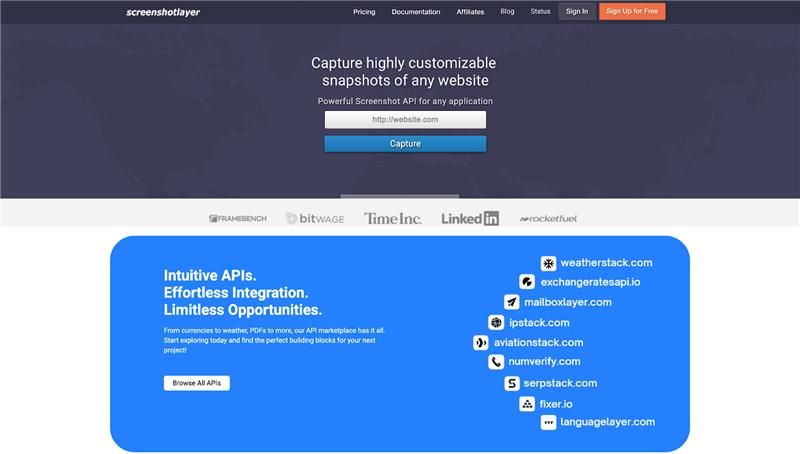
Screenshotlayer delivers high-quality website screenshots through a simple REST API that handles all the rendering complexity for you. The API captures live web pages with full JavaScript execution, custom viewport sizes, and pixel-perfect accuracy without managing headless browsers or server infrastructure. You get reliable screenshot generation that scales from prototype to production with minimal code changes.
Key Features:
- Full-page captures (fullpage=1) grab everything from header to footer in a single image, giving you complete visual context instead of just above-the-fold content.
- Viewport control lets you test brand consistency across desktop (1440×900 default), tablet, and mobile breakpoints by adjusting width and height parameters.
- Retina/2x support (scale=2) doubles pixel density for accurate color sampling and crisp logo extraction without blurry edges or compression artifacts. Learn how Retina and WebP support improve screenshot quality and reduce file sizes.
- CSS injection (css_url) strips cookie banners, chat widgets, or ads from screenshots so you can isolate pure brand elements without visual clutter.
- Capture delay (delay) waits for JavaScript frameworks to finish rendering animations, lazy-loaded images, and dynamic content before taking the screenshot.
GPT-5 Vision
GPT-5 Vision converts raw screenshot images into structured brand asset data that you can actually use in your codebase. The model reads visual information like colors, fonts, spacing, and layouts, then outputs organized JSON or Markdown instead of forcing you to manually parse pixels. This combination of computer vision and language understanding handles complex design analysis that would take hours with traditional image processing libraries.
Key Features
- Multi-modal understanding processes visual hierarchy, color relationships, typography styles, and spacing patterns in a single API call instead of running separate detection algorithms.
- Context-aware extraction separates primary brand colors (buttons, headers, CTAs) from decorative backgrounds, borders, and one-off accent colors that aren’t part of the core palette.
- Logo detection finds and extracts logo variations across headers, footers, favicons, and mobile menus without hardcoding selectors or coordinates.
- Design principle inference generates human-readable descriptions of design approaches (minimalist layouts, bold typography, corporate color schemes) that help document brand guidelines automatically.
Prerequisites and Setup
Required Tools
- Python 3.9+
- Screenshotlayer API key (Get 100 free requests)
- OpenAI API key with GPT-5 access
- Libraries: requests, openai, Pillow, python-dotenv
Installation
pip install requests openai pillow python-dotenv
Environment Configuration
					# .env file
SCREENSHOTLAYER_API_KEY=your_api_key_here
OPENAI_API_KEY=your_openai_key_here
Step 1: Capture High-Quality Website Screenshots
Screenshotlayer API converts any URL into a pixel-perfect screenshot by rendering the full page with JavaScript execution, custom viewports, and configurable delays for dynamic content. This step captures the complete visual presentation of a website, including below-the-fold content, animations, and lazy-loaded elements that traditional DOM scraping misses entirely. You get accurate snapshots of how real users see the site, not just the underlying HTML structure.
Basic Screenshot Capture
					import requests
import os
from dotenv import load_dotenv

load_dotenv()

def capture_website_screenshot(url, output_path="screenshot.png"):
    """
    Capture fullpage screenshot using Screenshotlayer API
    """
    api_key = os.getenv("SCREENSHOTLAYER_API_KEY")

    params = {
        'access_key': api_key,
        'url': url,
        'fullpage': 1,  # Capture full page height
        'viewport': '1440x900',  # Desktop viewport
        'format': 'PNG',
        'delay': 3,  # Wait 3s for animations/lazy loading
        'force': 0,  # Use cached version if available
        'user_agent': 'BrandKit-Extractor/1.0'
    }

    api_url = "https://api.screenshotlayer.com/api/capture"

    try:
        response = requests.get(api_url, params=params, timeout=30)
        response.raise_for_status()

        # Save screenshot
        with open(output_path, 'wb') as f:
            f.write(response.content)

        print(f"Screenshot saved: {output_path}")
        return output_path

    except requests.exceptions.RequestException as e:
        print(f"Screenshot failed: {e}")
        return None

# Example usage
screenshot_path = capture_website_screenshot("https://stripe.com")
Output
					Screenshot saved: screenshot.png
File size: 2.4 MB
Dimensions: 1440x8720px (full page)
Step 2: Extract Colors with GPT-5 Vision
GPT-5 Vision analyzes the visual hierarchy of your screenshot to identify intentional brand colors, distinguishing primary CTAs from decorative elements, and provides usage context that traditional color extraction tools cannot. By understanding color relationships and prominence, the model delivers a structured palette with percentage coverage and semantic descriptions like “Primary CTA buttons” or “Hero section background”. This approach separates signal from noise, giving you the colors that actually matter for brand consistency.
Color Palette Extraction
					import base64
from openai import OpenAI

client = OpenAI(api_key=os.getenv("OPENAI_API_KEY"))

def extract_color_palette(screenshot_path):
    """
    Extract primary, secondary, and accent colors using GPT-5 Vision
    """
    # Encode screenshot to base64
    with open(screenshot_path, "rb") as image_file:
        base64_image = base64.b64encode(image_file.read()).decode('utf-8')

    prompt = """
    Analyze this website screenshot and extract the complete color palette:

    Return a JSON object with:
    - primary_colors: Array of 1-3 dominant brand colors (HEX format)
    - secondary_colors: Array of 2-4 supporting colors
    - accent_colors: Array of 1-2 CTA/highlight colors
    - background_colors: Array of 1-2 main background colors
    - text_colors: Array of 1-2 primary text colors

    For each color, include:
    - hex: Color code
    - usage: Where/how it's used (e.g., "Primary CTA buttons", "Hero section background")
    - percentage: Estimated coverage on page (0-100)

    Focus on intentional brand colors, not incidental image colors.
    Return only valid JSON, no markdown formatting.
    """

    response = client.chat.completions.create(
        model="gpt-5",
        messages=[
            {
                "role": "user",
                "content": [
                    {"type": "text", "text": prompt},
                    {
                        "type": "image_url",
                        "image_url": {
                            "url": f"data:image/png;base64,{base64_image}"
                        }
                    }
                ]
            }
        ],
        max_tokens=1500,
        response_format={"type": "json_object"}
    )

    import json
    colors = json.loads(response.choices[0].message.content)
    return colors

# Example usage
colors = extract_color_palette("screenshot.png")
print(json.dumps(colors, indent=2))
Output
					{
  "primary_colors": [
    {
      "hex": "#635BFF",
      "usage": "Primary brand color, CTA buttons, links",
      "percentage": 15
    }
  ],
  "secondary_colors": [
    {
      "hex": "#0A2540",
      "usage": "Headlines, navigation text",
      "percentage": 10
    },
    {
      "hex": "#425466",
      "usage": "Body text, secondary elements",
      "percentage": 20
    }
  ],
  "accent_colors": [
    {
      "hex": "#00D4FF",
      "usage": "Hover states, highlights",
      "percentage": 3
    }
  ],
  "background_colors": [
    {
      "hex": "#FFFFFF",
      "usage": "Main background",
      "percentage": 50
    }
  ],
  "text_colors": [
    {
      "hex": "#1A1A1A",
      "usage": "Primary text",
      "percentage": 2
    }
  ]
}
Step 3: Detect Typography and Fonts
The vision model examines text rendering across the page to identify font families, weights, and typographic patterns, recognizing system fonts, Google Fonts, and custom typefaces by their visual characteristics. This approach captures the complete typographic hierarchy including heading scales, body text sizing, and letter-spacing decisions that define the brand’s reading experience. You get structured font data without parsing CSS files or dealing with obfuscated font names.
Typography Extraction
					def extract_typography(screenshot_path):
    """
    Identify font families, sizes, and typographic hierarchy
    """
    with open(screenshot_path, "rb") as image_file:
        base64_image = base64.b64encode(image_file.read()).decode('utf-8')

    prompt = """
    Analyze the typography in this website screenshot:

    Return JSON with:
    - heading_font: {
        family: Font name (e.g., "Inter", "Helvetica"),
        weight: Font weight used for headings,
        style: "serif", "sans-serif", or "monospace",
        characteristics: Description of the typeface
      }
    - body_font: {
        family: Font name,
        weight: Typical weight for body text,
        style: Font style category
      }
    - mono_font: Font used for code/technical content (if present)
    - font_sizes: {
        h1: Estimated size in px,
        h2: Estimated size,
        body: Base body text size,
        small: Fine print size
      }
    - line_heights: Tight (1.2), normal (1.5), or loose (1.8)
    - letter_spacing: tight, normal, or wide

    Return only valid JSON.
    """

    response = client.chat.completions.create(
        model="gpt-5",
        messages=[
            {
                "role": "user",
                "content": [
                    {"type": "text", "text": prompt},
                    {
                        "type": "image_url",
                        "image_url": {
                            "url": f"data:image/png;base64,{base64_image}"
                        }
                    }
                ]
            }
        ],
        max_tokens=1000,
        response_format={"type": "json_object"}
    )

    typography = json.loads(response.choices[0].message.content)
    return typography
Output
					{
  "heading_font": {
    "family": "Söhne",
    "weight": 600,
    "style": "sans-serif",
    "characteristics": "Modern geometric sans-serif with clean lines"
  },
  "body_font": {
    "family": "Söhne",
    "weight": 400,
    "style": "sans-serif"
  },
  "mono_font": "SF Mono",
  "font_sizes": {
    "h1": 72,
    "h2": 48,
    "body": 16,
    "small": 14
  },
  "line_heights": "normal",
  "letter_spacing": "normal"
}
Step 4: Logo Extraction and Analysis
Beyond simple detection, GPT-5 Vision analyzes logo design principles, identifying whether it’s a wordmark, icon, or combination mark, while describing stylistic elements like minimalism, geometric patterns, or playful characteristics. The model also detects logo placement patterns and color variations that inform proper usage in different contexts. This level of analysis gives you documentation-ready insights instead of just cropped image files.
Logo Analysis
					def extract_logo_details(screenshot_path):
    """
    Identify and describe logo placement, variations, and design
    """
    with open(screenshot_path, "rb") as image_file:
        base64_image = base64.b64encode(image_file.read()).decode('utf-8')

    prompt = """
    Analyze the logo(s) in this website screenshot:

    Return JSON with:
    - logo_location: "top-left", "center", "top-right", etc.
    - logo_type: "wordmark", "icon", "combination", or "emblem"
    - logo_colors: Array of HEX colors used in logo
    - logo_style: Description (e.g., "minimalist", "geometric", "playful")
    - has_variations: Boolean - are there light/dark versions visible?
    - approximate_dimensions: {width: px, height: px}
    - design_elements: Array of notable features (e.g., "rounded corners", "gradient fill")

    Return only valid JSON.
    """

    response = client.chat.completions.create(
        model="gpt-5",
        messages=[
            {
                "role": "user",
                "content": [
                    {"type": "text", "text": prompt},
                    {
                        "type": "image_url",
                        "image_url": {
                            "url": f"data:image/png;base64,{base64_image}"
                        }
                    }
                ]
            }
        ],
        max_tokens=800,
        response_format={"type": "json_object"}
    )

    logo_info = json.loads(response.choices[0].message.content)
    return logo_info
Step 5: Complete Brand-Kit Assembler
The orchestrator class coordinates all extraction steps (screenshot capture, color analysis, typography detection, and logo examination) into a unified pipeline that produces structured brand kits in multiple export formats. This architecture ensures consistent error handling, caching strategies, and extensibility for adding new analysis modules like spacing patterns or animation styles. You build once and run the entire extraction workflow with a single function call.
Full Pipeline Implementation
					import json
from datetime import datetime
import base64
import requests
import os
from dotenv import load_dotenv
from openai import OpenAI

# Load environment variables
load_dotenv()

# Initialize OpenAI client
client = OpenAI(api_key=os.getenv("OPENAI_API_KEY"))

class BrandKitExtractor:
    """
    Complete brand-kit extraction pipeline
    """

    def __init__(self, url):
        self.url = url
        self.timestamp = datetime.now().isoformat()
        self.screenshotlayer_key = os.getenv("SCREENSHOTLAYER_API_KEY")
        self.openai_client = client
        self.brand_kit = {
            'url': url,
            'extracted_at': self.timestamp,
            'colors': {},
            'typography': {},
            'logo': {},
            'design_system': {}
        }

    def capture_screenshot(self, output_path="temp_screenshot.png"):
        """
        Capture fullpage screenshot using Screenshotlayer API
        """
        params = {
            'access_key': self.screenshotlayer_key,
            'url': self.url,
            'fullpage': 1,
            'viewport': '1440x900',
            'format': 'PNG',
            'delay': 3,
            'force': 0,
            'user_agent': 'BrandKit-Extractor/1.0'
        }

        api_url = "https://api.screenshotlayer.com/api/capture"

        try:
            response = requests.get(api_url, params=params, timeout=30)
            response.raise_for_status()

            with open(output_path, 'wb') as f:
                f.write(response.content)

            print(f"✓ Screenshot saved: {output_path}")
            return output_path

        except requests.exceptions.RequestException as e:
            print(f"✗ Screenshot failed: {e}")
            return None

    def extract_colors(self, screenshot_path):
        """
        Extract color palette using GPT-5 Vision
        """
        with open(screenshot_path, "rb") as image_file:
            base64_image = base64.b64encode(image_file.read()).decode('utf-8')

        prompt = """
        Analyze this website screenshot and extract the complete color palette:

        Return a JSON object with:
        - primary_colors: Array of 1-3 dominant brand colors (HEX format)
        - secondary_colors: Array of 2-4 supporting colors
        - accent_colors: Array of 1-2 CTA/highlight colors
        - background_colors: Array of 1-2 main background colors
        - text_colors: Array of 1-2 primary text colors

        For each color, include:
        - hex: Color code
        - usage: Where/how it's used (e.g., "Primary CTA buttons", "Hero section background")
        - percentage: Estimated coverage on page (0-100)

        Focus on intentional brand colors, not incidental image colors.
        Return only valid JSON, no markdown formatting.
        """

        response = self.openai_client.chat.completions.create(
            model="gpt-5",
            messages=[
                {
                    "role": "user",
                    "content": [
                        {"type": "text", "text": prompt},
                        {
                            "type": "image_url",
                            "image_url": {
                                "url": f"data:image/png;base64,{base64_image}"
                            }
                        }
                    ]
                }
            ],
            max_tokens=1500,
            response_format={"type": "json_object"}
        )

        return json.loads(response.choices[0].message.content)

    def extract_typography(self, screenshot_path):
        """
        Identify font families, sizes, and typographic hierarchy
        """
        with open(screenshot_path, "rb") as image_file:
            base64_image = base64.b64encode(image_file.read()).decode('utf-8')

        prompt = """
        Analyze the typography in this website screenshot:

        Return JSON with:
        - heading_font: {
            family: Font name (e.g., "Inter", "Helvetica"),
            weight: Font weight used for headings,
            style: "serif", "sans-serif", or "monospace",
            characteristics: Description of the typeface
          }
        - body_font: {
            family: Font name,
            weight: Typical weight for body text,
            style: Font style category
          }
        - mono_font: Font used for code/technical content (if present)
        - font_sizes: {
            h1: Estimated size in px,
            h2: Estimated size,
            body: Base body text size,
            small: Fine print size
          }
        - line_heights: Tight (1.2), normal (1.5), or loose (1.8)
        - letter_spacing: tight, normal, or wide

        Return only valid JSON.
        """

        response = self.openai_client.chat.completions.create(
            model="gpt-5",
            messages=[
                {
                    "role": "user",
                    "content": [
                        {"type": "text", "text": prompt},
                        {
                            "type": "image_url",
                            "image_url": {
                                "url": f"data:image/png;base64,{base64_image}"
                            }
                        }
                    ]
                }
            ],
            max_tokens=1000,
            response_format={"type": "json_object"}
        )

        return json.loads(response.choices[0].message.content)

    def extract_logo(self, screenshot_path):
        """
        Identify and describe logo placement, variations, and design
        """
        with open(screenshot_path, "rb") as image_file:
            base64_image = base64.b64encode(image_file.read()).decode('utf-8')

        prompt = """
        Analyze the logo(s) in this website screenshot:

        Return JSON with:
        - logo_location: "top-left", "center", "top-right", etc.
        - logo_type: "wordmark", "icon", "combination", or "emblem"
        - logo_colors: Array of HEX colors used in logo
        - logo_style: Description (e.g., "minimalist", "geometric", "playful")
        - has_variations: Boolean - are there light/dark versions visible?
        - approximate_dimensions: {width: px, height: px}
        - design_elements: Array of notable features (e.g., "rounded corners", "gradient fill")

        Return only valid JSON.
        """

        response = self.openai_client.chat.completions.create(
            model="gpt-5",
            messages=[
                {
                    "role": "user",
                    "content": [
                        {"type": "text", "text": prompt},
                        {
                            "type": "image_url",
                            "image_url": {
                                "url": f"data:image/png;base64,{base64_image}"
                            }
                        }
                    ]
                }
            ],
            max_tokens=800,
            response_format={"type": "json_object"}
        )

        return json.loads(response.choices[0].message.content)

    def analyze_design_principles(self, screenshot_path):
        """
        Extract high-level design approach and principles
        """
        with open(screenshot_path, "rb") as image_file:
            base64_image = base64.b64encode(image_file.read()).decode('utf-8')

        prompt = """
        Analyze the overall design approach of this website:

        Return JSON with:
        - design_style: "minimalist", "bold", "corporate", "playful", etc.
        - spacing: "tight", "comfortable", or "generous"
        - corner_radius: "sharp", "slightly rounded", or "heavily rounded"
        - shadow_usage: "none", "subtle", or "prominent"
        - image_treatment: "photography", "illustrations", "3D graphics", "mixed"
        - layout_style: "grid-based", "asymmetric", "magazine-style", etc.
        - animation_presence: Boolean
        - overall_feel: 2-3 sentence description

        Return only valid JSON.
        """

        response = self.openai_client.chat.completions.create(
            model="gpt-5",
            messages=[
                {
                    "role": "user",
                    "content": [
                        {"type": "text", "text": prompt},
                        {
                            "type": "image_url",
                            "image_url": {
                                "url": f"data:image/png;base64,{base64_image}"
                            }
                        }
                    ]
                }
            ],
            max_tokens=600,
            response_format={"type": "json_object"}
        )

        return json.loads(response.choices[0].message.content)

    def extract_complete_brand_kit(self):
        """
        Run full extraction pipeline with both API keys
        """
        print(f"Extracting brand kit from: {self.url}\n")

        # Validate API keys
        if not self.screenshotlayer_key:
            print("Error: SCREENSHOTLAYER_API_KEY not found in environment")
            return None

        if not os.getenv("OPENAI_API_KEY"):
            print("Error: OPENAI_API_KEY not found in environment")
            return None

        # Step 1: Capture screenshot using Screenshotlayer API
        print("Step 1/5: Capturing screenshot...")
        screenshot_path = self.capture_screenshot("temp_screenshot.png")

        if not screenshot_path:
            return None

        # Step 2: Extract colors using GPT-5 Vision
        print("Step 2/5: Analyzing color palette...")
        self.brand_kit['colors'] = self.extract_colors(screenshot_path)

        # Step 3: Extract typography using GPT-5 Vision
        print("Step 3/5: Detecting typography...")
        self.brand_kit['typography'] = self.extract_typography(screenshot_path)

        # Step 4: Extract logo using GPT-5 Vision
        print(" Step 4/5: Analyzing logo...")
        self.brand_kit['logo'] = self.extract_logo(screenshot_path)

        # Step 5: Generate design principles using GPT-5 Vision
        print("✨ Step 5/5: Generating design principles...")
        self.brand_kit['design_system'] = self.analyze_design_principles(screenshot_path)

        print("\n Brand kit extraction complete!")
        return self.brand_kit

    def export_to_json(self, output_file="brand_kit.json"):
        """
        Save brand kit to JSON file
        """
        with open(output_file, 'w') as f:
            json.dump(self.brand_kit, f, indent=2)

        print(f"\n Brand kit saved to: {output_file}")

    def generate_markdown_report(self, output_file="brand_kit.md"):
        """
        Create human-readable markdown report
        """
        report = f"""# Brand Kit: {self.url}
*Extracted on {self.timestamp}*

## Color Palette

### Primary Colors
"""
        for color in self.brand_kit['colors'].get('primary_colors', []):
            report += f"- **{color['hex']}** - {color['usage']} ({color['percentage']}% coverage)\n"

        report += "\n### Secondary Colors\n"
        for color in self.brand_kit['colors'].get('secondary_colors', []):
            report += f"- **{color['hex']}** - {color['usage']}\n"

        report += f"\n## Typography\n\n"
        typo = self.brand_kit['typography']
        report += f"- **Heading Font:** {typo.get('heading_font', {}).get('family', 'Unknown')}\n"
        report += f"- **Body Font:** {typo.get('body_font', {}).get('family', 'Unknown')}\n"

        report += f"\n## Logo\n\n"
        logo = self.brand_kit['logo']
        report += f"- **Type:** {logo.get('logo_type', 'Unknown')}\n"
        report += f"- **Style:** {logo.get('logo_style', 'Unknown')}\n"

        report += f"\n## Design System\n\n"
        design = self.brand_kit['design_system']
        report += f"**Overall Feel:** {design.get('overall_feel', 'N/A')}\n"

        with open(output_file, 'w') as f:
            f.write(report)

        print(f"Markdown report saved to: {output_file}")

# Example Usage
if __name__ == "__main__":
    # Ensure .env file contains both API keys
    extractor = BrandKitExtractor("https://vercel.com")
    brand_kit = extractor.extract_complete_brand_kit()

    if brand_kit:
        extractor.export_to_json("vercel_brand_kit.json")
        extractor.generate_markdown_report("vercel_brand_kit.md")

        # Display summary
        print("\n" + "="*50)
        print("BRAND KIT SUMMARY")
        print("="*50)
        print(f"\nPrimary Color: {brand_kit['colors']['primary_colors'][0]['hex']}")
        print(f"Heading Font: {brand_kit['typography']['heading_font']['family']}")
        print(f"Logo Type: {brand_kit['logo']['logo_type']}")
        print(f"Design Style: {brand_kit['design_system']['design_style']}")
Complete Output
					Extracting brand kit from: https://vercel.com

Step 1/5: Capturing screenshot...
Screenshot saved: temp_screenshot.png

Step 2/5: Analyzing color palette...
Step 3/5: Detecting typography...
Step 4/5: Analyzing logo...
Step 5/5: Generating design principles...

Brand kit extraction complete!

Brand kit saved to: vercel_brand_kit.json
Markdown report saved to: vercel_brand_kit.md

==================================================
BRAND KIT SUMMARY
==================================================

Primary Color: #000000
Heading Font: Geist Sans
Logo Type: wordmark
Design Style: minimalist
Real World Use Cases
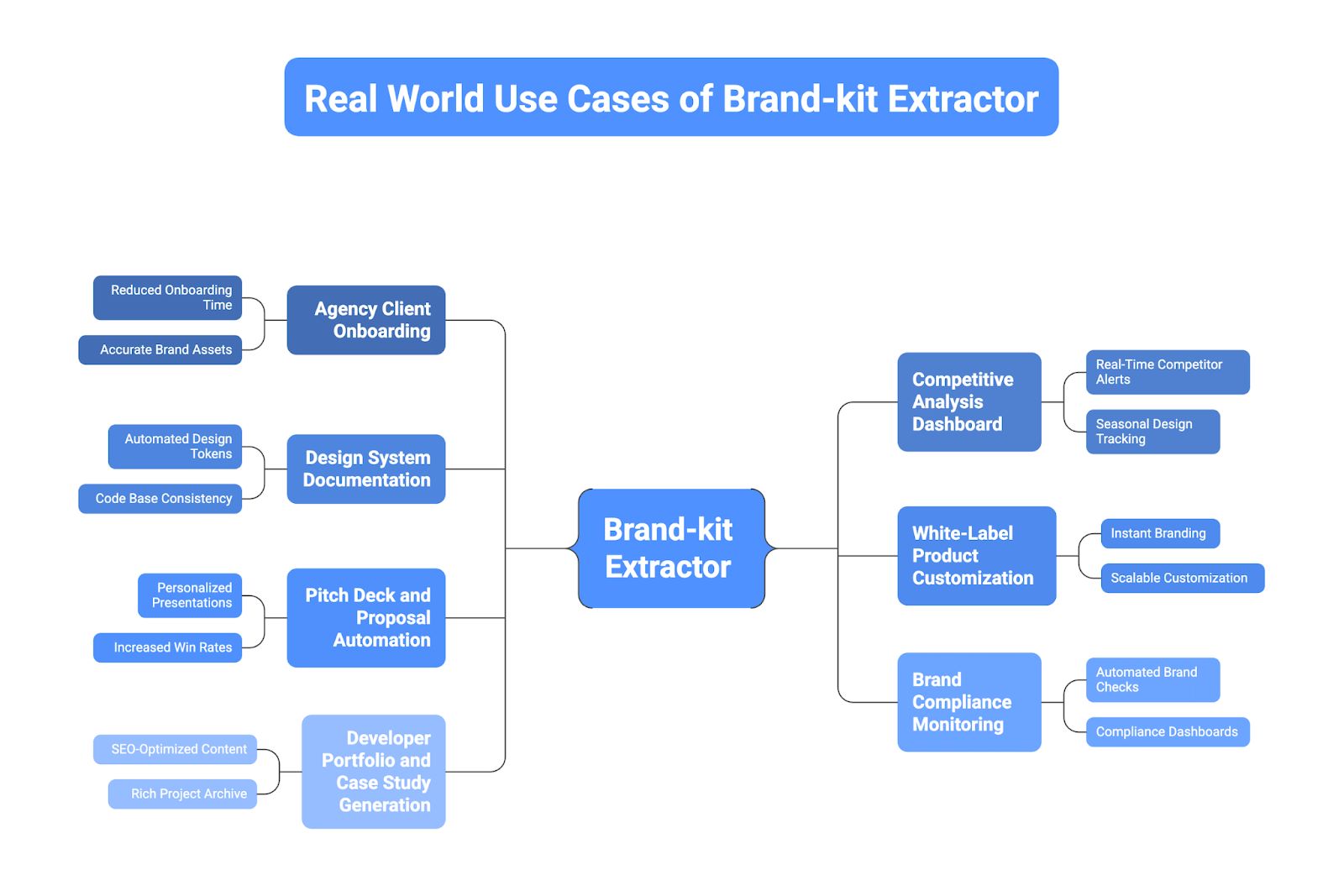
Use Case 1: Agency Client Onboarding
Marketing agencies reduce client onboarding time from 3-4 hours to under 5 minutes by instantly generating comprehensive brand guidelines from a new client’s URL.
- Creative teams start production immediately with accurate assets (colors, logos, fonts), eliminating the need to wait for outdated brand books or manual site inspection.
- Account managers present professional, automated brand documentation during kickoff meetings, establishing technical competence and attention to detail from day one.
Use Case 2: Competitive Analysis Dashboard
Product and marketing teams enable real-time competitor monitoring by scheduling weekly automated extractions across 20-50 rival websites to track design evolution.
- Teams receive instant alerts when competitors update color schemes or logos, signaling potential rebrands or market repositioning efforts before they are officially announced.
- E-commerce and SaaS companies track seasonal design patterns and visual positioning shifts, allowing them to counter-position their own brand strategy effectively.
Use Case 3: Design System Documentation
Engineering teams automatically generate design tokens from existing production websites, exporting structured JSON that feeds directly into Figma, Storybook, or CSS-in-JS frameworks.
- Developers avoid manually documenting 50+ color variables and typography scales, ensuring that the code base always reflects the actual deployed styles.
- During migrations, teams extract legacy brand assets to compare against new specifications, identifying inconsistencies and regression risks before committing to full redesigns.
Get Your Free
Website Screenshot API Key!
Join thousands of developers using Screenshotlayer to capture high-quality website screenshots in real time..
Get Your Free API Key!100 Requests Free!
Use Case 4: White-Label Product Customization
SaaS platforms with white-label offerings automatically theme customer instances by capturing brand assets from the client’s corporate website during signup.
- The system applies the client’s specific colors, fonts, and logos to dashboards and email templates instantly, reducing implementation time from weeks to hours.
- This automation allows platforms to scale to hundreds of enterprise customers without requiring a dedicated design team to manually customize each environment.
Use Case 5: Pitch Deck and Proposal Automation
Sales teams and freelancers increase win rates by extracting a prospect’s brand assets to create personalized, “brand-matched” pitch decks and proposals automatically.
- Presentations feel bespoke and professionally aligned with the client’s identity, demonstrating a high level of effort and understanding without actual manual design work.
- Agencies use this to showcase how their services integrate with the client’s existing visual language during the very first meeting, showing rather than just telling.
Use Case 6: Brand Compliance Monitoring
Enterprise marketing teams with distributed franchises or regional offices maintain brand integrity by automating checks across 100+ local websites against official guidelines.
- The system flags unauthorized color variations, stretched logos, or off-brand typography, allowing central teams to catch inconsistencies without manual audits.
- Automated compliance dashboards and quarterly reports help regional managers stay aligned with global brand standards efficiently.
Use Case 7: Developer Portfolio and Case Study Generation
Web developers and agencies automate the documentation of their work by extracting final brand implementations to generate structured case studies.
- Instead of manual screenshots, the tool generates SEO-optimized content showing color decisions, typography choices, and design principles used in the project.
- This creates a rich archive of “before and after” comparisons (if legacy data was captured), serving as powerful marketing material to attract new clients.
Screenshotlayer API Pricing
Screenshotlayer offers flexible pricing tiers designed for everyone from individual developers to large enterprise teams. All paid plans include a discount of up to 15% when billed annually.
Plan | Monthly Cost | Annual Cost | Offers |
Free Plan | $0 | $0 | – 100 snapshots/month – Full customization options – Lightning-fast rendering – PNG, JPG, GIF formats – WebP format with quality up to 70% – Standard support |
Basic Plan | $19.99 | 215.99 | – 10,000 snapshots/month – 10 Dedicated Workers for speed – Retina/2x Support for high-DPI displays – WebP format with quality up to 70% – High-priority Platinum Support – 256-bit HTTPS Encryption |
Professional Plan | $59.99 | 629.99 | – 30,000 snapshots/month – FTP & AWS S3 Export support – 20 Dedicated Workers – Retina/2x & WebP support – Extended usage statistics |
Enterprise Plan | 149.99 | 1,529.99 | – 75,000 snapshots/month – Maximum processing power (Dedicated Workers) – Unlimited S3/FTP uploads – Full format support (PNG, JPG, GIF, WebP) – Retina/2x high-resolution captures – Premium SLA & Support |
Conclusion
You now have a production-ready system that pairs Screenshotlayer’s screenshot API with GPT-5 Vision’s analysis capabilities to extract complete brand kits from any website. This approach delivers results 10x faster than manual inspection while capturing design details that traditional web scraping completely misses. The workflow handles full-page rendering, JavaScript execution, and intelligent color/font/logo detection in under 150 lines of Python code.
Ready to build? Get your free Screenshotlayer API key with 100 requests included and start testing immediately. For implementation questions or advanced features like CSS injection and viewport customization, check out the Screenshotlayer documentation.
FAQs
Can I extract brand kits from password-protected websites?
No, Screenshotlayer captures publicly accessible pages. For internal sites, consider using a headless browser like Playwright combined with authentication credentials, then process screenshots with GPT-5 Vision.
Why use GPT-5 Vision instead of parsing CSS files directly?
CSS files don’t show what actually renders on screen because of opacity layers, JavaScript-injected styles, and responsive breakpoints that change colors dynamically. GPT-5 Vision analyzes the final rendered output like a human designer would, catching brand colors that only appear after hover states, animations, or media query triggers that DOM parsing completely misses.
How many websites can I process with the free Screenshotlayer plan?
You get 100 free screenshots per month, which means you can extract brand kits from 100 different websites without paying anything. The free plan has a rate limit of 2 requests per minute, so if you need to process websites faster, you’ll want to upgrade to a paid plan.
How do I handle lazy-loaded images that don’t show up immediately?
Pass a delay parameter (delay=3) in your API request, which forces the renderer to wait a few seconds for animations and scripts to finish before snapping the picture.
Why use APILayer instead of building my own screenshot service?
APILayer provides production-grade APIs with built-in rate limiting, caching, monitoring, and 99.9% uptime guarantees. Building your own service means managing server costs, browser updates, security patches, and scaling issues that APILayer already solved for thousands of developers.
