

Claude can now call APIs on its own. No LangChain glue code, no manual function-calling boilerplate, no prompt hacks to force structured output. The trick is wrapping your API as an MCP server, and once you do, Claude discovers your tools, reads their schemas, and invokes them mid-conversation.
This guide shows the exact pattern using a real APILayer API. You will wrap the mediastack REST API as an MCP server, run it locally, connect it to Claude Desktop, and then apply the same pattern to any other REST API in the APILayer. The code here is tested, the responses are real, and every link points to live documentation.
Table of Contents
Key Takeaways
MCP lets Claude discover and call any REST API without LangChain, prompt hacks, or model-specific function-calling glue.
One REST endpoint maps to one MCP tool, with query parameters becoming typed function arguments and JSON responses flowing straight back to Claude.
The FastMCP helper in the official Python SDK reads your type hints and docstrings to auto-generate the input schema Claude uses to pick tools.
Never print() to stdout in a stdio-transport server, because it corrupts the JSON-RPC messages and silently breaks the connection.
Store API keys in environment variables and pass them through the env block of claude_desktop_config.json, never hardcoded in the server file.
Every APILayer API (mediastack, currencylayer, ipstack, numverify, and the rest) fits the same wrapping pattern, so one server template scales across your entire toolchain.
What MCP Is, and Why It Matters Right Now
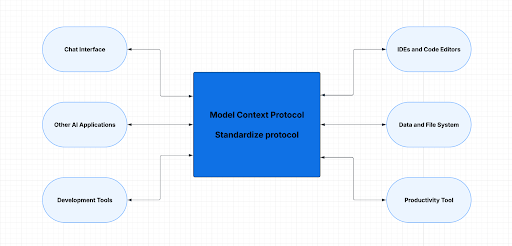
The Model Context Protocol is an open spec from Anthropic that defines how a language model discovers and calls external tools over a standard transport. A model like Claude connects to any MCP server and automatically gets a list of callable tools, each with a name, description, and JSON input schema. No client-side tool registration, no custom function definitions in every prompt.
The practical shift is about discovery and portability. Before MCP, if you wanted Claude to call your REST API, you had three options and all of them hurt. You could write function-calling glue against each model provider’s SDK and maintain it as their schemas drifted. You could wrap the API in a framework like LangChain, which added latency, pinned you to a specific agent pattern, and tied your tool to whatever client you built. Or you could prompt-inject API docs into the system prompt and hope the model produced valid URL-encoded strings, which it sometimes did.
MCP replaces all three. The server is the contract, and every MCP-compatible client (Claude Desktop, Claude Code, Cursor, ChatGPT desktop, and others) can use the same server without modification. Tool discovery happens at connection time, so adding a new endpoint is a redeploy of the server, not a change to every client that uses it.
That is why MCP became the default in 2026. One server, many clients, and the tool definitions live next to the API logic instead of scattered across prompt templates. For anyone who already exposes a REST API, this is a thin wrapper that opens the door to an entirely new class of users.
If you want a primer on REST fundamentals before continuing, the step-by-step guide covers the basics. Otherwise, keep reading.
Mapping MCP to Your REST API
MCP servers expose three kinds of primitives: tools, resources, and prompts. Tools are functions the model can call, resources are data the model can read, and prompts are reusable templates users can invoke. For wrapping a REST API, tools are what you care about, and they map almost one-to-one onto endpoints.
The mental model is simple: one REST endpoint becomes one MCP tool. The endpoint’s query parameters become the tool’s input schema, the endpoint’s auth header becomes a server-side environment variable, and the JSON response becomes the tool’s structured return value. Resources are worth using when an API returns stable data a model should read directly into context (think “load the product catalog”), but most REST APIs are dynamic, so tools carry the weight.
Under the hood, MCP servers talk to clients over one of two transports. stdio runs the server as a local subprocess and communicates through standard input and output, which is the right choice for local tools and anything that holds secrets. Streamable HTTP runs the server as a remote service, which suits shared team servers and cloud deployments. Claude Desktop supports both, but stdio is the shortest path for a first server.
Here is how common REST patterns translate to MCP:
|
REST API pattern |
MCP equivalent |
|
GET /items?q=… with query params |
Tool with input schema matching the params |
|
POST /items with JSON body |
Tool with input schema matching the body fields |
|
API key in header (Authorization: Bearer …) |
Server reads key from env var, client never sees it |
|
JSON response body |
Tool return value (FastMCP serializes dicts to JSON) |
|
HTTP 4xx or 5xx errors |
Structured { “error”: …, “detail”: … } return, not a raised exception |
|
Rate limit headers |
Server-side retry, backoff, or caching layer |
|
Pagination (page, offset) |
Tool argument plus a “next page” hint in the return value |
With that mapping in mind, you are ready to write a real server.
A Working Walkthrough: Wrapping mediastack as an MCP Server
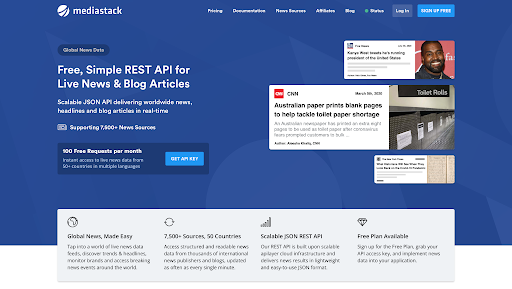
You will use the mediastack API, a REST news API with three endpoints (live news, historical news, and sources). It is a good first target because auth is a single query parameter, responses are clean JSON, and the free plan gives you 500 requests per month.
1. Get an API Key
Sign up at mediastack.com/signup/free and copy your access key from the dashboard. No credit card needed.
2. Install the MCP Python SDK
The official Python SDK has the most mature tooling in 2026, so this guide uses it. A TypeScript SDK is also available at the same organization if you prefer Node.
					# Create a project and install the SDK + HTTP client
uv init mediastack-mcp
cd mediastack-mcp
uv venv && source .venv/bin/activate
uv add "mcp[cli]" httpx
If you are not using uv, plain pip install “mcp[cli]” httpx works too. The [cli] extra gives you the mcp dev inspector command you will use in a moment.
3. Write the Server
Create mediastack_server.py. The file defines three tools, one per mediastack endpoint, plus a shared helper for auth and error handling.
					"""mediastack MCP server."""
import os
from typing import Any

import httpx
from mcp.server.fastmcp import FastMCP

mcp = FastMCP("mediastack")
MEDIASTACK_BASE = "https://api.mediastack.com/v1"
API_KEY = os.environ.get("MEDIASTACK_API_KEY")


async def mediastack_get(path: str, params: dict[str, Any]) -> dict[str, Any]:
    """Shared helper: attach access_key, call the API, return clean JSON."""
    if not API_KEY:
        return {"error": "MEDIASTACK_API_KEY environment variable is not set."}

    params = {**params, "access_key": API_KEY}
    url = f"{MEDIASTACK_BASE}/{path}"

    async with httpx.AsyncClient(timeout=30.0) as client:
        try:
            response = await client.get(url, params=params)
            response.raise_for_status()
            data = response.json()
        except httpx.HTTPStatusError as exc:
            return {"error": f"HTTP {exc.response.status_code}",
                    "detail": exc.response.text[:500]}
        except httpx.HTTPError as exc:
            return {"error": "Network error", "detail": str(exc)}

    if isinstance(data, dict) and "error" in data:
        err = data["error"]
        return {"error": err.get("code", "api_error"),
                "detail": err.get("message", "")}
    return data


@mcp.tool()
async def search_news(
    keywords: str,
    countries: str = "",
    categories: str = "",
    languages: str = "en",
    limit: int = 10,
) -> dict[str, Any]:
    """Search live news articles from mediastack.

    Use this when the user asks for recent news, headlines, or articles
    on a specific topic. Results include title, author, description,
    source, URL, and publication timestamp.

    Args:
        keywords: Search terms. Prefix with '-' to exclude (e.g. "tesla -musk").
        countries: Comma-separated 2-letter country codes (e.g. "us,gb,de").
        categories: One of general, business, entertainment, health,
            science, sports, technology.
        languages: Comma-separated 2-letter language codes. Defaults to "en".
        limit: Number of articles (1-100). Defaults to 10.
    """
    params: dict[str, Any] = {
        "keywords": keywords,
        "languages": languages,
        "limit": max(1, min(limit, 100)),
        "sort": "published_desc",
    }
    if countries:
        params["countries"] = countries
    if categories:
        params["categories"] = categories
    return await mediastack_get("news", params)


@mcp.tool()
async def get_historical_news(
    date: str,
    keywords: str = "",
    countries: str = "",
    limit: int = 10,
) -> dict[str, Any]:
    """Fetch historical news from a specific date or range.

    Requires mediastack Standard plan or higher.

    Args:
        date: Single date "YYYY-MM-DD" or range "YYYY-MM-DD,YYYY-MM-DD".
        keywords: Optional search terms.
        countries: Optional comma-separated country codes.
        limit: 1-100. Defaults to 10.
    """
    params: dict[str, Any] = {"date": date, "limit": max(1, min(limit, 100))}
    if keywords:
        params["keywords"] = keywords
    if countries:
        params["countries"] = countries
    return await mediastack_get("news", params)


@mcp.tool()
async def list_news_sources(
    search: str,
    countries: str = "",
    categories: str = "",
    limit: int = 25,
) -> dict[str, Any]:
    """Find news sources supported by mediastack.

    Use this when the user wants to know which publications are available
    or needs a source ID to filter later searches.
    """
    params: dict[str, Any] = {"search": search, "limit": max(1, min(limit, 100))}
    if countries:
        params["countries"] = countries
    if categories:
        params["categories"] = categories
    return await mediastack_get("sources", params)


if __name__ == "__main__":
    mcp.run(transport="stdio")
Two things worth pointing out. First, the docstrings matter. FastMCP reads type hints and the Args: block to build the JSON input schema that Claude sees, so vague wording here leads to Claude picking the wrong tool. Second, never print()to stdout in a stdio server. Anything on stdout corrupts the JSON-RPC protocol and breaks the connection. Use logging to stderr if you need logs.
4. Test with MCP Inspector
The MCP Inspector is a browser-based tool that speaks MCP and lets you call each tool manually. It is the single most useful debugging tool in the ecosystem.
					export MEDIASTACK_API_KEY=your_key_here
mcp dev mediastack_server.py
Open the URL the command prints, click “List Tools”, and you should see all three tools with their schemas. Fire search_news with keywords: “ai regulation” and you will get back a real JSON response. Based on the mediastack documentation, a successful call returns this exact shape:
					{
  "pagination": { "limit": 10, "offset": 0, "count": 10, "total": 1843 },
  "data": [
    {
      "author": "TMZ Staff",
      "title": "Rafael Nadal Pulls Out Of U.S. Open Over COVID-19 Concerns",
      "description": "Rafael Nadal is officially OUT of the U.S. Open...",
      "url": "https://www.tmz.com/2020/08/04/rafael-nadal-us-open-tennis-covid-19-concerns/",
      "source": "TMZ.com",
      "image": "https://imagez.tmz.com/image/fa/4by3/...",
      "category": "general",
      "language": "en",
      "country": "us",
      "published_at": "2020-08-05T05:47:24+00:00"
    }
  ]
}
If your key is wrong, mediastack returns {“error”: {“code”: “invalid_access_key”, “message”: “You have not supplied a valid API Access Key…”}}, which the helper unwraps into a clean error dict.
For a deeper walkthrough of the mediastack endpoints themselves, the real-time news tutorial on the APILayer blog is a solid companion read.
5. Connect It to Claude Desktop
Open your Claude Desktop config. On macOS that is ~/Library/Application Support/Claude/claude_desktop_config.json; on Windows it is
					%APPDATA%\Claude\claude_desktop_config.json. Add the server entry:
{
  "mcpServers": {
    "mediastack": {
      "command": "uv",
      "args": [
        "--directory",
        "/ABSOLUTE/PATH/TO/mediastack-mcp",
        "run",
        "mediastack_server.py"
      ],
      "env": {
        "MEDIASTACK_API_KEY": "your_key_here"
      }
    }
  }
}
Fully quit Claude Desktop (Cmd+Q on macOS, right-click and Quit on Windows), relaunch, and open the connectors menu. You should see three mediastack tools listed. Ask something like, “What are the top business headlines from the UK this week?” and Claude will pick search_news, fill in the arguments, and summarize the results.
Generalizing the Pattern to Any REST API
Now that the mediastack server works, the playbook transfers cleanly. Five steps:
- Read the API docs and list the endpoints you want to expose.
- Create one @mcp.tool() function per endpoint.
- Map query parameters to typed function arguments, then write a clear docstring. The docstring is the prompt Claude reads to decide when to use the tool.
- Read your API key from an environment variable, never a hardcoded string.
- Return clean JSON. Wrap errors so Claude gets a useful message instead of a raised exception.
To prove the pattern is portable, here is the same approach applied to the currencylayer API, also an APILayer product. It handles forex data instead of news, but the structure is identical.
					"""currencylayer MCP server (abbreviated)."""
import os
from typing import Any

import httpx
from mcp.server.fastmcp import FastMCP

mcp = FastMCP("currencylayer")
BASE = "https://api.currencylayer.com"
API_KEY = os.environ.get("CURRENCYLAYER_API_KEY")


async def _get(path: str, params: dict[str, Any]) -> dict[str, Any]:
    params = {**params, "access_key": API_KEY}
    async with httpx.AsyncClient(timeout=30.0) as client:
        r = await client.get(f"{BASE}/{path}", params=params)
        r.raise_for_status()
        return r.json()


@mcp.tool()
async def get_live_rates(currencies: str = "", source: str = "USD") -> dict[str, Any]:
    """Fetch the most recent exchange rates relative to a base currency.

    Args:
        currencies: Comma-separated 3-letter codes (e.g. "EUR,GBP,JPY").
            Empty returns all 168 supported currencies.
        source: Base currency code. Defaults to USD.
    """
    params: dict[str, Any] = {"source": source}
    if currencies:
        params["currencies"] = currencies
    return await _get("live", params)


@mcp.tool()
async def convert_amount(from_currency: str, to_currency: str, amount: float) -> dict[str, Any]:
    """Convert an amount from one currency to another using live rates."""
    return await _get("convert", {"from": from_currency, "to": to_currency, "amount": amount})


if __name__ == "__main__":
    mcp.run(transport="stdio")
A call to get_live_rates with currencies=”EUR,GBP” returns exchange rates in currencylayer’s standard format: {“success”: true, “source”: “USD”, “quotes”: {“USDEUR”: 0.9234, “USDGBP”: 0.7891}, …}. Same pattern, different domain. If you want more candidate APIs to wrap, the APILayer 2026 free API roundup is a good starting list.
Production Considerations
The tutorial version works. The production version needs a few more things.
Rate limiting. APILayer plans have monthly request quotas (mediastack’s free plan is 500/month, currencylayer’s is 100/month). A single Claude conversation can easily fire a dozen calls, so add a small in-memory cache keyed by the tool arguments, with a TTL that matches how fresh the data needs to be. Thirty seconds is often enough for news and overkill for forex. A simple functools.lru_cache wrapper around the HTTP helper, combined with a time-bucketed cache key, gets you most of the value in ten lines.
Error surface. Claude reasons over whatever you return, so turn raw HTTP errors into structured messages. A response like {“error”: “rate_limit_reached”, “detail”: “Monthly quota exceeded, resets in 4 days”} lets Claude tell the user something useful. Returning a 500 stack trace does not. APILayer’s error responses are already consistent, so you mostly need to unwrap them and surface the code and message fields.
API keys. Use environment variables and the env block in claude_desktop_config.json. Never hardcode keys in the server file, and never commit them. If you are sharing the server with a team, document the required env vars in a README and let each user set their own. For remote MCP servers, put the key in your hosting environment and use streamable HTTP with an Authorization header instead of exposing it to the client.
Tool descriptions. When a user has ten tools installed, Claude picks based on your descriptions. Be specific about when to use a tool and what it returns. “Get news” is weak. “Search live news articles filtered by keyword, country, and category, returning title, source, and URL” is strong. If two of your tools overlap (say, live news and headlines), spell out the difference in the first sentence of each docstring so Claude does not guess.
Current limitations. Debugging MCP can be rough. Log output written to stdout silently breaks the transport, and error messages from Claude Desktop live in ~/Library/Logs/Claude/mcp*.log rather than the main interface. Check those logs first when a server will not start. Not every client supports every transport either, so if you plan to ship a remote server, test it against both Claude Desktop and Claude Code before committing to streamable HTTP only. The spec itself also moves quickly, so pin your SDK version in production and read the changelog before upgrading.
Why This Matters for the APILayer Ecosystem
The APILayer is almost entirely REST APIs, and each one is a file away from becoming an MCP tool. Real-Time News Data, Historical News Data, and News Headlines all live behind mediastack’s single endpoint, so a single server gives Claude three capabilities at once. Stack a second server for currency data, a third for geolocation, a fourth for phone validation, and you have an AI agent that reasons across live data from multiple providers without touching a framework.
That is the shift worth building for. The hard part of agent tooling used to be plumbing. MCP removes the plumbing, and APILayer supplies the data.
Every API in the APILayer is a REST API, which means every one of them can become an MCP tool for Claude using the pattern in this guide. Browse the full catalog, grab a free API key, and start building your first AI-native toolchain today. Explore APILayer’s Products→
Frequently Asked Questions
What is an MCP server and how does it work?
An MCP server is a program that exposes tools, resources, and prompts over the Model Context Protocol so LLM clients like Claude can discover and call them without custom integration code. The server runs as a local subprocess or a remote HTTP service, and any compatible client connects to it, reads the tool list, and invokes tools based on the user’s request.
Can any REST API be turned into an MCP server?
Yes, any REST API can be wrapped as an MCP server by mapping each endpoint to one @mcp.tool() function, converting query parameters into typed arguments, and returning the JSON response. The pattern is identical whether you are wrapping a news API, a forex API, or an internal company API.
How do I connect an MCP server to Claude?
Add your server to the mcpServers block in claude_desktop_config.json with the command, args, and env fields, then fully quit and restart Claude Desktop. Claude will discover your tools on launch and show them in the connectors menu.
What is the difference between MCP and OpenAI function calling?
Function calling is a model-specific API where tool definitions are passed inline with every request, while MCP is a transport-agnostic protocol where tools live in a separate server that any compliant client can connect to. MCP removes duplicate tool definitions across prompts and supports discovery, approval flows, and resources that function calling does not.
How do I handle API keys securely in an MCP server?
Read the key from an environment variable inside the server code and set its value in the env block of claude_desktop_config.json so the key never appears in prompts or tool arguments. For remote MCP servers, store the key in your hosting environment and authenticate requests with an Authorization header instead of exposing it to the client.
Get Your Free API Key
Access real-time and historical news data from thousands of trusted sources worldwide. Build powerful news applications with a simple and developer-friendly News API.
Get Free API AccessFree monthly requests included
Stay Connected
Recommended Resources:
