

Table of Contents
Key Takeaways
• Public IP addresses identify devices or services on the internet, while private IPs operate inside local networks and are not routable outside them.
• Understanding this distinction is essential for logging, analytics, user segmentation, fraud detection, and compliance.
• Private IPs reveal internal behaviour but cannot tell you where a user is; public IPs enable location-based analytics, timezone normalisation, and routing optimisation.
• APIs like IPstack return detailed metadata (location, ASN, ISP, proxy/VPN flags, security attributes) so teams can automate enrichment without maintaining their own lookup datasets.
• SaaS and enterprise teams use IP intelligence to improve observability, personalise experiences, and strengthen access controls.
1. What Is an IP Address?
An IP address is a numerical identifier used to route traffic across networks.
Every device (laptops, APIs, load balancers, IoT sensors) depends on IP addresses to communicate.
Modern systems rely on two categories:
- Public IP addresses (internet-facing)
- Private IP addresses (local-network only)
Understanding the difference is foundational for debugging, request attribution, data governance, and platform security.
2. Public IP Addresses Explained
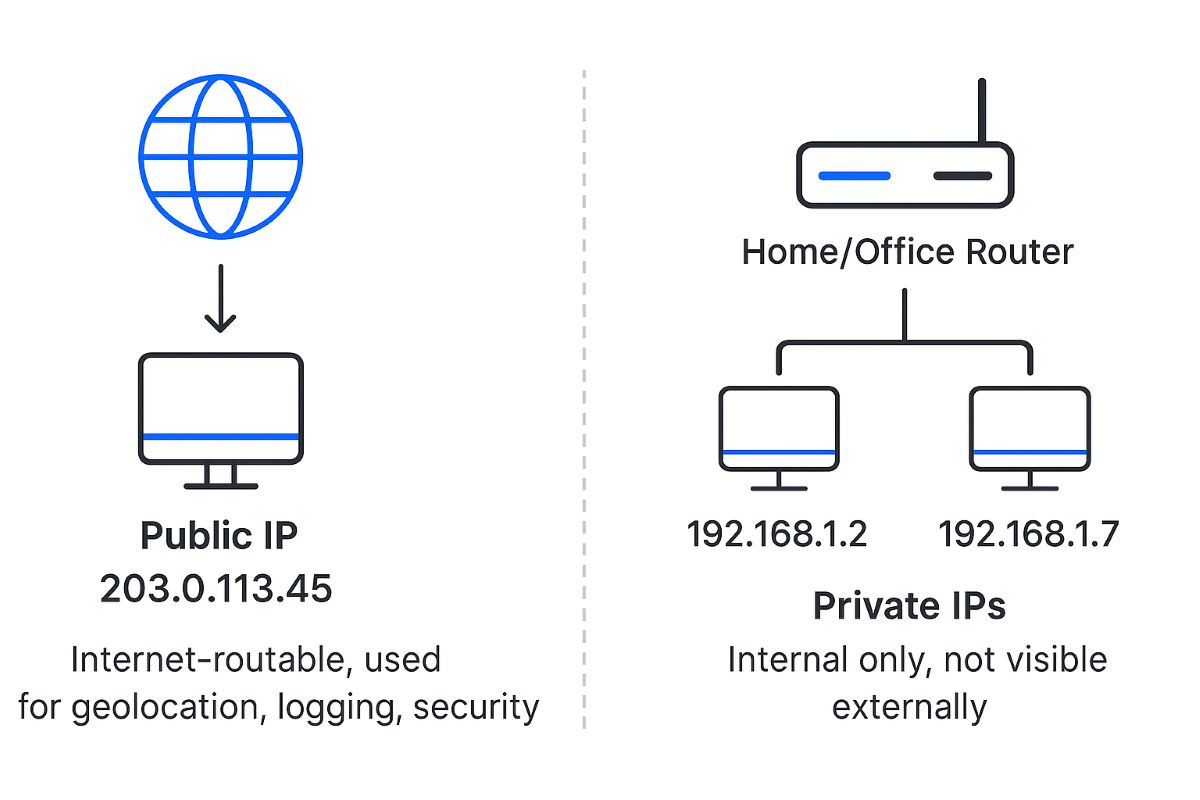
A public IP address is assigned by an ISP or cloud provider and is accessible on the public internet.
This is the address your server or client appears to come from when making external requests.
Examples of public IP usage
- A user accessing your SaaS product from home
- A company gateway routing all employees’ traffic
- A cloud VM running a production API
- A CDN edge node making a callback to your webhook endpoint
Why public IPs matter
Public IPs allow you to understand:
- Where a request originates (country, city, region)
- When to normalise timestamps (via timezone metadata)
- How to detect risky behaviour (TOR, proxies, hosting providers)
- Who might be violating rate limits or access rules
Public IPs are essential for any architecture that handles traffic at scale.
3. Private IP Addresses Explained
Private IP addresses operate inside internal networks: home Wi-Fi, business LANs, VPCs, containers, Kubernetes clusters.
They follow reserved ranges such as:
- 10.0.0.0 – 10.255.255.255
- 172.16.0.0 – 172.31.255.255
- 192.168.0.0 – 192.168.255.255
These addresses cannot be routed on the internet.
Examples of private IP usage
- A laptop inside a company network (e.g., 10.51.20.8)
- Containers in ECS/EKS using 172.17.x.x ranges
- Databases inside a VPC that should never be exposed publicly
- Home routers assigning 192.168.1.x to devices
Why private IPs matter
For internal systems, private IPs help track:
- East-west traffic
- Service intercommunication
- Internal security events
- Load balancing and autoscaling behaviour
But a private IP cannot tell you a user’s real geographic origin.
3.1 How to Tell if an IP Is Private (Quick Test)
If you need a fast way to classify an IP address, start with this rule:
Private IP addresses fall into three reserved ranges:
- 10.0.0.0 – 10.255.255.255
- 172.16.0.0 – 172.31.255.255
- 192.168.0.0 – 192.168.255.255
If an IP matches one of those ranges, it is private and not routable on the public internet. If it does not match, it is typically public (with a few special exceptions noted below).
Quick examples
IP Address | Private or Public? | Why |
10.24.8.19 | Private | Falls in 10.0.0.0/8 |
172.20.14.2 | Private | Falls in 172.16.0.0–172.31.255.255 |
172.40.10.5 | Public | 172.40 is outside the private 172.16–31 range |
192.168.1.12 | Private | Falls in 192.168.0.0/16 |
8.8.8.8 | Public | Not in a private range |
Common “special” ranges people confuse with private
These are not public internet-routable in the normal sense, but they are also not part of the three private RFC1918 ranges:
- 127.0.0.0/8 (loopback, e.g., 127.0.0.1)
- 169.254.0.0/16 (link-local/APIPA, often seen when DHCP fails)
Why this matters
- If you are enriching traffic data for analytics, personalization, or security, you generally need the public IP of the request source.
- Private IPs are still valuable for internal observability, but they will not map to a real-world user location on their own.
4. How NAT and VPNs Affect IP Visibility
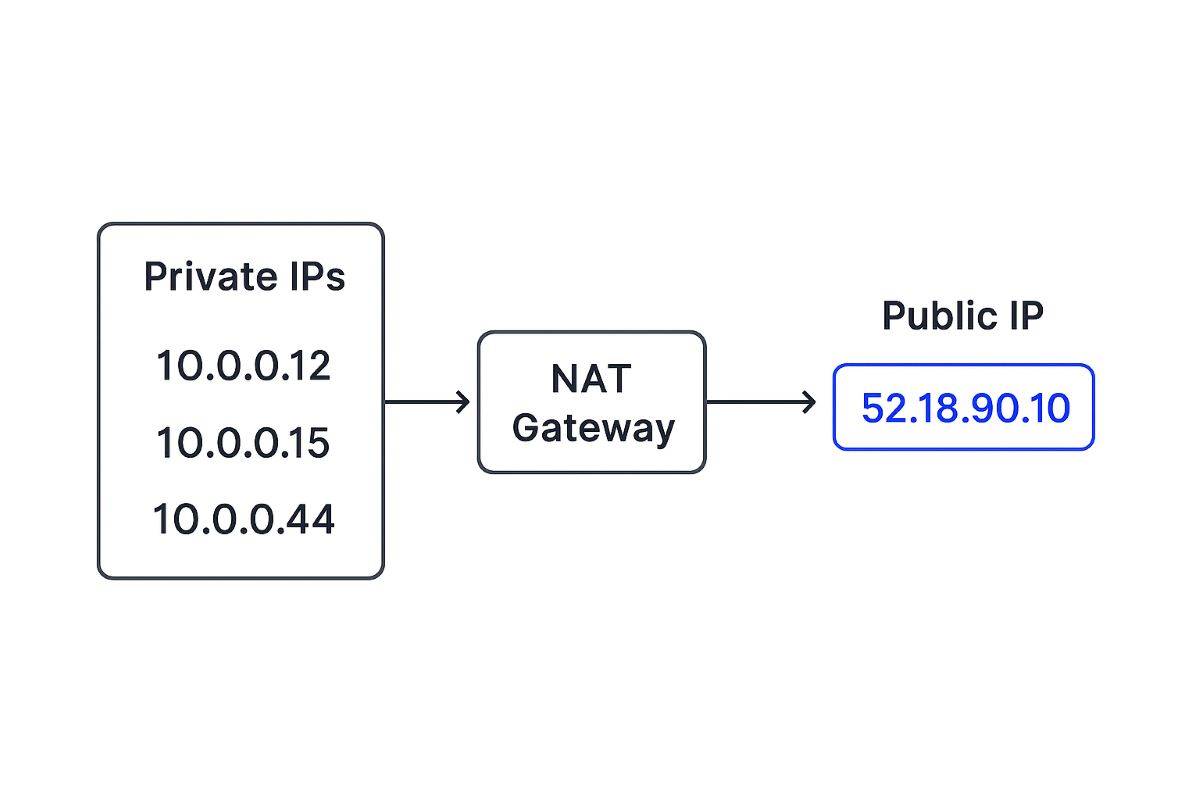
Most real-world systems use NAT (Network Address Translation), which maps many private IPs to a single external public IP.
Example:
An office with 600 employees may appear as one public IP to your logging infrastructure.
This complicates:
- User attribution
- Rate limiting
- Fraud scoring
- Geo-analysis
VPNs and proxies introduce additional layers.
A user in India may appear as being in the UK if they use a commercial VPN exit node.
A good IP intelligence API helps teams spot:
This is crucial for SaaS fraud prevention and enterprise compliance.
5. Why Public vs Private IPs Matter for SaaS and Enterprise Teams
Understanding the difference directly impacts your ability to run secure, well-instrumented systems.
Logging & Observability
Public IPs enrich logs with geolocation, ASN, risk score, enabling cleaner dashboards and alerting patterns.
Analytics & Personalisation
Teams use public IP metadata to:
- Auto-detect timezone
- Apply language defaults
- Tailor content or pricing by region
- Understand user distribution
Internal private IP data helps teams analyse:
- Internal system load
- Service dependencies
- Cluster-level performance trends
Security
Public IP intelligence powers:
- Suspicious login detection
- Impossible-travel checks
- Blocking TOR/proxy exits
- Identifying automated abuse
- Regional access policies (GDPR, LATAM, APAC)
Private IPs matter for zero-trust architectures and internal segmentation.
6. Using IPstack to Enrich Logs, Analytics, and Security
IPstack provides a developer-friendly way to enrich every incoming request with structured metadata.
Example of IPstack metadata returned from a public IP
- Country, region, city
- Latitude/longitude
- Timezone
- Currency
- ASN + ISP
- Hosting provider
- Proxy, TOR, or VPN flags
- Threat level indicators
Teams integrate IPstack into:
- NGINX / API gateway middleware
- Authentication pipelines
- Logging pipelines (ELK, Datadog, Splunk)
- Security and compliance workflows
- BI and analytics dashboards
This eliminates the need to maintain your own IP datasets or update them manually.
Get Your Free
IP Geolocation Key!
IPstack
Join thousands of developers using ipstack for real-time IP intelligence!
Get Your Free API Key!100 Requests Free!
7. The Best API Stack for IP Intelligence
A strong IP-driven personalisation or security stack often combines:
- IPstack for IP intelligence, ASN data, proxy/VPN detection, and location metadata
- Positionstack for forward and reverse geocoding
- Userstack for device detection and fingerprint attributes (browser, OS, device type)
- Numverify / VATLayer for additional identity, compliance, and business validation checks for additional identity, compliance, and business validation checks
For inspiration, see: Top 5 APIs for Geolocation-Based Personalisation
And if you’re just starting with IPstack, a full guide is here:
How to Build an IP-to-Geolocation App in React Native
This stack gives you a robust, cookie-free way to understand users with minimal integration overhead.
8. Conclusion
Public and private IP addresses are foundational to how devices communicate.
For SaaS and enterprise teams, the distinction shapes how you log, analyse, and secure traffic.
Public IPs unlock geographic, behavioural, and security insights.
Private IPs help trace internal behaviour and system-to-system communication.
APIs such as IPstack allow teams to automate IP intelligence at scale instead of building their own enrichment pipeline.
Start free with 100 requests → Try IPstack today
FAQs
1. Can private IP addresses reveal a user’s physical location?
No. Private IPs exist only inside local networks. Only a public IP can provide geographic metadata.
2. Are IPv6 public and private ranges handled the same way?
Yes in concept. IPv6 also has global (public) and unique-local (private) ranges, though the notation differs.
3. Does using a VPN change the public IP address I see in logs?
Yes. A VPN replaces a user’s public IP with the VPN exit node’s IP, which may be in a different country.
4. Why does my analytics tool show multiple users under the same IP?
Most organisations route traffic through a shared NAT gateway or proxy, so hundreds of users may appear as a single public IP.
5. How often does IPstack update its IP intelligence data?
IPstack updates datasets continuously using multiple trusted sources, ensuring accurate location, ASN, and security flags in real time.
Recommended Resources:
- Build an IP Blacklist Check Application Using IPstack API
- Build Location-Aware AI Chatbots with IPstack

