

emAPIs power modern applications by enabling systems to communicate efficiently. Whether you are building fintech products, SaaS platforms, mobile apps, or analytics dashboards, understanding HTTP request methods is essential for reliable integrations.
In this guide, you will learn how HTTP methods work, when to use them, common mistakes to avoid, and how real-world APIs like Fixer.io help developers retrieve currency exchange data quickly and securely.
Get 100 free requests from Fixer.io and start testing instantly. Check out the Fixer.io API on the apilayer marketplace to explore production-ready currency data.
Table of Contents
Key Takeaways
- HTTP methods tell an API what action you want to perform on a resource
- GET reads data, POST creates, PUT updates/replaces, DELETE removes
- Understanding idempotency prevents bugs and duplicate operations (GET/PUT/DELETE are idempotent, POST is not)
- Most API errors are easier to solve when you know which method is expected and what status code should be returned
- Real-world APIs like Fixer.io demonstrate these methods in action for practical use cases
What Are HTTP Request Methods?
HTTP request methods (also called HTTP verbs or HTTP methods) are commands that tell a server what action you want to perform on a resource. Think of them as the verbs in a sentence, they describe the action you’re taking.
When you interact with an API, you’re essentially having a conversation with a server. The HTTP method is how you tell the server what you want to do, while the URL (endpoint) tells it where to do it, and the request body (if present) provides the details.
APIs use HTTP methods combined with URLs and parameters to perform operations. For example, if you want to get the latest exchange rates from Fixer.io, you would use a GET request. If you wanted to create a new user account, you would use POST. Each method has specific rules about how it should behave.
HTTP Methods at a Glance
Here’s a quick comparison table of the most commonly used HTTP methods:
Method | Purpose | Has Body? | Idempotent? | Success Code | Cache? |
GET | Read/Retrieve | No | Yes | 200 OK | Yes |
POST | Create | Yes | No | 201 Created | No |
PUT | Update/Replace | Yes | Yes | 200 OK / 204 | No |
PATCH | Partial Update | Yes | No* | 200 OK | No |
DELETE | Remove | Optional | Yes | 200 OK / 204 | No |
*PATCH can be idempotent depending on implementation
GET: Read Data
What GET Does
GET is the most common HTTP method. It’s used to retrieve data from a server without modifying anything. When you visit a website, view a product page, or check your email, your browser is making GET requests behind the scenes.
Key characteristics of GET:
- Safe: GET requests should never modify server data
- Idempotent: Calling GET multiple times produces the same result
- Cacheable: Responses can be cached to improve performance
- Parameters go in the URL query string, not in the request body
Real-World Example: Fixer.io Currency API
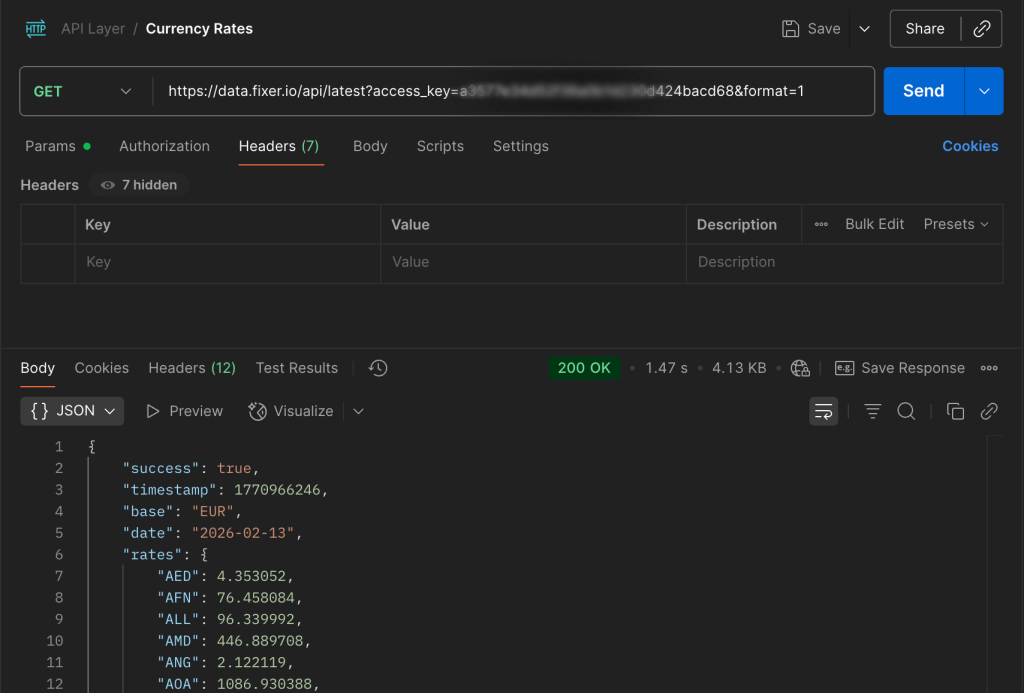
Let’s look at a practical example using Fixer.io, a popular currency exchange rate API. Most currency APIs are GET-based because you’re just reading exchange rates, not modifying them.
Example: Get Latest Exchange Rates
Endpoint:-
https://data.fixer.io/api/latest?access_key=YOUR_ACCESS_KEY&base=USD&symbols=EUR,GBP
Using cURL:
curl --location 'https://data.fixer.io/api/latest?access_key="your_access_key"&format=1'
Using JavaScript (fetch):
					fetch('https://api.fixer.io/latest?base=USD&symbols=EUR,GBP')
  .then(response => response.json())
  .then(data => console.log(data))
  .catch(error => console.error('Error:', error));
Response (200 OK):
					{
  "success": true,
  "base": "USD",
  "date": "2026-02-11",
  "rates": {
	"EUR": 0.92,
	"GBP": 0.79
  }
}
Example
Common GET Status Codes
- 200 OK: Request succeeded, data returned
- 304 Not Modified: Cached version is still valid
- 404 Not Found: Resource doesn’t exist
- 401 Unauthorized: Authentication required
POST: Create Data
What POST Does
POST is used to create new resources or submit data for processing. Unlike GET, POST sends data in the request body, not in the URL. This makes it suitable for larger payloads and sensitive data.
Key characteristics of POST:
- Not idempotent: Multiple identical POST requests create multiple resources
- Not safe: POST modifies server state by creating resources
- Not cacheable by default
- Data goes in the request body, usually as JSON
When to Use POST
- Creating a new user account
- Submitting a form
- Uploading a file
- Placing an order
- Any operation that creates a new resource
Real-World Example
Let’s say you’re building an app that lets users save their favorite currency pairs. You’d use POST to create a new favorite.
Example: Create a New Favorite Currency Pair
Endpoint:-
https://api.yourapp.com/favorites
Request Body (JSON):
					{
  "user_id": "12345",
  "base_currency": "USD",
  "target_currency": "EUR"
}
Response (201 Created):
					{
  "id": "fav_789",
  "user_id": "12345",
  "base_currency": "USD",
  "target_currency": "EUR",
  "created_at": "2026-02-11T10:30:00Z"
}
Common POST Status Codes
- 201 Created: Resource successfully created
- 200 OK: Request processed successfully (but resource may not have been created)
- 400 Bad Request: Invalid data submitted
- 409 Conflict: Resource already exists
PUT vs PATCH: Update Data
Both PUT and PATCH are used to update existing resources, but they work differently. Understanding this distinction is crucial for building reliable APIs.
PUT: Full Replacement
PUT replaces the entire resource. If you send a PUT request with partial data, the missing fields will be removed or set to defaults. Think of PUT as “here’s the complete new version of this resource.”
Key characteristics of PUT:
- Idempotent: Multiple identical PUT requests produce the same result
- Replaces the entire resource
- Requires complete data in the request body
Example: Update User Settings (Full Replacement)
Endpoint:-
https://api.yourapp.com/users/12345/settings
					{
  "default_currency": "EUR",
  "notification_enabled": true,
  "theme": "dark"
}
PATCH: Partial Update
PATCH updates only specific fields without affecting the rest of the resource. It’s more flexible and efficient when you only need to change one or two fields.
Key characteristics of PATCH:
· Not necessarily idempotent (depends on implementation)
· Updates only the fields provided
· More efficient for small changes
Example: Update Only Theme (Partial Update)
Endpoint:-
https://api.yourapp.com/users/12345/settings
					{
  "theme": "light"
}
PUT vs PATCH: When to Use Each
Scenario | Use PUT | Use PATCH |
Updating entire profile | ✓ | ✗ |
Changing one field | ✗ | ✓ |
Need idempotency | ✓ | Maybe* |
Bandwidth concerns | ✗ | ✓ |
*Depends on implementation
DELETE: Remove Data
What DELETE Does
DELETE is straightforward: it removes a resource from the server. Once deleted, subsequent GET requests to that resource should return 404 Not Found.
Key characteristics of DELETE:
- Idempotent: Deleting the same resource multiple times has the same effect as deleting it once
- Not safe: DELETE modifies server state
- Usually doesn’t require a request body (but can optionally include one)
Real-World Example
Example: Delete a Favorite Currency Pair
Endpoint:-
https://api.yourapp.com/favorites/fav_789
Response (204 No Content):
(No response body – the resource is deleted)
Common DELETE Status Codes
· 204 No Content: Successfully deleted, no response body
· 200 OK: Successfully deleted, response body includes deletion details
· 404 Not Found: Resource doesn’t exist (but this is actually OK due to idempotency)
· 403 Forbidden: User doesn’t have permission to delete
Understanding Idempotency
What Is Idempotency?
In simple terms, an operation is idempotent if performing it multiple times has the same effect as performing it once. It’s like a light switch, flipping it to “on” once or ten times has the same result: the light is on.
This concept is crucial in distributed systems and APIs because networks can be unreliable. If a request times out, you need to know whether it’s safe to retry.
Which Methods Are Idempotent?
Method | Idempotent? | What Happens If You Retry? |
GET | Yes ✓ | You get the same data every time |
POST | No ✗ | Each call creates a new resource (duplicates!) |
PUT | Yes ✓ | Resource ends in the same state |
PATCH | Maybe | Depends on how it’s implemented |
DELETE | Yes ✓ | Resource is gone (even if it was already gone) |
Why Idempotency Matters
Real-world scenario: You’re building a payment system. A user clicks “Pay Now” but the request times out. Did the payment go through? With a non-idempotent POST, retrying might charge them twice. With an idempotent operation (using idempotency keys), it’s safe to retry.
Idempotency prevents bugs like duplicate charges, duplicate database entries, and double emails. It makes systems more reliable and easier to reason about.
Common HTTP Status Codes
Status codes tell you whether your request succeeded or failed, and why. They’re grouped by the first digit:
· 2xx: Success
· 3xx: Redirection
· 4xx: Client error (you messed up)
· 5xx: Server error (they messed up)
Code | Name | What It Means |
200 | OK | Request succeeded, response body contains data |
201 | Created | Resource was successfully created (used with POST) |
204 | No Content | Request succeeded but no content to return (common with DELETE) |
400 | Bad Request | Invalid syntax, malformed JSON, missing required fields |
401 | Unauthorized | Missing or invalid authentication (API key, token, etc.) |
403 | Forbidden | Valid authentication but insufficient permissions |
404 | Not Found | The requested resource doesn’t exist |
429 | Too Many Requests | Rate limit exceeded, try again later |
500 | Internal Server Error | Something went wrong on the server side |
503 | Service Unavailable | Server is temporarily down or overloaded |
Common Mistakes (And How to Avoid Them)
1. Using POST When API Expects GET
❌ Wrong:
POST /api/exchange-rates // Should be GET!
✓ Right:
GET /api/exchange-rates
Why it matters: GET is for reading data, not creating it. Using POST for read operations breaks HTTP semantics and can cause caching issues.
2. Sending Body Parameters Incorrectly
❌ Wrong:
GET /api/users
Body: { “user_id”: “123” } // GET shouldn’t have a body!
✓ Right:
GET /api/users?user_id=123 // Use query params instead
Why it matters: GET requests should never have a request body. Parameters should go in the URL query string.
3. Missing Authentication Headers
❌ Wrong:
curl https://api.fixer.io/latest
// Returns 401 Unauthorized
✓ Right:
curl -H "apikey: YOUR_API_KEY" https://api.fixer.io/latest
Why it matters: Most APIs require authentication. Check the API docs for the correct header name (could be Authorization, apikey, X-API-Key, etc.).For Fixer.io, you can get your API key from the dashboard.
4. Confusing 401 vs 403 vs 429
· 401 Unauthorized: You didn’t provide credentials or they’re invalid → Check your API key
· 403 Forbidden: You’re authenticated but don’t have permission → Check your account’s access level
· 429 Too Many Requests: You hit the rate limit → Wait and retry, or upgrade your plan
5. Using PUT When PATCH Would Be Better
❌ Inefficient:
PUT /api/users/123
					Body: {
  "name": "John", "email": "john@example.com",
  "age": 30, "city": "New York"  // Just to change one field!
}
✓ Better:
PATCH /api/users/123
Body: { “city”: “Boston” } // Only what changed
Why it matters: PATCH is more efficient for small updates and reduces the chance of accidentally overwriting data.
Real-World Use Case: Fixer.io Currency API
Fixer.io is a great example of an API that heavily relies on GET requests. As a currency exchange rate service, users primarily read data rather than modify it. This makes GET the perfect fit.
Common Fixer.io Endpoints
1. Get Latest Rates
GET https://api.fixer.io/latest?base=USD&symbols=EUR,GBP,JPY
2. Get Historical Rates
GET https://api.fixer.io/2026-01-15?base=USD
3. Get Supported Currencies
GET https://api.fixer.io/symbols
Why Fixer Uses GET
· Read-only operations: Users retrieve rates, not modify them
· Cacheable: Exchange rates don’t change every second, so responses can be cached
· Idempotent: Calling the same endpoint multiple times returns consistent data
· Simple integration: GET requests are the easiest to implement and debug
This design makes Fixer.io fast, reliable, and easy to use, exactly what you want from a data API. Get your free 100 requests here.
Want to learn more about currency APIs? Check out 7 Best Free Currency Converter APIs in 2025.
Explore APILayer Products
Discover APIs for geolocation, finance, aviation, weather, web scraping, AI, and more. Browse APILayer's product catalog to find the right APIs for your application and integrate the data and functionality your project needs.
Explore APILayer ProductsFind the right tools to start building.
Frequently Asked Questions
What’s the difference between GET and POST?
GET retrieves data without changing server state. POST submits data to create or process a resource.
When should I use PUT vs PATCH?
Use PUT to replace a resource completely. Use PATCH to update only specific fields.
What does idempotent mean in simple terms?
Idempotent operations produce the same result even if repeated. GET and DELETE are idempotent, POST is not.
Can I send a body with a GET request?
It is technically allowed but not recommended. Always use query parameters for GET requests.
What’s the difference between 401 and 403?
401 means authentication is required or invalid. 403 means authenticated but not authorized.
Why do some APIs return 204 instead of 200?
